
$59.90
Free delivery · 7–14 days
Vertical Wireless Mouse with USB-C Charging, Silent Clicks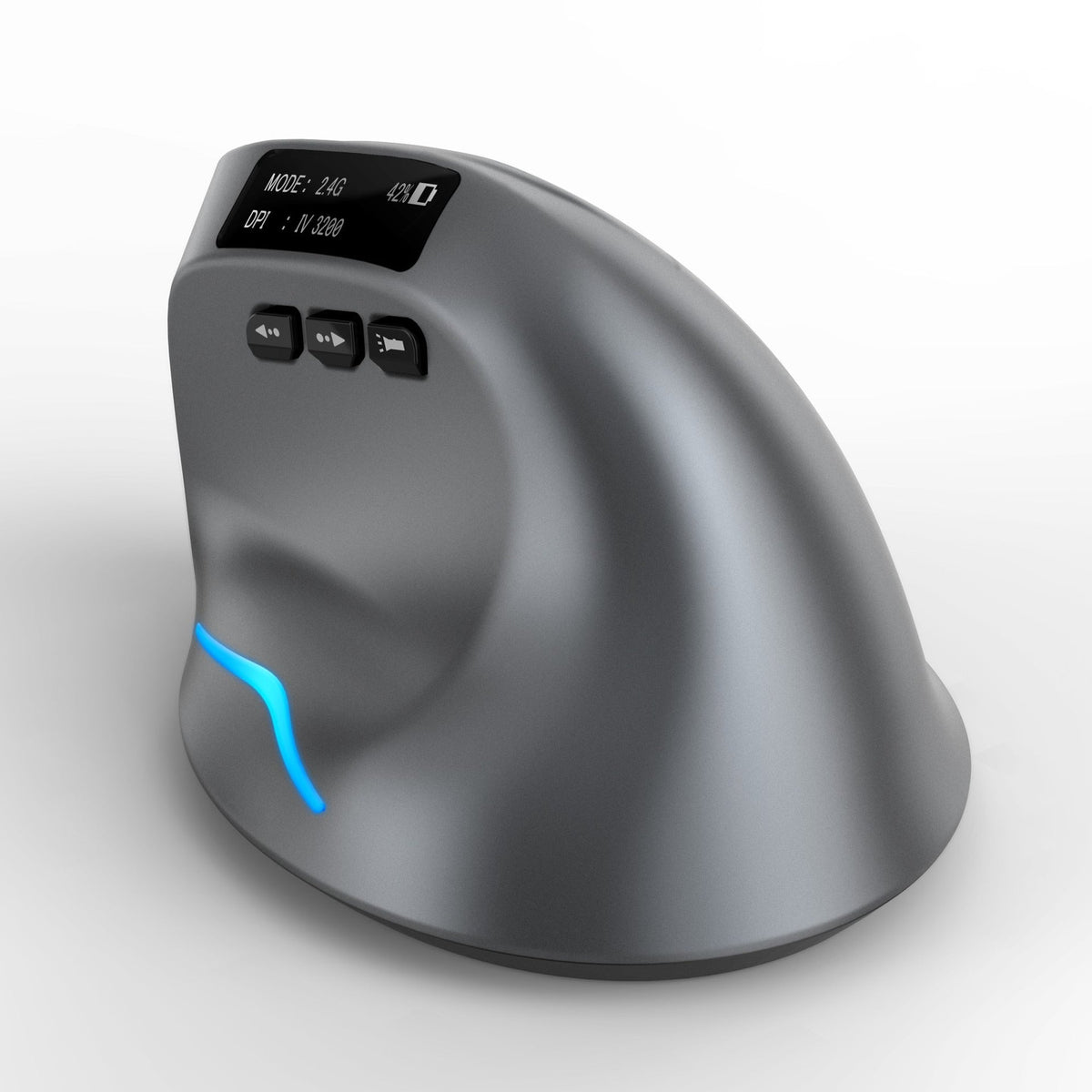


Hours at a flat mouse leave the wrist stiff and the forearm tight by afternoon. The F-26C holds your hand in a vertical handshake grip, so the forearm stays calmer through long desk sessions. Dual Bluetooth and 2.4G connection and an OLED status display keep laptop and desktop work simple.
Read the full descriptionHours at a flat mouse leave the wrist stiff and the forearm tight by afternoon. The F-26C holds your hand in a vertical handshake grip, so the forearm stays calmer through long desk sessions. Dual Bluetooth and 2.4G connection and an OLED status display keep laptop and desktop work simple.
Vertical ergonomic grip for a more natural, relaxed hand and wrist position
Flat mice keep your forearm twisted and your wrist bent through every session. The F-26C turns your hand into a natural handshake, so the end of the day feels like the start.

The vertical body holds your hand in a natural handshake position. Your forearm stops rotating to keep the cursor moving, and the thumb rest supports the hand through long sessions.

The Bluetooth and 2.4G mode switch sits on the underside. Set it to match the device in front of you and skip the re-pairing routine each morning. The on/off switch sits on the side of the base.
The glossy black OLED display reports the current mode, battery percentage and DPI at a glance. A blue accent light strip shows the mouse is awake and ready.
Remove the film from the shell and the OLED display before first use.
Flip the on/off switch on the side of the base. The blue accent light confirms it is active.
Check the mode indicators on the underside and set the switch to match the device in front of you.
For Bluetooth, pair through your system's Bluetooth settings. For 2.4G, plug the receiver into a free USB port.
Plug the USB-C cable into the rear port. The OLED display shows the battery percentage while it charges.
Graphite-grey soft-touch shell with OLED display
For the rechargeable battery
For the 2.4G connection mode

By mid-afternoon the wrist is stiff and the forearm feels tight. You grip a flat mouse all morning, and the hand stays rotated and bent for hours. You notice it, then you push through it again tomorrow.
The vertical body lifts your hand into a handshake position, so the forearm stops rolling just to move the cursor. The thumb rest carries part of the load, and the side buttons sit right where your thumb already rests.
Bluetooth and 2.4G sit on one switch under the mouse, so the same device moves between a laptop and a desktop. The OLED screen shows the mode, battery percentage and DPI, so you check the setup without guessing. It charges through a usb c cables port on the rear.
Connect via Bluetooth or 2.4G and confirm the mode on the OLED display. Your hand may feel unfamiliar on the vertical grip at first, which is normal while you adjust.
Most people settle into the handshake position after a few sessions. Keep the thumb rest in its natural spot and let the mouse guide your hand.
After a month of regular use, the vertical grip becomes the default. Individual results vary, so track how your wrist and forearm feel at the end of the day.
| ZELOTES F-26C | Standard flat mouse | |
|---|---|---|
| Hand position | Vertical handshake | Flat, forearm rotated |
| OLED status display | — | |
| Bluetooth and 2.4G switch | Varies by model | |
| USB-C rechargeable | Varies by model |
Expect a short adjustment. Your hand has used a flat mouse for years, so the first few sessions feel unfamiliar. Most people settle in after a few sessions when the thumb rest stays in its natural spot. Start with a few hours a day and build up to full workdays.
Once each device is paired, the Bluetooth and 2.4G switch on the underside moves the mouse between them. The OLED screen confirms the active mode, so you know which connection you are on before you start typing.
The F-26C has a matte soft-touch shell, a metallic graphite finish, an OLED display and USB-C charging. You use a mouse for hours every working day, so the cost spreads across more desk time than most accessories get. If a flat mouse already leaves your wrist sore, compare the price against that ache.
Many office workers with wrist and forearm tension find the handshake grip more relaxed than a flat mouse. It is a mouse, not a treatment. If pain is severe or keeps coming back, talk to a doctor before changing your setup.
Charge through the USB-C port on the rear. The OLED display shows the battery percentage, so you can check it before a long session.


 Vertical Ergonomic Wireless Mouse With OLED Display