
$59.90
Free delivery · 7–14 days
Vertical Wireless Mouse with USB-C Charging, Silent Clicks
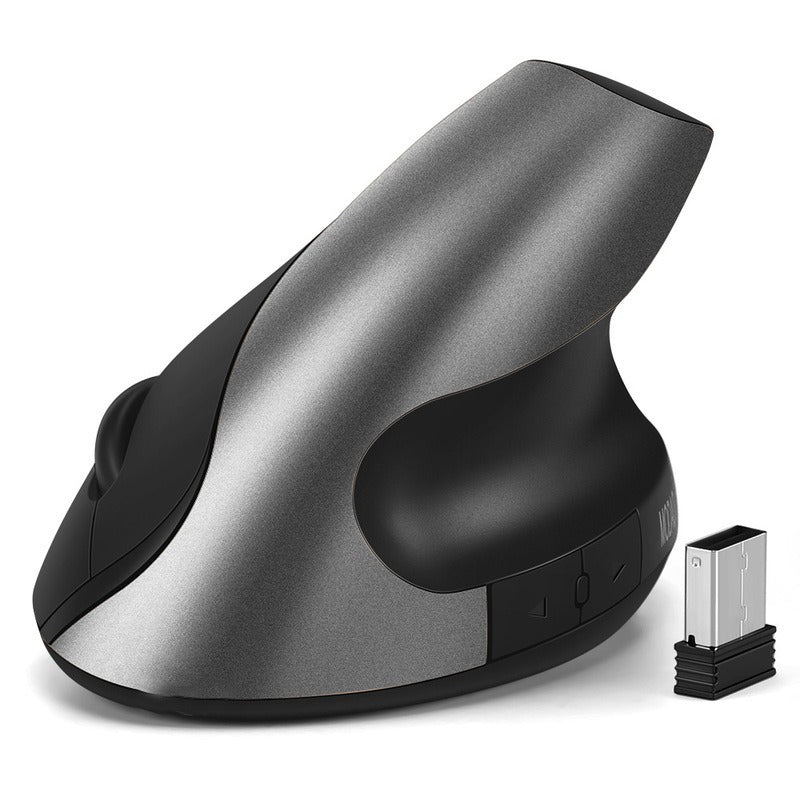


Your forearm rests in a handshake grip, your clicks stay quiet, and the mouse charges instead of eating batteries. The vertical ergonomic shape suits long days at the desk. The 2.4G receiver is a small plug-in that stays in your laptop.
Read the full descriptionYour forearm rests in a handshake grip, your clicks stay quiet, and the mouse charges instead of eating batteries. The vertical ergonomic shape suits long days at the desk. The 2.4G receiver is a small plug-in that stays in your laptop.
Ergonomic vertical design with silent, rechargeable wireless comfort
Flat mice cramp your forearm by mid-afternoon. This vertical, silent, rechargeable mouse lets your hand rest in a natural handshake position, so long sessions feel lighter.

The vertical profile and thumb rest hold your forearm in a neutral handshake position. Your palm sits on the shell, your thumb settles on the black rest, and your wrist stops twisting through a full afternoon of typing and browsing.

The buttons click at a low volume, which suits open offices and video calls. Expect a soft click, not total silence, but the people across the aisle will not look up every time you select something.

The gray and black models carry a built-in rechargeable battery that charges over micro-USB. Top it up overnight at the desk and skip the trips to buy disposables. The gold model runs on a standard dry battery, so check the variant if charging matters to you.
Slide the USB nano receiver into a free USB port on your laptop or desktop. It stays there, so you can leave it in place for good.
Power on the mouse and move the cursor. No driver install is needed, so the cursor should respond straight away.
On the gray and black models, connect the micro-USB cable to the charging port overnight. Charge before the battery runs low, not after it is empty.
Vertical body with thumb rest and side buttons, in champagne gold, space gray or matte black.
Slim 2.4G receiver that stays in the laptop port. No software needed.
Yes, plan on a few days. Your forearm has to learn a new angle, so start with a few hours a day and build up to full workdays over a week or two. Most people find the grip feels normal within the first week.
The gray and black models charge over micro-USB, so a cable on the desk is all you need. The product information does not list a runtime, so we won't guess one. Top up overnight and avoid letting the battery drain to empty.
They are quiet, not silent. The clicks sit at a low volume, which works for shared desks and calls. You will still hear a soft click when you press.
Yes. The 2.4G nano receiver plugs into a standard USB port and stays there. It works without installing software, so you can move between a home desk and an office without re-pairing.
Yes. The vertical shape works when you lift it off the desk, and the side buttons handle back and forward while you browse from the couch or bed.
A basic mouse costs less up front, but a rechargeable battery means you stop buying disposables, and the grip is what changes how your wrist feels after eight hours. If you want to compare, the logitech m720 range is a useful reference point.


 Ergonomic Vertical Wireless Mouse with Silent Clicks