
$74.90
Free delivery · 7–14 days
Retro TV Game Console With 2 Wireless Controllers


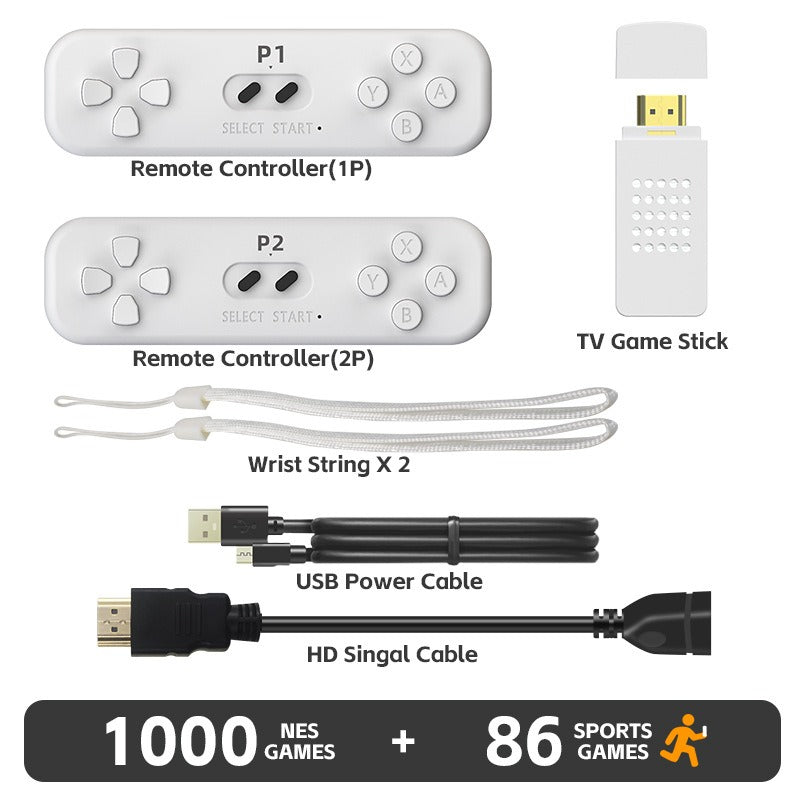

Game night gets its spark back with a single stick that plugs into the TV. It brings 1000 NES classics and 86 sports games, and two wireless controllers let the whole family play at once. Flick the handle and the couch turns into the loudest room in the house.
Read the full descriptionGame night gets its spark back with a single stick that plugs into the TV. It brings 1000 NES classics and 86 sports games, and two wireless controllers let the whole family play at once. Flick the handle and the couch turns into the loudest room in the house.
1000 NES classics and 86 sports games on your TV with motion-style handle controls
Before: a stack of cables, a dead couch night, and screens everywhere. After: 1000 NES classics and 86 sports games on your TV, with a handle flick to start.
The stick holds 1000 NES games and 86 built-in sports titles, so there is always a next game to try. Pick a retro platformer for a quick round or a tennis match when the kids want to move. You do not need to download anything or sign in. The package badge lists the count, and the stick delivers it. For a deeper retro shelf, pair the stick with a retro game console you already own.
The sports titles use a handle flick instead of a thumb press. A swing of the wrist sends the ball over the net, and the whole room can see the motion. It feels more like a game of catch than a game on a couch. Keep the wrist strap on, because the flicks are quick and the room should be clear around the player.
Two matte white remotes come in the box, one labeled 1P and one labeled 2P. The battery compartment sits on the back of each controller and opens without tools, so setup is a few minutes, not an afternoon. Add the two wrist strings, and two people can start the same round without swapping hardware.
Slide the TV game stick into a free HDMI port. The gold-plated connector seats firmly, so there is no wobble to fight with.
Connect the USB power cable and use a proper adapter for steady power. A weak TV USB port can cause restarts or a dim picture.
Choose the input on your TV where the stick is plugged in. If the screen stays blank, the input is the first thing to check.
Insert AAA batteries into the back of each remote, fit a wrist string on each one, and hand the 1P and 2P remotes to the players.
Choose a sports game from the menu and flick the handle to play. Clear some space around the couch before the first swing.
Plugs into HDMI, with Select and Start buttons
Matte white wireless remote for player one
Matte white wireless remote for player two
One for each controller
Powers the stick
Connects the video signal

Everyone is on the couch and nobody is playing. The kids drift to their phones, the old console is buried under a pile of cables, and the one controller that still works has a sticky button. Game night quietly stops happening.

The stick is small enough to hide behind the TV. Plug it into an HDMI port, power it with the USB cable, and the game menu appears. The library is already loaded with 1000 NES titles and 86 sports games, so there is no shopping list to build first.

Two white remotes, one marked 1P and one marked 2P, are ready for a pair of players. A quick flick of the handle swings the racket or lobs the ball, and the couch turns into the loudest part of the house. The kids want one more round, and the grown-ups are already arguing about the score.
If your TV has a free HDMI port, the stick plugs straight in. Switch the TV to that HDMI input and power the stick with the included USB cable and a proper adapter.
No. There is no app, no account and no update to run. Plug in the stick, power it, pick the HDMI input, insert AAA batteries into the remotes, and the game menu appears.
Each controller comes with a wrist string. Fit it before play and keep a clear space around the couch, since the handle flick is a quick motion. Adults should supervise younger kids during active sports games.
A standard console costs hundreds, needs accounts and updates, and takes a full cable setup. This stick brings 1000 NES games and 86 sports titles for a fraction of that, and it sits behind the TV with no extra box to hide.
Yes. The box includes an HD signal cable to connect the stick to the TV, a USB power cable, two wrist strings and both controllers. You only need a free HDMI port, a power adapter and AAA batteries for the remotes.


 Plug-In Retro TV Game Stick: 1000 NES Games & 86 Sports