
$46.90
Free delivery · 7–14 days
Dual PS5 Controller Charging Dock for Two Controllers


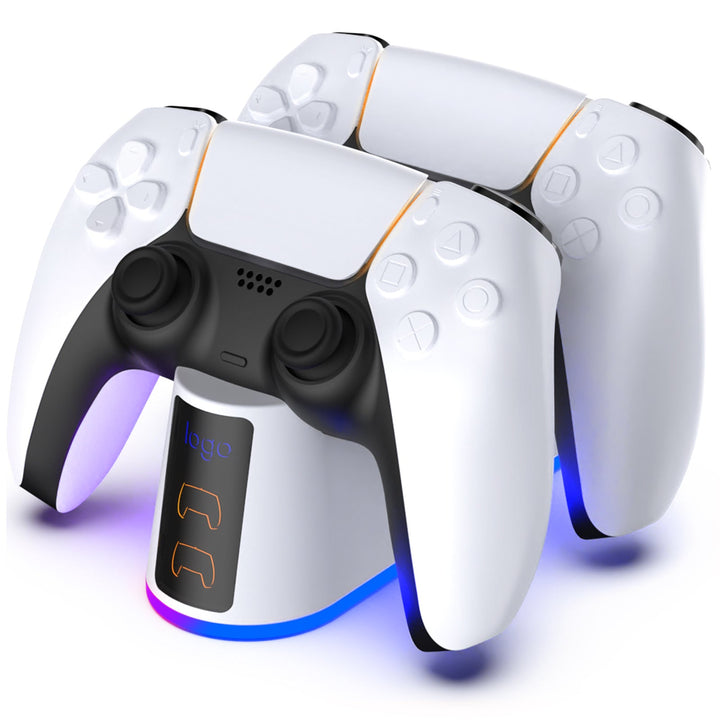

PS5 charging stations and DualSense controller docks keep your gaming setup organized while providing a dedicated place to recharge compatible controllers. This category includes dual-controller docks such as the OIVO PS4 Controller Charging Dock and the Tidy PS4 Controller Dock, so check each product listing carefully for console and controller compatibility before buying.
Start by confirming that the dock supports your exact controller model. The products shown here are identified as PS4 controller docks, so do not assume they will charge a PS5 DualSense controller without clear compatibility information from the listing. Next, decide whether you need a single-controller solution or a dual charging station. A dual dock can be useful if you regularly alternate between two controllers or want both ready for multiplayer sessions. Check how the station connects to power, whether charging cables or adapters are included, and how much space it needs beside your console. If you are comparing PS5 charging station price options, compare the included accessories and supported devices—not just the headline price.
A controller charging dock provides a fixed cradle where you place the controller after playing. Dual docks are designed to hold two controllers at once, which can reduce cable clutter and keep a spare controller ready. A charging cable, such as a PS5 controller charger cord with a USB-C connector, is a more flexible alternative because it can be used while you play and is easy to store. However, a cable does not create a dedicated storage spot. Some docks use contact points built into the cradle, while others rely on connected USB leads. For this category, compare the dock design, controller fit, charging method, LED indicators, and stated compatibility before choosing between a DualSense charging station and a cable-based setup.
Look for clear support for the PS5 DualSense controller rather than relying on a product title that only says PlayStation charger PS5. The cradle should hold the controller securely and let you place it down without excessive adjustment. Useful features may include separate charging indicators, a compact footprint, and space for two controllers. Review the power connection and included cables to understand whether the dock plugs into the console, a wall adapter, or another USB power source. Also check product dimensions if your console sits in a narrow entertainment unit. For the OIVO and Tidy products listed here, pay particular attention to their PS4 labeling and the seller’s stated compatibility before using them as a PS5 charging station.
Read the product instructions first, then connect the dock using the supplied cable or the specified power source. Place the controller into the cradle so its charging contacts or connector align correctly; do not force it into position. If the station has LED indicators, use them to check whether charging has started and whether the controller is ready. Keep the dock on a stable, dry surface with enough room to remove the controller easily. If you are using a PS5 controller charger cord instead, connect the USB-C end firmly to the controller and the other end to a compatible power source. Before relying on any dock for a DualSense controller, verify that the product is specifically listed as PS5-compatible.
The most common mistake is buying a dock based only on its appearance or the word “PlayStation” in the title. PS4 and PS5 controllers have different designs, so a PS4 controller charging dock may not fit or charge a PS5 DualSense controller. Another mistake is assuming every USB-C charger has the same connector fit, power arrangement, or included cable; check the controller and charger specifications. Avoid forcing a controller into a cradle, using an unsuitable adapter, or placing the station where cables are sharply bent. Also check whether the package includes one cable, two cables, a power adapter, or no adapter. These details can change the practical value of a PS5 charging station and its total cost.
A charging station suits players who want a consistent place to store controllers and prefer dropping them into a dock after each session. It can be especially convenient for households with two compatible controllers, provided the station is designed for those controllers. A charging cord may be enough if you usually play near the console, need to charge while playing, or want the lowest-cost setup. You do not need a charging station if you are satisfied charging through the console with an existing compatible cable. Before ordering from this category, confirm whether the OIVO or Tidy dock supports PS5 DualSense controllers, since both products are labeled for PS4 controllers and should not be treated as universal PS5 accessories.
They can be worthwhile if you want a dedicated storage spot, fewer loose cables, or convenient charging for two compatible controllers. A charging cable may be the better value if you only need occasional charging or want to play while connected. Check compatibility first, especially because the products shown in this category are labeled as PS4 controller docks.
The best option is one that explicitly supports PS5 DualSense controllers, fits your available space, and includes the power accessories you need. Compare single- and dual-controller capacity, charging indicators, cradle design, and connection type. Do not choose the OIVO or Tidy products for PS5 use unless the current listing specifically confirms PS5 DualSense compatibility.
A USB-C cable may physically connect to a PS5 DualSense controller, but the cable and power source must still be suitable for the controller and product instructions. Check the manufacturer’s requirements and use a compatible adapter or console USB port. A USB-C connector alone does not confirm that every charger setup is appropriate.
Look for a retailer or manufacturer listing that clearly identifies the product as an official Sony accessory if that is important to you. Check the exact model name, supported controller, included accessories, and seller details before purchasing. Product listings labeled for PS4 controllers should not be assumed to be official PS5 charging stations.
No. You can charge a compatible PS5 controller with a suitable USB-C charging cable and an appropriate power source. A station is mainly useful for organized storage, quick drop-in charging, or keeping multiple compatible controllers in one place.
Confirm explicit PS5 DualSense compatibility first, then compare controller capacity, cradle fit, charging indicators, power connection, included cables, size, and price. If you are considering a PS4 dock such as the OIVO or Tidy model, verify compatibility with the seller before ordering. This avoids buying a dock that cannot properly hold or charge your PS5 controller.