
$169.90
Free delivery · 7–14 days
Wireless SNES-Style Controller for PC, Switch & Android


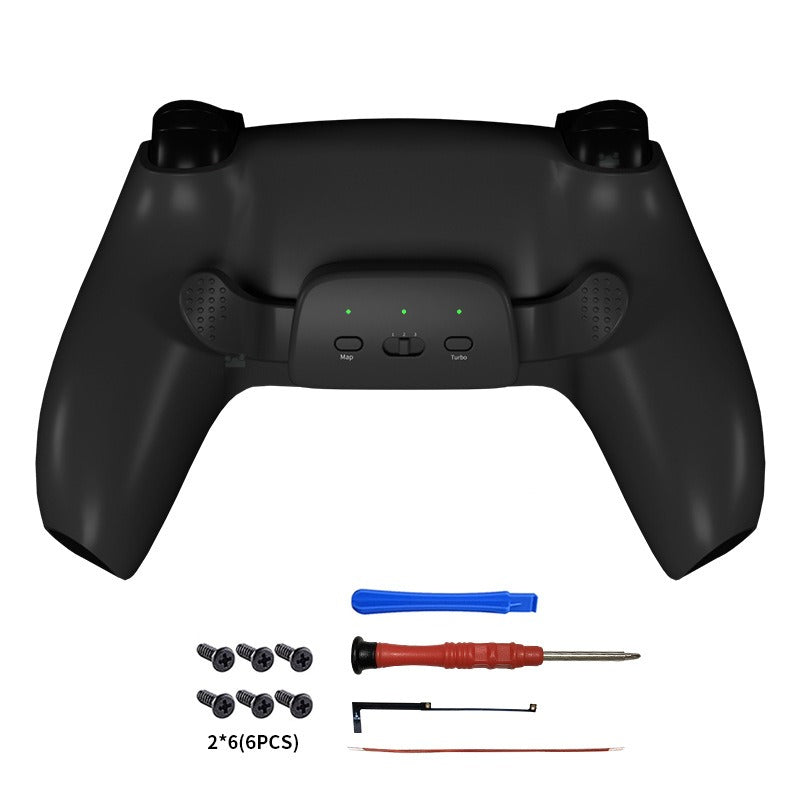
Two rear paddles turn your DualSense into a sharper competitive controller. Your thumbs stay on the sticks while jump, reload or crouch land on the back of the controller. OMRON micro switches, three macro groups and a replaceable module make it a six-piece upgrade worth an afternoon.
Read the full descriptionTwo rear paddles turn your DualSense into a sharper competitive controller. Your thumbs stay on the sticks while jump, reload or crouch land on the back of the controller. OMRON micro switches, three macro groups and a replaceable module make it a six-piece upgrade worth an afternoon.
Upgraded OMRON rear back buttons for faster, more sensitive, longer-lasting programmable inputs on PS5 controller
Stop lifting your thumbs to hit the buttons that matter. Map two rear paddles with upgraded OMRON switches and keep your focus on the screen.
The paddles run on upgraded OMRON micro switches. That is the part that replaces the conductive glue in the earlier design, and it is why presses register quickly and repeatedly. Textured grip pads keep your fingertips planted on the paddles during a long session.
Three macro configuration groups let you store separate layouts, so a shooter and a fighting game can each get their own setup. The central mode switch slider and three status LEDs show which layout is live, and the black version adds Map and Turbo buttons on the module.
Firmware update support means the module keeps pace with new releases. The rear back-clip module is a separate piece, so if a paddle or ribbon cable ever wears out, you replace the module instead of the controller.
Start at the seam with the blue plastic pry tool and work around the edge. Go slowly so the clips and finish stay intact.
Remove the screws with the red screwdriver, then separate the shell so the rear section comes free.
Set the rear back-clip module in place, connect the replacement ribbon cable, and confirm it lies flat.
Fit the six screws, snug each one until firm, then stop. Test the paddles before you close the shell fully.
Matte finish with textured grip pads
Opens the shell at the seam
For the module screws
Two sets of six in the pack
Spare connection for the module
Secures the cable in place

You are mid-fight, your thumb leaves the left stick to hit jump, and by the time it lands the round is gone. Those thumb trips add up over a night of ranked matches. The fix is not a new controller. It is a few inches of reach you were missing.

The rear module adds two paddles to the back of your DualSense. You map jump, reload or crouch to them, and the face buttons stay free for everything else. It is a swap you do once, and the controller you already own plays differently from then on.

Upgraded OMRON micro switches replace the older conductive glue design, which is where the extra sensitivity and longer service life come from. Three macro groups let you save separate layouts for each game, and the firmware update support keeps the module current.
Your thumbs will reach for the stick buttons out of habit, so expect a short adjustment period.
After a few sessions your favorite inputs are assigned and your thumbs start finding the paddles on their own.
With regular play the rear paddles feel like part of the controller, and your saved layouts cover the games you play most.
| This kit | Full pro controller | Cheap paddle add-on | |
|---|---|---|---|
| Keeps your current controller | — | ||
| Two rear paddles | |||
| OMRON micro switches | — | — | |
| Three macro configuration groups | — | ||
| Replaceable rear module | — | — | |
| Firmware update support | — |
It is a careful, step-by-step swap rather than a hard one. The kit includes a blue plastic pry tool, a red screwdriver and six screws, so you do not need to source anything else. Work slowly around the seam, seat the ribbon cable fully, and snug each screw without forcing it. Plan on one focused afternoon.
Yes. The module is built for the PS5 DualSense and supports firmware updates, so the mapping features keep working as the firmware moves forward.
A full pro controller replaces everything you own and costs much more. This is a six-piece upgrade for the controller already in your hands. You get two rear paddles, OMRON micro switches and three macro groups without retiring a controller you already know.
The paddles sit on the back of the shell where your middle and ring fingers already rest, and the textured grip pads keep your fingertips steady. Reach depends on hand size, so try the position with a few sessions before you decide it is the right fit.
The rear back-button module with paddles, a blue plastic pry tool, a red screwdriver, six screws, a replacement ribbon cable and an adhesive strip. Everything you need for the swap is in the kit.


 PS5 Back Button Paddles with OMRON Switches for DualSense