
$169.90
Free delivery · 7–14 days
Wireless SNES-Style Controller for PC, Switch & Android


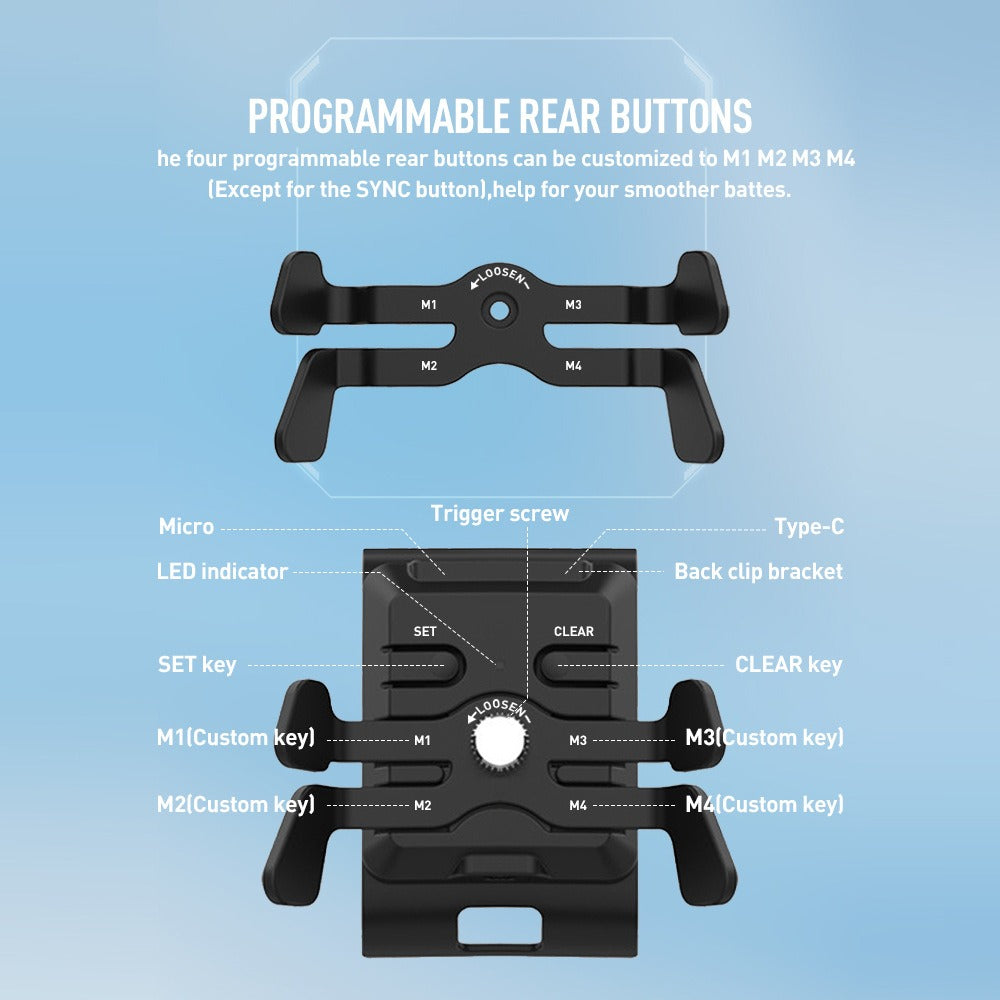
Four programmable back keys and two sets of paddle triggers clip onto your Xbox controller. Reload, crouch and swap from the back while your thumbs stay on the sticks. Built for competitive FPS and battle-royale players on Series X/S or One X/S.
Read the full descriptionFour programmable back keys and two sets of paddle triggers clip onto your Xbox controller. Reload, crouch and swap from the back while your thumbs stay on the sticks. Built for competitive FPS and battle-royale players on Series X/S or One X/S.
Add four extra back buttons to your Xbox controller for custom mapping without giving up your thumbs
Stop stretching across the face buttons to reload, crouch and swap mid-fight. Clip on four programmable back keys and four paddles, and those actions move to your fingers.
Reload, crouch, jump and weapon swap usually live on the face buttons, so your thumb travels every time. The M1-M4 keys sit on the back of the controller, under your fingers. Map the actions you reach for most and the face buttons stay free for aim and movement.
The box includes trigger A and trigger B, each as a 4 in 1 set. Try both and keep the one that sits under your fingers. Hands differ, so the shape you prefer may not be the one a friend prefers.
The metal-look LOOSEN dial sets the clamp. Tighten it gradually until the module sits firm on the controller back, and loosen it when you want to reposition the module.
Connect the module to the console with the data cable from the box. The 3M USB to Type-C cable gives you room to move, and the short cables suit a tight setup.
Seat the module on the back of the controller and add the screw. Turn the LOOSEN dial a little at a time until the module sits firm.
Press SET, press the back key you want, then press the in-game action. Repeat for each M key you plan to use.
Press CLEAR to reset a mapping. Test the layout in a practice lobby before you take it into ranked play.
Matte black with M1-M4 keys and SET, CLEAR and LOOSEN controls
Paddle trigger set, shape A
Paddle trigger set, shape B
For Xbox One controllers only
Secures the module
Long cable for flexible placement
0.05M Micro to Micro and 0.05M Micro to Type-C
Connection and key mapping steps
Mid-match, your thumb is stuck on the face buttons, trying to reload, crouch and swap in the same second. Every reach costs a half-second, and in a close fight that half-second is the round.

The back module clips onto the controller with four programmable M1-M4 keys and four paddle triggers. It is held in place with one screw and a clamp, and the controller works the way it always has.

Hold SET, press the back key, then press the action you want. CLEAR resets any mapping. Your thumbs stay on the sticks while the paddles handle the extra work, and you can change the layout whenever you like.
| This module | Full pro controller | Remapping only | |
|---|---|---|---|
| Adds back inputs | — | ||
| Works with the controller you own | — | ||
| Needs a new controller | — | — | |
| Paddle triggers in the box | — | ||
| Adds inputs beyond the face buttons | — |
Yes. The module is compatible with Xbox Series X/S and Xbox One X/S controllers. The silicone pad is for Xbox One controllers only, so leave it off a Series controller.
Only on an Xbox One controller. It is included for that model. Series X/S players do not need it.
The module clamps onto the back and is secured with one screw. Tighten the LOOSEN dial gradually. Forcing it can strain the clamp and the shell, so stop once it sits firm.
Both come in the box, so you do not have to guess. Fit each one, play a few rounds, and keep the shape that feels natural under your fingers.
Press SET, then the back key you want, then the in-game action. Press CLEAR to reset a key. Set up your layout in a practice lobby before you play ranked.
Yes. The box has a 3M USB to Type-C cable for distance, plus two short cables: Micro to Micro and Micro to Type-C.


 Xbox Series X/S Back Paddle Attachment with 4 Buttons