
$59.90
Free delivery · 7–14 days
Headset Audio Splitter Cable with Separate Chat Mic
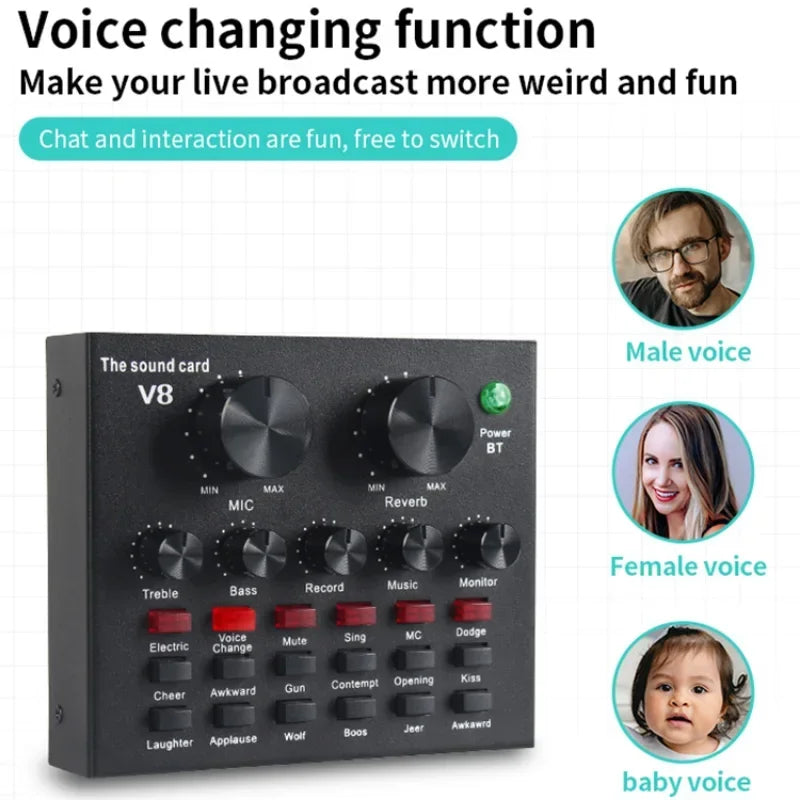


Stream, sing or record with a voice that sounds like you planned it. The V8 sound card carries 12 voice and effect buttons, and the condenser mic arrives on a boom arm with a shock mount and pop filter. Set it up once and spend your time on the show.
Read the full descriptionStream, sing or record with a voice that sounds like you planned it. The V8 sound card carries 12 voice and effect buttons, and the condenser mic arrives on a boom arm with a shock mount and pop filter. Set it up once and spend your time on the show.
Change your voice in real time for fun, live broadcasts with one sound card and a complete mic kit
Tired of a flat voice and a mic that pops every time you get excited? Turn your desk into a live show with one box that does the voice, effects and mounting.

Twelve labeled buttons change your sound live, from Electric and Voice Change to Applause, Laughter and Wolf. The Sing button handles karaoke nights, and Mute is there when you need a breath. Pair the card with a sound card setup and the effects land on the same mic you talk into.

The condenser mic sits in a shock mount, so desk knocks and typing stay out of the recording. The pop filter on its flexible gooseneck catches the hard P and B sounds before they hit the capsule. The gold knurled grille looks as good on camera as it sounds.

The scissor boom arm comes with its own desk clamp, so there is no extra hardware to hunt for. Clamp it to a solid, flat desk edge, tighten it firmly, then set the mic height in front of your mouth. The arm holds that position through a full stream.
Plug the mic into the Condenser MIC input and connect your phone or PC through Live1 or Live2 with the USB-C cable.
Clamp the scissor arm to a solid, flat desk edge and tighten it firmly before you touch the mic position.
Attach the shock mount to the mic, then place the pop filter a few inches in front of it on the flexible gooseneck.
Record a short test, set the mic knob to a middle level, then raise it until your peaks sit at a safe level. Tap a button to hear the effect.
Matte black metal chassis with 12 effect buttons
Gold knurled grille
Reaches over the desk
Attaches the boom arm to the desk edge
On a flexible gooseneck
Isolates the mic from desk knocks
Connects the mic to the sound card
For phone and PC connections

Your voice comes out thin, the mic thumps on every P, and the cables you bought separately are tangled under the monitor. Viewers notice before you do. They scroll on, and the chat goes quiet.

The V8 sound card takes the mic, instruments and phone or PC through its own ports, and the boom arm clamps to the desk edge. The condenser mic, shock mount, pop filter and cables arrive in the same box, already matched to each other.
Press one of the 12 voice and effect buttons and your voice turns into something new, mid-sentence. Chat starts typing faster, and the next bit writes itself.
Connect the sound card, mic and boom arm, then record a quick test to check levels and hear what the shock mount and pop filter change.
After a few sessions the effect buttons become part of your flow, and you learn which effects suit your channel and which to skip.
Mic position, gain and boom arm height stay put, so going live becomes one step instead of a setup session.
| V8 kit | Separate parts | Basic USB mic | |
|---|---|---|---|
| Effect buttons on the sound card | — | — | |
| Shock mount included | Partial | — | |
| Pop filter included | Partial | — | |
| Boom arm and desk clamp included | Partial | — | |
| Phone and PC connection without adapters | — | Partial |
Yes. The sound card has two USB-C live ports, Live1 and Live2, and the packaging lists support for multiple devices live online at the same time. Three USB cables are in the box, so you can connect phone and PC without buying adapters.
The buttons are there for the moments that need a laugh: a chat bit, a reaction clip, a karaoke break. Many streamers use them as a set of cues, not a constant effect. The bigger value is the mic itself, which you would otherwise buy with a boom arm, shock mount and pop filter.
The packaging lists app compatibility for singing, recording, live broadcasts and games. The buttons sit on the sound card, so you can switch effects without opening a menu while you talk.
They cut the two most common problems. The shock mount isolates the mic from desk knocks and keyboard taps, and the pop filter softens the hard P and B sounds that cause plosive pops. Keep the pop filter a few inches in front of the mic for the best result.
The scissor arm clamps to a desk edge. A thin or wobbly edge lets the arm drop mid-sentence, so use a solid, flat edge and tighten the clamp before you set the mic position.
The packaging states support for karaoke software on all major platforms. Plug in the accompaniment port, connect the mic and use the Sing button for effects. Reverb is adjustable with its own knob.


 USB Sound Card Voice Changer Mic Kit for Streaming