
$69.90
Free delivery · 7–14 days
Mobile Game Controller with Phone Clamp for Android
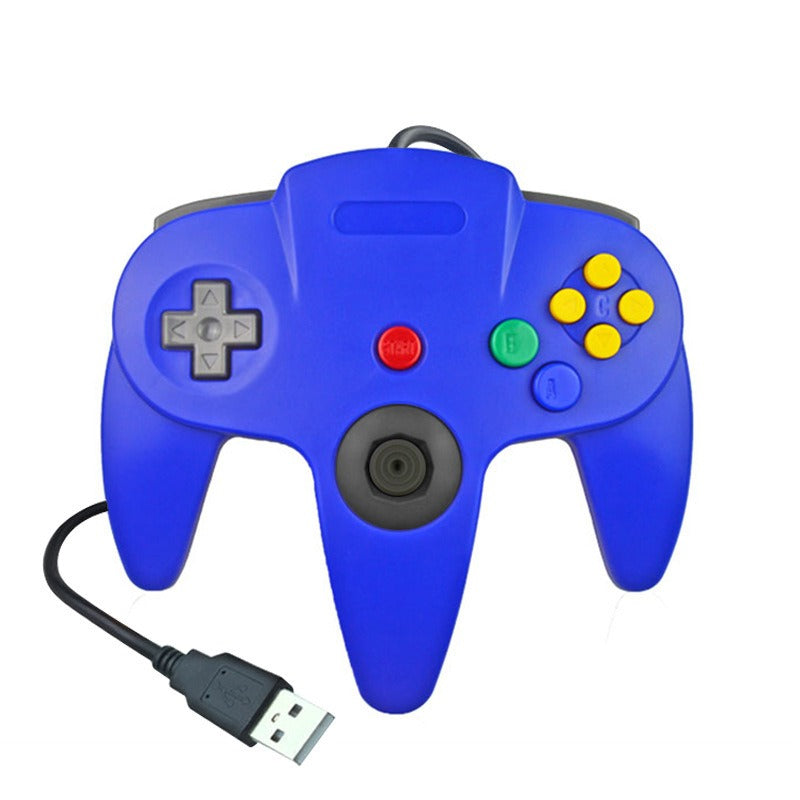


Plug it into your PC and your N64 favorites feel like they did on the living room floor. The pad copies the N64 layout with an analog stick in the center grip, A and B buttons, a C-button cluster and a Z trigger area. It is a wired USB controller with the cable attached, so...
Read the full descriptionPlug it into your PC and your N64 favorites feel like they did on the living room floor. The pad copies the N64 layout with an analog stick in the center grip, A and B buttons, a C-button cluster and a Z trigger area. It is a wired USB controller with the cable attached, so there is nothing else to buy before you start playing.
Classic N64-style controller with plug-and-play USB connection for PC
Stop fighting a mismatched pad during your favorite classics. Plug in one wired N64-style controller and the game feels like it did in the living room.

The USB-A plug is attached to the cable, so there is no adapter to hunt down. Run it to a rear port on your PC, open your emulator, and the pad is ready to map. Plug it into a rear port rather than a crowded hub and the connection stays steady through fast rounds.

The analog stick sits in the center grip, with the A and B face buttons under your right thumb and the C-button cluster beside them. The Z trigger area sits on top of the handle where your index finger expects it. Racing games, platformers and fighters all sit in the same thumb positions they did on the original pad.

Pick classic gray, royal blue, pearl white or jet black. The face buttons are color-matched to each shell, and the black analog stick stands out against the lighter colorways. Pick a color per player and nobody mixes up whose pad is whose on game night.
Use a rear port for the steadiest connection. Keep the cable clear of the chair so the plug does not take the strain.
Launch the emulator and open its controller settings. The pad appears as a standard USB controller.
Assign the stick, A, B, C-buttons and START in the settings, then load your favorite N64 title and press START.
N64-style layout with analog stick, A and B buttons, C-button cluster and START.
USB-A plug built into the cable, ready for any PC or laptop port.
The layout follows the original pad: analog stick in the center grip, A and B face buttons, a C-button cluster and the Z trigger area on top of the handle. It is styled after the N64 controller and built to sit in the same hand positions, so games that rely on the stick and C-buttons feel familiar.
Yes. It is a plug-and-play wired USB controller, so you connect the cable and map it in your emulator or game settings. No adapter and no driver download is needed to get started.
The shell is matte molded plastic and it feels light in the hand. It is not a heavy premium pad. For weekend emulator nights and retro game sessions it does the job, and it is priced as an affordable retro pad rather than a flagship controller.
It works with emulators that accept standard USB game controllers, which covers most N64 emulators on Windows and Linux. Map the stick, face buttons and C-buttons once in the controller settings, and the mapping stays with that emulator.
Yes, if you want the N64 feel without a bundle of adapters. You get the controller and its attached cable in one box, and it replaces the mismatched pad that makes classic games feel wrong. Two of them cover a split-screen night for the price of a single pad from a major brand.


 N64-Style Wired USB Controller for PC and Emulators