
$54.90
Free delivery · 7–14 days
3-in-1 Braided Charging Cable 100W for iPhone, USB-C, Micro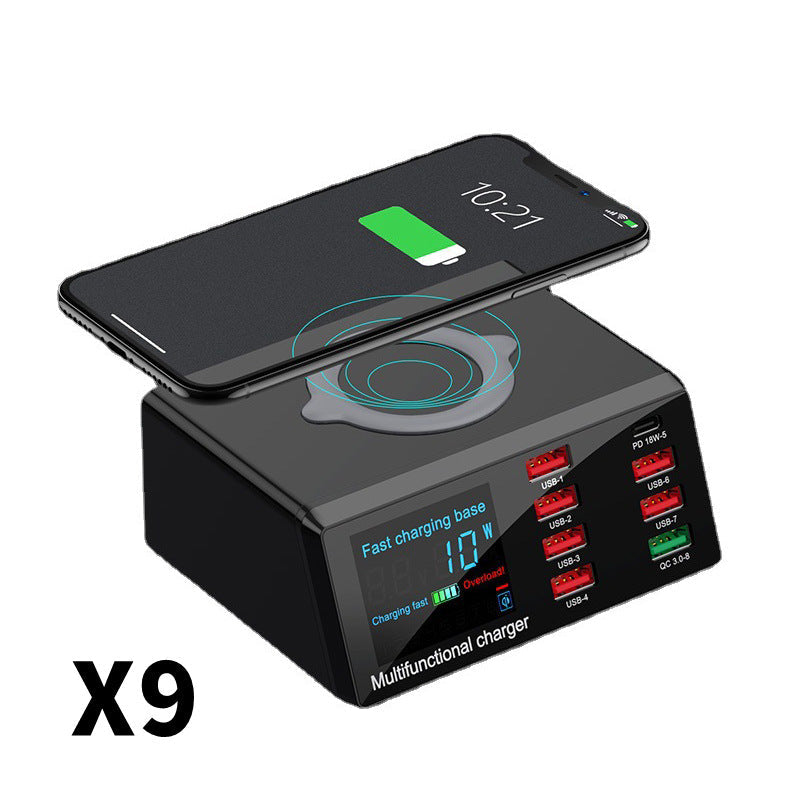


Eight ports, a raised wireless pad and a live LCD readout sit in one 120 x 90 x 50 mm base. Put it on the nightstand or the desk and the outlet stops filling up. One plug powers every device, and the display shows what each one draws.
Read the full descriptionEight ports, a raised wireless pad and a live LCD readout sit in one 120 x 90 x 50 mm base. Put it on the nightstand or the desk and the outlet stops filling up. One plug powers every device, and the display shows what each one draws.
One desktop station that charges up to 8 devices at once, including wireless charging for your phone
Tired of a nightstand buried in chargers and a desk with a tangle of cables? One compact station charges up to 8 devices and tops up your phone on the wireless pad.

Six USB-A ports, one QC 3.0 port and one USB-C PD 18W port let several devices charge from a single outlet. The ports sit in a recessed row numbered 1 to 8, so you always know which socket is which. Lay out a phone, a tablet, earbuds and a spare device, and the base handles them together. Pair it with a multi port charging cables set if you want every device on its own short lead.

The raised wireless pad takes the phone without a cable, which leaves the port rows free for the tablet and earbuds. Set the phone down and check that the battery icon appears on screen. A thick case or a metal wallet on the pad slows the charge, so take those off first.

The backlit LCD shows voltage, current and wattage in real time. Port status indicators numbered 1 to 8 show which ports are active, and the overload indicator lights when the base is working harder than it should. You stop guessing and start reading the numbers.
Connect the base to a wall outlet and watch the LCD light up. The status indicators show the station is ready for the first device.
Centre the phone on the raised wireless pad and check that the battery icon appears. Remove thick cases or magnetic accessories first.
Plug the tablet, earbuds and spare devices into the numbered ports. The LCD shows wattage as each one draws power, and the overload indicator warns you when the base is working too hard.

The phone is down to a sliver of battery, the tablet is still on the nightstand and the earbuds case is somewhere under the pillow. The only outlet in reach is packed with mismatched adapters, and the power strip underneath has no room left.
One 120 x 90 x 50 mm base gives you eight ports and a raised wireless pad on top. The phone sits on the pad with no cable, six USB-A ports and one QC 3.0 port take the rest, and the USB-C PD port covers the 18W jobs. Plug in once and the drawer of chargers can finally stay closed.

You wake up to a clear nightstand and a desk you can actually see. Every device is topped up, nothing is tangled on the floor, and the base sits in the corner where the old pile used to be.
Sits comfortably beside a phone and a mug on most nightstands.
| This station | Loose chargers | Basic power strip | |
|---|---|---|---|
| One base for every device | — | ||
| Wireless charging pad | — | — | |
| Live wattage readout | — | — | |
| Numbered port status | — | — | |
| Overload indicator | — | — | |
| USB-C PD port | Partial | — |
Yes, a little. The base splits its output across the ports you use, so the more devices draw at once, the less each one gets. The LCD shows the wattage each session pulls, which makes it easy to spot when to unplug the least urgent device. Overnight is the easiest time to run the full set, since nothing needs to be ready in a hurry.
Thin cases usually work. Thick cases, cases with metal plates or magnetic rings, and wallets with cards in them can block the link, so the phone charges slowly or not at all. Take off the thick case, centre the phone on the pad and check for the battery icon on screen.
The USB-C PD port delivers up to 18W. That covers phones, earbud cases and most tablets. Check your laptop's power requirement before you rely on this port for it, since a laptop that draws more will charge slowly.
The backlit LCD shows voltage, current and wattage while the base charges. Watch the wattage change as devices connect and disconnect. The numbered indicators beneath the screen show which of the eight ports are active.
Keep it on a hard, flat surface with a few centimetres of air around it, away from bedding and papers. The vents need that space to stay clear while the base is charging. If the overload indicator lights, unplug the least urgent device and let the rest finish.
A power strip gives you outlets. This base gives you eight charging ports, a wireless pad for the phone and a live readout of what is drawing power. Replacing a drawer of adapters with one base is the value argument: one purchase covers every device on the nightstand.


 Multi-Port Desktop Charging Station with Wireless Pad