$34.90
Free delivery · 7–14 days
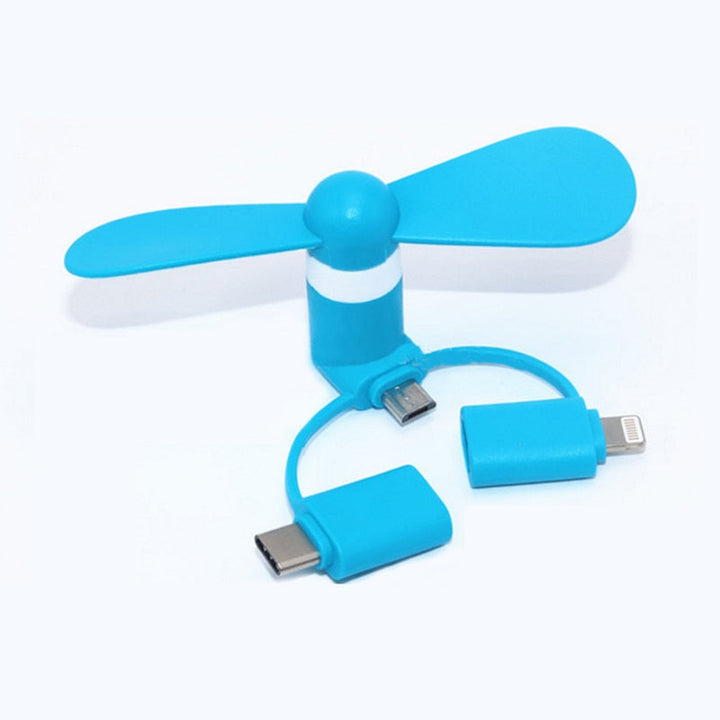
Mini Phone Cooling Fan — 3-in-1 Plug-In Cooler


Build a practical mobile setup with portable phone tripods, lighting, audio, charging and power accessories for iPhone and other compatible smartphones. Whether you are comparing vlogging kits for beginners or looking for a vlogging kit with light and microphone, choose components that match how and where you record.
Start with the way you plan to film. For talking-head videos, a stable phone tripod, adjustable light and clear microphone are the core items. If you record outdoors, add a magnetic back clip power bank or another portable charging option so your phone can keep filming without staying near a wall outlet. Check that the tripod or phone holder fits your device and case, and confirm how the microphone connects to your phone. A smartphone vlogging kit is often easier to carry than a separate camera setup, while a vlogging kit with camera is better suited to shoppers who already own a compatible camera. For home creators, a 3-in-1 wireless charger station can keep an iPhone, Watch and Pods organised between filming sessions.
A useful vlogging kit should cover stability, lighting, sound and power. A portable phone tripod helps keep the frame steady and can make hands-free filming easier. A dedicated lighting and audio kit can improve the consistency of your setup when room lighting changes or background noise becomes distracting. For longer shoots, consider a clip-on power bank that can travel with your phone. Some creators also use a wireless charger station at home to recharge their iPhone, Watch and Pods in one place. A phone repair kit is not a filming accessory, but it may appeal to shoppers who maintain their own devices; it should be used carefully and only with the correct tools and instructions. Before buying, check included adapters, mounting parts, cable types and phone compatibility.
Beginner vlogging kits are usually simplest when built around a smartphone you already own. A phone tripod plus lighting and microphone gives you a compact starting point without requiring a separate camera, lenses or camera batteries. A vlogging kit for iPhone may also benefit from a wireless charging station for home use and a magnetic back clip power bank for mobile recording. Camera-based kits can offer a different shooting experience, but they require compatibility checks for the camera body, microphone connection, mounting system and power needs. If you mainly film short videos, tutorials or product clips, a phone setup is often easier to position and carry. Compare the complete setup rather than the accessory count: a smaller kit with compatible parts is more useful than a larger kit you cannot connect or comfortably transport.
When comparing a vlogging kit with microphone, check how the microphone connects to your iPhone or mobile device and whether the required adapter is included. Look for controls that are easy to reach while filming, along with a mounting method that keeps the microphone clear of the phone screen and camera. For lighting, consider adjustable brightness or positioning so you can avoid harsh shadows and glare on glasses or reflective surfaces. A compact light is useful for desks, bedrooms and travel, while a tripod helps keep the light and phone position repeatable from one recording to the next. Also review cable length, battery or charging requirements and the total packed size. The best vlogging kits are those whose audio, light and mounting parts work together without blocking buttons, ports or the phone camera.
Set up your phone at eye level and frame a little space above your head before recording. Place the light slightly to one side or in front of you, then check for reflections and strong shadows. Connect the microphone before opening your recording app, and make a short test clip so you can confirm that the phone is using the intended audio input. Keep the tripod on a stable surface and avoid extending it farther than feels secure. For outdoor sessions, attach the magnetic back clip power bank only when it sits securely and does not cover the camera, controls or wireless charging area you need. At home, return the phone, Watch and Pods to the 3-in-1 charger station after filming. A repeatable setup saves time and makes it easier to record consistently.
One common mistake is buying a kit without checking phone, case, connector and mounting compatibility. Another is treating lighting as an afterthought: a bright window behind you can leave your face too dark, while a light placed too close can create glare. Poor audio is also easy to overlook, so test the microphone before recording a full video and monitor for cable movement or handling noise. Avoid placing a tripod on an unstable edge, and check that a power bank does not interfere with your grip or camera view. Beginners may also pack too much equipment and spend more time assembling than filming. Start with a phone tripod, microphone and light, learn your workflow, then add charging or power accessories when your recording habits show a real need.
The best vlogging kit depends on your phone, filming location and content style. For mobile creators, a compatible phone tripod combined with lighting and a microphone is a practical foundation, while a portable power bank helps with longer sessions.
A beginner-friendly setup is usually a smartphone vlogging kit with a stable tripod, simple light and microphone. It uses equipment you may already own and avoids the extra compatibility and setup requirements of a separate camera.
The essentials are a phone holder or tripod, a microphone for audio and a light for more consistent illumination. Depending on where you film, you may also want a portable power bank and a home charging station for your everyday devices.
You need a recording device, stable support and a way to capture usable sound and light. An iPhone or other smartphone, portable tripod, microphone and compact light can cover the basics; extra power and charging accessories support longer or more frequent shoots.
Choose one topic, set your phone at eye level and record a short test before making a full video. Check framing, lighting and microphone input, then keep the setup simple until you learn which accessories improve your workflow.
Frequent mistakes include skipping an audio test, placing the light behind the subject, using an unstable tripod and overlooking connector compatibility. Beginners can also buy too many accessories at once instead of starting with a tripod, light and microphone that work with their phone.