
$109.90
Free delivery · 7–14 days
Wireless Gaming Mouse 12,000 DPI for FPS Aiming


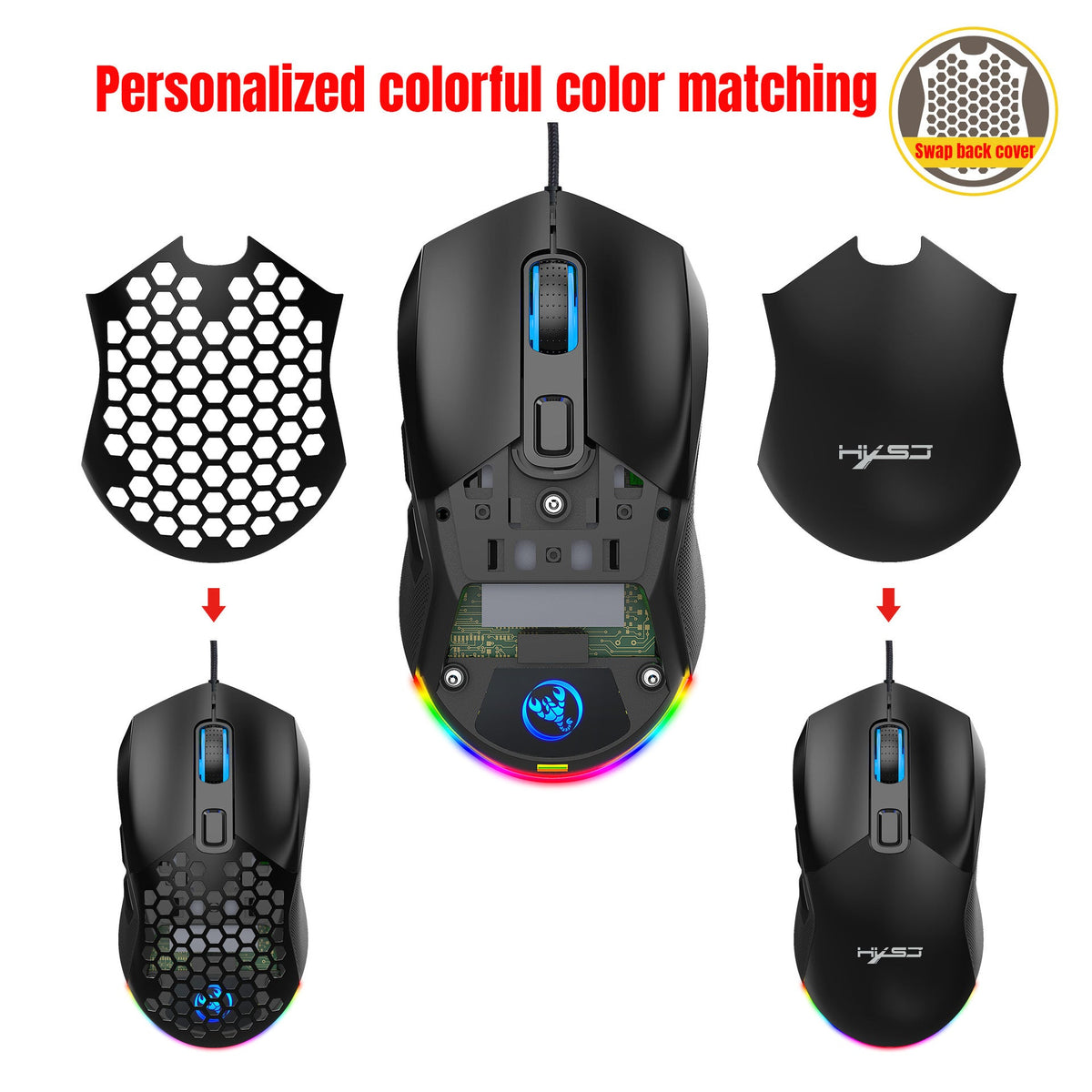


Heavy mice tire the hand and make every desk look the same. This wired gaming mouse keeps your grip light with a honeycomb hollow shell, gives you six DPI levels up to 7200, and lets you swap between honeycomb and solid black covers. It also lights up with 14 RGB modes to match your setup.
Read the full descriptionHeavy mice tire the hand and make every desk look the same. This wired gaming mouse keeps your grip light with a honeycomb hollow shell, gives you six DPI levels up to 7200, and lets you swap between honeycomb and solid black covers. It also lights up with 14 RGB modes to match your setup.
Lightweight honeycomb gaming mouse with swappable back covers, 7200 DPI precision and RGB lighting
Heavy mice wear down your hand and your setup looks like everyone else's. This lightweight honeycomb mouse keeps your grip relaxed and your RGB glowing.

The hollow honeycomb back cover cuts material where a solid shell would sit heavy in your palm. The packaging does not list a gram figure, so hold it for a minute before you decide. Most players notice the difference by the end of the first long session. Pair it with a big computer mouse pad for smooth, even glides.

Six levels, 1200, 1600, 2400, 3200, 4800 and 7200, cover slow tactical aim and fast flick shots alike. Roll the blue-lit DPI wheel to step between them and you always know where you are. The 125Hz polling rate keeps cursor updates steady during quick movements.

Both the honeycomb and solid black back covers come in the box. Press the release, lift the cover away, and click the other one into place. Your desk can look stealthy one week and loud the next, without buying a second mouse.
Connect the braided wired cable to your PC. The mouse works right away, with no software to install.
Press the light mode button at the bottom of the mouse to cycle through the 14 RGB modes until the glow suits your desk.
Roll the blue-lit DPI wheel to step through six levels, from 1200 up to 7200. Settle on one for each game you play.
Press the release, lift the back cover away, then click the honeycomb or solid black cover into place.
Matte black body with RGB underglow and braided cable
Hollow shell that keeps the weight down
Swap in for a darker desk look

Three ranked matches in, the hand starts to cramp and the flicks get sloppy. A heavy, plain mouse turns a good night into a slog, and it does nothing for the desk you spend those hours in.

The honeycomb shell takes weight out of the mouse, so your hand has less to hold up. Six DPI steps let you dial sensitivity for a shooter, then drop it for a slower title, without digging through menus. The blue-lit wheel shows you which level you are on.

Swap the honeycomb cover for the solid black one when the setup needs a darker look. Cycle through 14 RGB modes with the button under the mouse until the glow matches the rest of your gear.
| This mouse | Generic budget mouse | Premium RGB mouse | |
|---|---|---|---|
| Honeycomb hollow shell | — | — | |
| Swappable back covers | — | — | |
| Six DPI levels up to 7200 | — | ||
| RGB underglow with light modes | — |
Yes. It is a plug-in wired mouse, so you connect the cable and it works right away. Use the light mode button under the mouse for RGB and the blue-lit DPI wheel for sensitivity. You do not need a driver to get started.
The cover is matte plastic, the same material as the rest of the body. It holds up to everyday clicking and cover swaps when you press the release and lift it off slowly. Forcing it with a screwdriver is what cracks the edges, so keep the lift gentle.
Press the release at the back, lift the current cover away, then click the other one into place. The whole swap takes a few seconds and needs no tools.
Press the light mode button at the bottom of the mouse to cycle through the 14 RGB modes. For sensitivity, roll the DPI wheel through six levels from 1200 up to 7200. The light button changes color only, and the wheel changes sensitivity only.
For daily ranked play, yes. You get 7200 max DPI, six sensitivity steps and a 125Hz polling rate for the price of a basic mouse. Premium mice cost more mainly for brand name and finer sensor tuning, so compare it with optical mice before you spend more. Over a year of nightly play, a mouse that feels right and lasts is the better buy than one that just costs more.
The shell is plastic with a matte finish, so it will not feel as dense as a premium aluminium or heavy-coated mouse. What you get in exchange is a light body, six DPI levels and two covers in the box. Judge it by how it feels in your hand over a few sessions.


 Lightweight Wired Gaming Mouse 7200 DPI with RGB Light