
$43.90
Free delivery · 7–14 days
Portable USB Fan with Flexible Neck for Power Banks


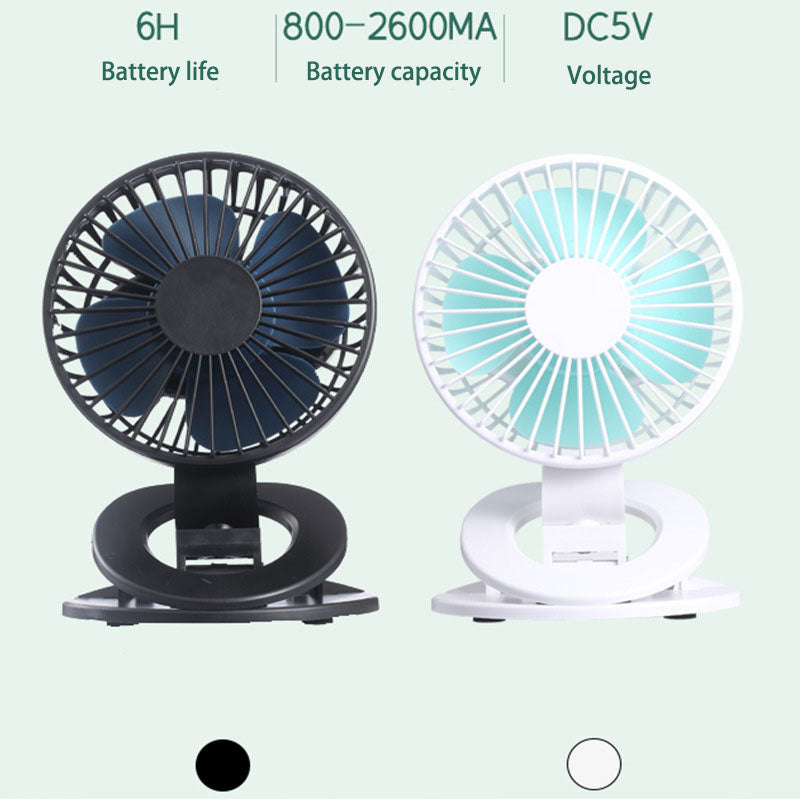


Stuffy desks and hot car seats stop being the problem once a clip-on fan goes wherever you sit. The clamp grips a desk edge, car seat, or bed rail, the 360° head aims air straight at your face, and a USB charge gives up to 6 hours on first gear.
Read the full descriptionStuffy desks and hot car seats stop being the problem once a clip-on fan goes wherever you sit. The clamp grips a desk edge, car seat, or bed rail, the 360° head aims air straight at your face, and a USB charge gives up to 6 hours on first gear.
Portable 360° clamp fan with up to 6 hours of wireless cooling
Stop sweating through lectures, commutes, and late study nights. This clip-on fan aims a full 360° and runs up to 6 hours on a USB charge.

The clamp base grips desk edges, car seats, and bed rails, so the fan sits where your face is instead of where the outlet is. Open the clamp slowly on thicker edges and check the grip before you let go. For a quick charge on the road, pair it with a car chargers: usb adapter.

The 360° rotating head and multi-directional tilt point airflow at your face without moving the whole clamp. Turn the head toward yourself at the desk, then tilt it down when you lie back on the bed. There is no dead angle to fight with.

The built-in 800-2600mA battery charges over DC5V USB and gives up to 6 hours on first gear, 4 hours on second, and 2 hours on third. Start low, step up when the room gets worse, and the battery lasts through a full study block.
Plug the fan into a DC5V USB source and let the built-in battery fill before the first use.
Open the clamp and grip a flat desk edge, car seat, or bed rail. Test the hold before you walk away.
Choose first gear for the longest runtime, then turn and tilt the head toward your face.

Midday air sits still in a shared dorm room. Your laptop adds its own heat, your notes stick to your arm, and the lecture slides blur. You are not imagining it. The room traps heat around your face and keeps it there.

The wall fan is across the room, pointed at the bed. The window does not open far enough to matter. The one outlet you can reach is behind the bed frame, so the fan you want stays unplugged. By the second week of the semester, you have stopped expecting relief.

This fan clamps to the desk edge, a car seat, or a bed rail, then the 360° head swings to point air at your face. Charge it over USB, pick one of three speeds, and it runs for up to 6 hours on first gear. The heat still exists, but it no longer owns your afternoon.
Charge over USB, clip the fan to your desk or seat, and start on first gear to feel the airflow aimed at you.
You will know which clamp position and tilt angle work best for your desk, car seat, or bed rail.
The fan becomes the thing you grab for study sessions, commutes, and warm nights without thinking about it.
| This clip fan | Tabletop fan | Pedestal fan | |
|---|---|---|---|
| Needs a power outlet | No | Yes | Yes |
| Takes up desk space | No | Yes | Partial |
| Aims 360° at your seat | Yes | No | No |
| Runs on its own battery | Yes | No | No |
| Clamps to desk, seat, or rail | Yes | No | No |
The clamp grips flat desk edges, car seats, and bed rails. Thick desks take a little more force to open, so open it slowly and test the grip before you let go. Thin, round, or flimsy edges are the ones to avoid.
It is a personal fan. It moves air right at your face from a few inches away, which is what a desk needs. It is not built to cool a whole room, so set it close and aim the head at yourself.
The packaging lists 6 hours on first gear, 4 hours on second, and 2 hours on third, all from the same built-in 800-2600mA battery. Start low and step up only when you need more airflow.
It charges over a standard DC5V USB connection, so a laptop port or a regular USB charger both work. Charge it before a long day and it is ready when you need it.
You pay once and skip the outlet hunt, the extension cord, and the desk space a tabletop fan takes up. The battery recharges over USB, so there are no replacement costs to add up over a semester.


 Clip-On Mini USB Desktop Fan, 360° Rotating Head