
$37.90
Free delivery · 7–14 days
Wired USB Optical Mouse for Office, Home and School Use


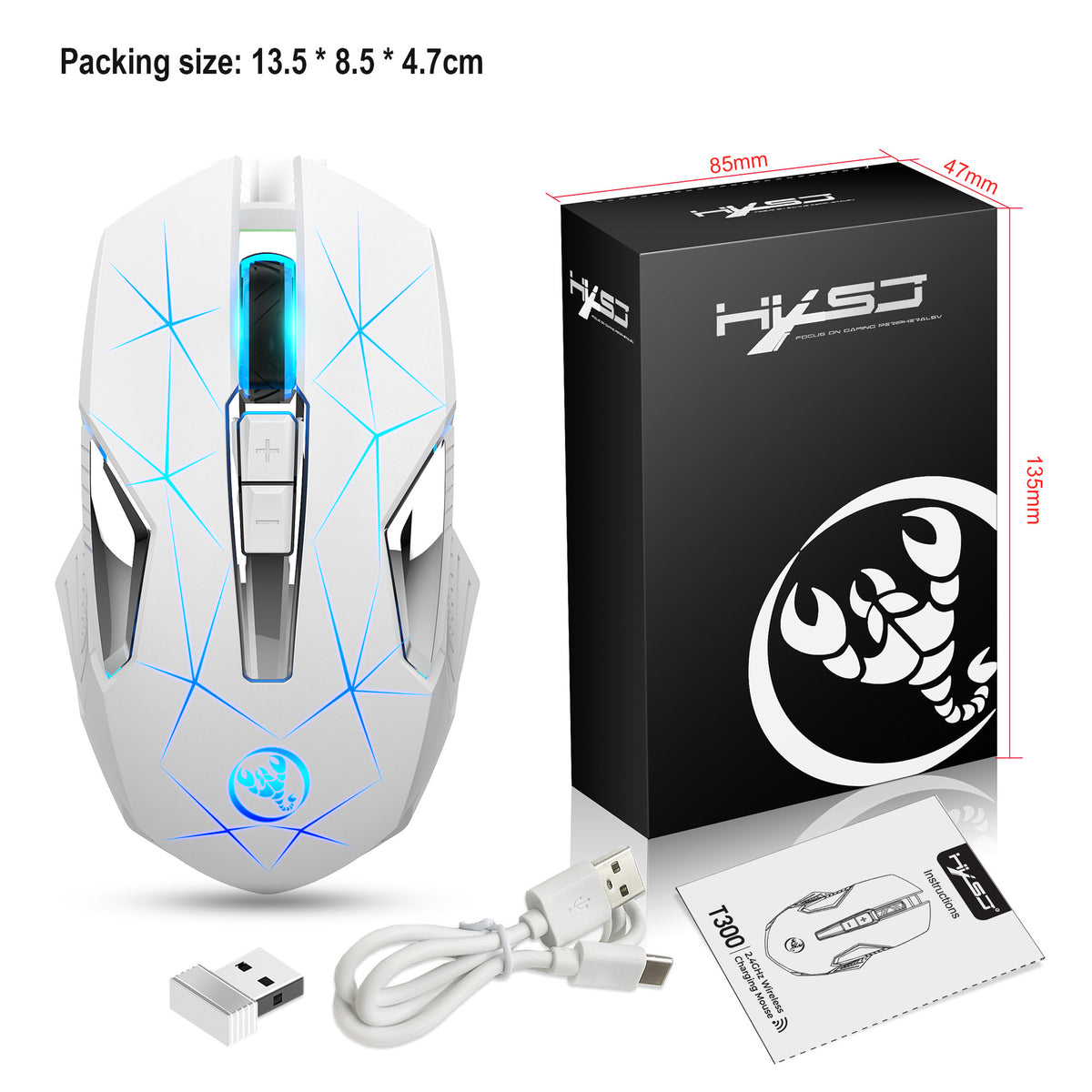
A cable-free mouse that glows the colour you pick and switches sensitivity for study, work or a late game. The 2.4G receiver, seven-colour breathing light and three DPI levels make the desk feel finished from the first day.
Read the full descriptionA cable-free mouse that glows the colour you pick and switches sensitivity for study, work or a late game. The 2.4G receiver, seven-colour breathing light and three DPI levels make the desk feel finished from the first day.
Colourful 7-colour breathing RGB mouse with reliable 2.4GHz wireless for office and gaming
Swap the tangled cable and the plain grey mouse for a 7-colour breathing RGB mouse that switches from study mode to game mode in one click. Your desk finally looks as good as you feel using it.

The backlight runs through seven colours with a breathing effect that fades in and out rather than flashing. A logo light sits on the palm rest and the scroll wheel is illuminated, so the glow reaches both your hand and your eye line. It works as a desk accent during study and as a cue for late-night sessions.

The 2.4GHz connection runs through a USB receiver that is small enough to leave in a port. Your desk loses the cable that drags across the keyboard and catches on mugs. The USB-C cable in the box handles charging, so the setup stays tidy from the first day.

The shell is sculpted with white side grips that guide your thumb and fingers into the same position every time. Ergonomic shaping is what keeps a long document or a ranked match from turning into wrist fatigue. The matte plastic finish keeps your palm from slipping during fast movement.
Insert the small USB 2.4GHz receiver into a free USB port on your laptop or PC. Leave it there, since it stays small enough to forget about.
Use the USB-C cable to charge the mouse before first use. The backlight starts cycling through its seven colours once it is switched on.
Press the +/- buttons to move between 1000, 1200 and 2400 DPI. Use 1000 or 1200 for documents and spreadsheets, and push to 2400 when you need a faster cursor.
Black matte shell with 7-colour RGB backlight
Small dongle that stays in the port
For charging the mouse

Most budget mice look like they came with the desk and nobody asked. The cable snags on the monitor stand every time you swing for a click, and the cursor moves the same way whether you are writing an essay or chasing a flag in a game. By midnight the whole setup feels unfinished.

Plug in the tiny USB receiver, and the cable disappears from your workspace. The seven backlight colours breathe slowly across the shell and the scroll wheel, so the mouse becomes a light source instead of a grey brick. Pick the colour that matches your mood and the desk starts to feel like yours.
| This mouse | Plain wired mouse | Premium RGB gaming mouse | |
|---|---|---|---|
| Cable-free connection | — | ||
| 7-colour RGB backlight | — | ||
| 3 DPI levels | — | ||
| Receiver and USB-C cable included | — |
The mouse uses a 2.4GHz USB receiver, which is the standard for budget wireless gear. Plug the receiver straight into a port on your PC rather than a crowded hub, and keep it within a short reach of the mouse. Most desk and casual gaming runs without trouble this way.
The packaging states the buttons were tested over 10 million keystrokes. That is a real durability test for a mouse you will click all day, and it is the reason a budget model can still last through a full school year or a long remote job.
The shell is sculpted with white side grips that guide your hand into a steady position. It is built for everyday sessions, from long documents to extended games, though the fit is personal and some people prefer a larger upright design.
Yes. The +/- buttons step through the three DPI levels of 1000, 1200 and 2400, and the DPI dial shows the 1600 level too. The backlight cycles through seven colours with a breathing effect, so the look stays fresh without another purchase.
A plain wired mouse costs a little less up front, but it gives you a cable, one sensitivity and no light. This one adds wireless freedom, three DPI levels and a lit-up desk for a similar budget. The receiver and USB-C cable are already in the box, so you will not be buying extras to get started.


 Wireless 2.4G RGB Mouse with 7-Colour Backlight