
$159.90
Free delivery · 7–14 days
USB-C Docking Station Dual DP HDMI 4K60Hz Triple Screen


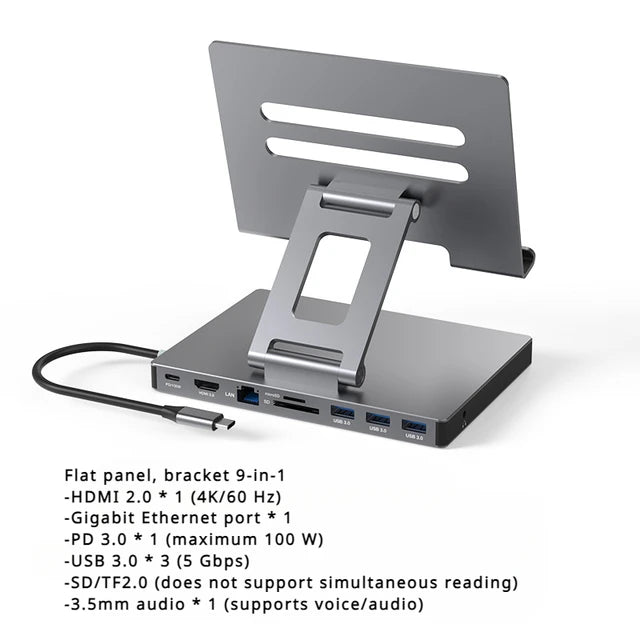


One USB-C cable turns your laptop or tablet into a full desk. Nine ports cover HDMI at 4K60Hz, Gigabit Ethernet, SD and TF cards, USB 3.0 and PD100W charging. The 360° rotating base and foldable stand hold your tablet at the angle you want.
Read the full descriptionOne USB-C cable turns your laptop or tablet into a full desk. Nine ports cover HDMI at 4K60Hz, Gigabit Ethernet, SD and TF cards, USB 3.0 and PD100W charging. The 360° rotating base and foldable stand hold your tablet at the angle you want.
One USB-C connection turns your laptop or tablet into a 9-port desk hub with 4K60Hz display output and a rotating stand
Stop juggling dongles and loose cables. Plug in once and your laptop or tablet gets 9 ports, a 4K60Hz display output and a stand that turns to meet you.

The hub gives you three USB 3.0 ports, an HDMI 4K@60Hz output, a Gigabit LAN port, SD and TF card slots, a 3.5mm audio jack and a PD100W charging port. You plug in once in the morning and the drives, network and monitor are all live. Editors who move footage between a card and a drive will notice the extra slots first. For anyone running a wired connection on a Wi-Fi-only desk, the Gigabit LAN port is the one that matters most.

The base turns a full 360 degrees on a smooth turntable, and the foldable arm sets the tablet anywhere from 70 to 180 degrees. You pick the angle once for typing, then turn the screen toward someone across the table for a review. The slotted aluminum cradle holds the tablet upright without a case getting in the way.

PD100W power delivery charges your laptop while the HDMI port sends a 4K60Hz picture to a monitor or TV. The HDMI output also supports 2K144Hz for high refresh gaming or fast-moving slides. The desk runs on one connection, so you stop choosing between charging and a bigger screen.
Connect the USB-C cable on the hub to the USB-C port on your laptop or tablet. The hub is ready as soon as it is connected.
Run an HDMI cable from the HDMI 4K@60Hz port to your display. Add the Ethernet cable, your drives and a USB-C PD charger to the remaining ports.
Fold the stand out, set the angle between 70 and 180 degrees, and slot the tablet into the aluminum cradle. Turn the base to face the screen toward you or your audience.
9 ports in a brushed aluminum body
Built into the hub, no separate cable to find
Matte grey stand with a slotted aluminum tablet cradle
Your laptop has two ports and every call depends on a Wi-Fi signal that drops at the worst moment. A monitor needs a cable, a drive needs another, and the tablet slumps at the wrong angle. Each morning you rebuild the same tangle.

The hub replaces the tangle with a single USB-C connection. Its built-in cable runs from your laptop or tablet to nine ports on the aluminum body, so the monitor, Ethernet line, drives and charger all stay plugged into one place.

The stand folds down when you travel and opens to any angle from 70 to 180 degrees. The base turns a full 360 degrees, so you can face the tablet toward a colleague or a seminar table. Plug in the HDMI cable and the same tablet is ready for a bigger screen.
| This hub | Separate stand and basic hub | |
|---|---|---|
| One USB-C connection for all ports | — | |
| 4K60Hz HDMI output | Partial | |
| Wired Gigabit Ethernet | — | |
| PD100W charging port | Partial | |
| 360° rotating tablet base | — | |
| Aluminum body in one unit | — |
Yes, if your device has a USB-C port. The hub connects through its built-in USB-C cable, so there is nothing extra to buy for the connection. For charging, the PD port is rated for 100W, so pair it with a USB-C PD charger that matches your laptop's wattage.
Yes. The HDMI port supports 4K60Hz, and the same port also supports 2K144Hz for smoother motion. Connect the HDMI cable to your monitor or TV, then the output runs alongside the other ports on the hub.
The PD port is rated for PD100W power delivery. Your laptop still needs a USB-C PD charger that can supply the power it asks for, so check the wattage on your charger before you plug in.
Yes. The LAN port is Gigabit Ethernet, which keeps a video call or a large file transfer on a wired line instead of a Wi-Fi signal that drops.
A separate stand, a basic hub and a loose Ethernet adapter add up quickly, and they leave three things on the desk. This aluminum unit covers the hub and the stand in one body, with 9 ports, 4K60Hz display output and PD100W charging. Buyers who would otherwise buy two or three separate gadgets get the value of the bundle in one purchase.


 USB-C Docking Station: 4K60Hz HDMI, Ethernet, 100W PD