
$54.90
Free delivery · 7–14 days
PS4 Controller Phone Holder Clip for Mobile Gaming




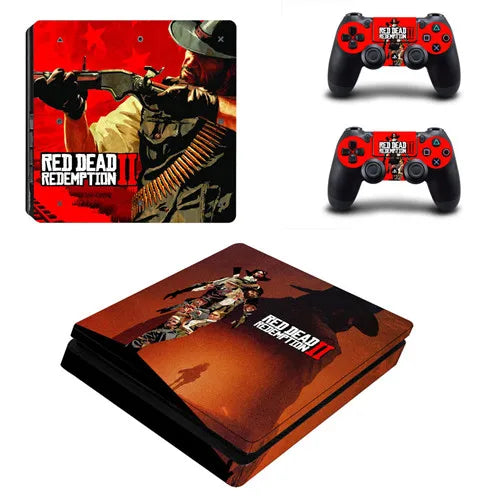


Your PS4 Slim and both controllers finally look like they belong together. This Red Dead Redemption 2 skin set covers the console and two DualShock 4 pads in matching artwork, so the gaming corner reads as one deliberate setup. The cut-outs sit over the ports and buttons, so the console stays easy to use.
Read the full descriptionYour PS4 Slim and both controllers finally look like they belong together. This Red Dead Redemption 2 skin set covers the console and two DualShock 4 pads in matching artwork, so the gaming corner reads as one deliberate setup. The cut-outs sit over the ports and buttons, so the console stays easy to use.
Show off your PS4 Slim and controllers with official-style Red Dead Redemption 2 artwork
Your console and controllers sit there plain and forgettable. After one skin set, your whole gaming corner looks like it belongs to a true RDR2 fan.

The kit covers the console and both DualShock 4 controllers in the same RDR2 artwork. Set them side by side and the corner reads as one deliberate setup instead of three mismatched gadgets.

Each skin is cut for the PS4 Slim ports and the DualShock 4 buttons, so nothing sits under the vinyl. Set the cut-outs over the openings first, then press down. Browse PlayStation controllers if you want a fresh pad to match.

One set dresses a console and two pads at a budget price. Buying three separate skins adds up quickly, and this kit keeps the artwork consistent across the whole setup.
Clean the console and both controllers with a dry microfiber cloth. Dust and oil stop the adhesive from grabbing evenly.
Hold the skin over the console and set the port and button openings before you touch the adhesive side.
Lay the vinyl down slowly, then press from the middle toward the edges to push out air bubbles.
Run a fingertip along the edges and check that every port and button sits clear of the vinyl.
Self-adhesive vinyl with cut-outs for the ports and buttons.
Matching RDR2 artwork with button cut-outs for each pad.
The console skin is cut for the PS4 Slim body, with openings for the ports and buttons. The two controller skins are shaped for DualShock 4 pads. The PS4 Pro and the original PS4 have different shapes, so check that you own a PS4 Slim before you order. Line up the cut-outs over the ports and buttons before you press anything down.
Peel it back slowly from one corner and keep the angle low so the adhesive lets go cleanly. Work on a smooth, dry surface and the skin comes off with a lot less fuss than you might expect.
No. The artwork is styled after Red Dead Redemption 2 in an official-style design. It is a vinyl accessory for your hardware, not a Rockstar product.
One set covers the console and both controllers. Matching hardware costs far more than a vinyl skin, and the skin comes off whenever you want a different look, so the set is a low-commitment way to get a coordinated setup.
Yes, if you catch it early. Lift one edge, peel back gently, then lay it down again and line up the cut-outs. Start with the console top, since it is the largest piece and sets the alignment for the rest.


 PS4 Slim Skin Sticker Red Dead Redemption 2 Set