
$69.90
Free delivery · 7–14 days
Ultra-Thin Portable Laptop Stand for Desk and Cafe Use


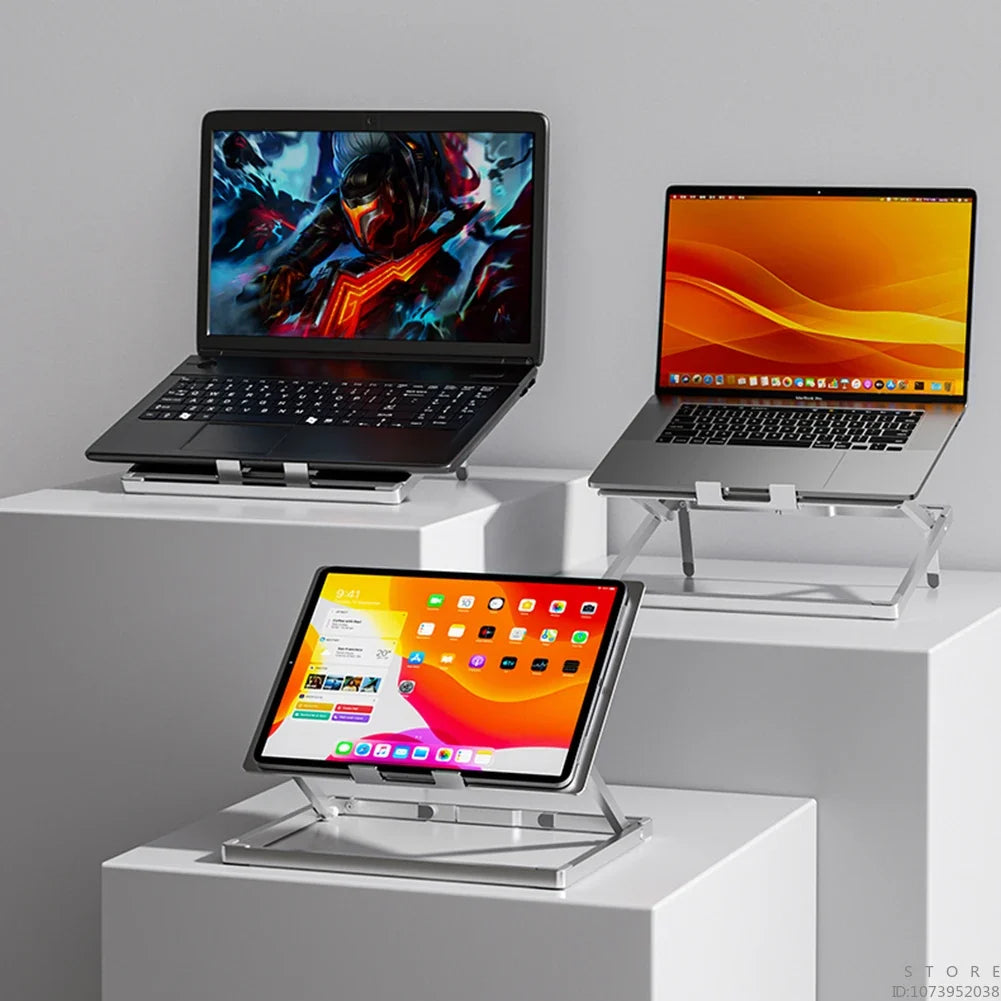

Lift your screen to eye level and let your neck stop working so hard at the end of the day. This foldable aluminum stand holds laptops and tablets up to 17.3 inches steady on the desk, with a slotted platform that lets air move under the device. It folds flat for the café and the...
Read the full descriptionLift your screen to eye level and let your neck stop working so hard at the end of the day. This foldable aluminum stand holds laptops and tablets up to 17.3 inches steady on the desk, with a slotted platform that lets air move under the device. It folds flat for the café and the road.
Adjustable, foldable aluminum laptop stand for up to 17.3-inch devices with stable, non-slip support
You've been looking down at a flat laptop all day, and your neck and wrists pay for it. This aluminum stand lifts the screen to a comfortable height, stays steady, and folds into your bag for the café or the road.

The platform adjusts in height and angle, so the top of the screen lands at or just below your eye line. Your head stays upright and your neck stops reaching down to read the display. Set it once for your desk and it stays where you put it.

Dark grey silicone pads cover the platform and the base, and a rubber baffle sits at the contact point. The center of gravity stays low, so the stand does not rock when you type or shift the laptop. Your device stays where you set it.

The platform is slotted, so air moves under the laptop instead of sitting trapped against a flat surface. Keep the slots clear and the underside stays open to the room. It is the simplest way to take heat off a machine that works all day.
Pull the hinged frame open with one hand. It locks with a firm click and the slotted platform sits flat on the base.
Raise the platform until the top of the screen sits at or just below your eye line. Adjust the angle to suit how you type.
Place the laptop in the middle of the platform, within the 17.3-inch limit, and leave the slots clear so air can move underneath.

By mid-afternoon the neck ache has settled in. A laptop lying flat on the desk pulls your head forward and drops your wrists to reach the keys. Stacked books help for a day, then slide or block the vents, and the machine runs hot underneath.
Set the platform to your eye line and the screen comes up to meet you. You keep typing on the same keyboard, in the same chair, but your head stays upright. The change is small and you feel it within a few workdays.

The frame folds flat, so the stand slides into a backpack beside your charger and cable organizers. Open it on a café table or a hotel desk and you have the same setup you use at home.
A dry microfiber cloth removes fingerprints and desk dust from the brushed finish.
Wipe the pads with a dry cloth so the grip stays clear of dust and crumbs.
Blow or brush out dust from the platform slots now and then so airflow stays unrestricted.
| This stand | Cheap plastic stand | Stacked books | |
|---|---|---|---|
| Adjustable height | Yes | No | No |
| Stable on the desk | Yes | Partial | No |
| Ventilated platform | Yes | No | No |
| Folds flat for carrying | Yes | Partial | No |
| Aluminum build | Yes | No | No |
Yes, within the stated limit. The base is solid, the center of gravity stays low, and silicone pads on the platform and base hold the device in place. Center the laptop on the platform and it will not slide when you type.
It fits any laptop or tablet up to 17.3 inches, so 13 and 14-inch laptops and tablets all fit. Smaller devices sit well on the platform, and the silicone keeps them from shifting. If you also prop up a phone, an adjustable phone stand is the better tool for that job.
The pads are dark grey silicone built for grip on the platform and base. Wipe them with a dry cloth to keep them clear of dust. The stand has no adhesive, so it lifts off the desk without residue.
Yes, if you use it every day. Aluminum holds its shape under a heavy laptop, resists the wobble that plastic stands develop, and feels solid when you adjust it. One stand that lasts for years costs less than replacing a cheap stand that cracks or slips.
Yes. The hinged frame folds flat, so the stand slides into a bag beside your charger. It is compact enough to carry between a desk, a café, and a hotel room.


 Adjustable Aluminum Laptop Stand for 17.3-Inch Laptops