
$64.90
Free delivery · 7–14 days
Wireless PS4 Controller for Precise, Comfortable Gaming



Build a more convenient setup with gaming accessories for PlayStation, PC, Nintendo Switch, mobile gaming, and retro play. This category includes controller charging docks, cooling and RGB features, control adapters, gamepads, microphones, and compact consoles for your desk or travel kit.
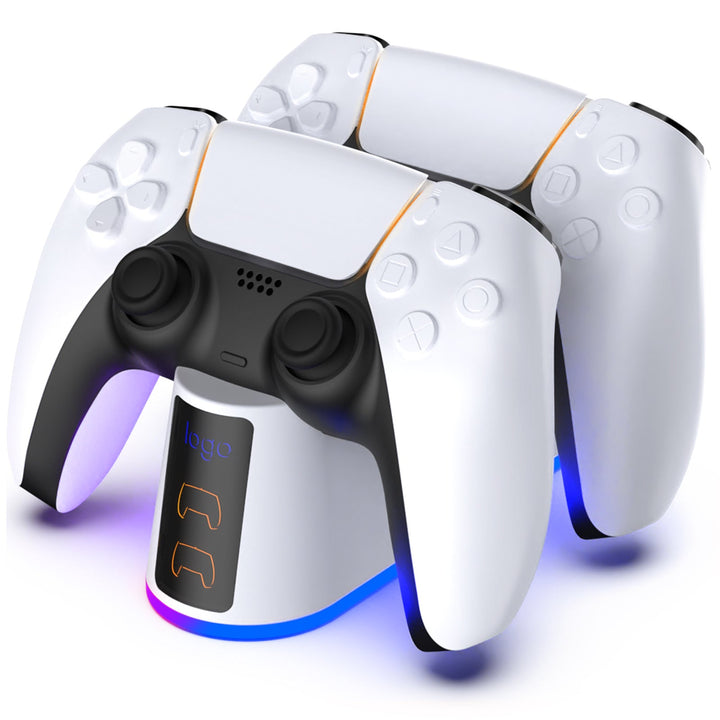
Start with the device and game style you use most. PlayStation players can choose a PS5 controller charger with RGB lighting, a PS5 Slim charging dock with a cooling fan, or an OIVO PS4 controller charging dock for dual-controller storage and charging. For PC gaming, the RGB USB microphone adds voice chat and streaming audio without drivers. Mobile players may prefer a metal-trigger gamepad, while Nintendo Switch users can choose a wireless Pro-style gamepad. If you want flexible controls on a console, a keyboard mouse converter can support keyboard-and-mouse input in compatible games. For gaming accessories gifts, match the accessory to the recipient’s platform before choosing features such as RGB lighting, cooling, portability, or extra controls.
The best gaming accessories depend on what you need to improve. Charging docks are practical PlayStation accessories because they keep controllers organized and ready between sessions. The PS5 Slim dock adds a cooling fan and RGB lighting, while the PS5 dual fast-charge dock focuses on charging two controllers. PC players may want a flexible RGB USB microphone for clear in-game communication, recording, or streaming. Console and mobile players who prefer precise button layouts can use a keyboard mouse converter or a mobile gamepad with metal triggers, where compatible. A Bluetooth gamepad suits Nintendo Switch play without a wired connection. For portable entertainment, the retro handheld game console provides a self-contained option with a large built-in game library.
For gaming accessories for a desk, prioritize compatibility, cable management, footprint, and everyday convenience. Check whether a charging dock is made for PS5, PS5 Slim, or PS4 controllers before ordering, since similar-looking accessories are not always interchangeable. RGB lighting can add a visible setup accent, but placement and brightness still matter in a shared room. A dock with a cooling fan needs enough open space around its vents, while a microphone needs a stable position that does not block your display or keyboard. For PC gaming accessories, confirm the microphone uses the connection available on your computer and that the no-driver design fits your preferred plug-and-play setup. Wireless gamepads are useful when you want fewer cables, but remember to keep them charged.
Place a PlayStation charging dock on a stable, ventilated surface near the console or another suitable power source. Seat each controller carefully on its charging contacts and check that it is aligned before leaving it to charge. For the PS5 Slim dock with cooling fan, keep the air openings clear and avoid covering the unit with other desk items. Use the correct dock for your controller generation: the PS4 dual charger is intended for PS4 controllers, while the PS5 docks are designed for PS5 controllers. Connect a microphone directly to the compatible PC port, then select it as the input device in your game or operating system if needed. Store wireless gamepads and mobile controllers where their buttons and triggers will not be pressed during transport.
A common mistake is buying by appearance alone and overlooking platform compatibility. A PS4 controller dock is not automatically suitable for PS5 controllers, and a PS5 Slim accessory may be designed around that console’s shape. Shoppers also sometimes choose a keyboard mouse converter without checking whether their console and game support the intended controls. For PC microphones, verify the connection and available desk space before ordering. Another mistake is treating RGB lighting as the main feature when charging speed, cooling, portability, or button layout matters more to your routine. Check the product description for included cables and required connections.
This category suits players building a first setup, replacing worn accessories, or looking for useful gaming accessories gifts. PlayStation owners can add a charging dock to keep one or two controllers organized, with the PS5 Slim model offering cooling and RGB features. PC gamers may benefit from the flexible USB microphone for multiplayer chat, content creation, or casual recording. Mobile players who want physical controls can choose the metal-trigger gamepad, while Nintendo Switch users can use the Bluetooth gamepad for wireless play. The retro handheld is a compact choice for players who enjoy classic-style gaming away from a main system. These products also work well for shoppers making a gaming accessories list: begin with charging and control needs, then add audio, lighting, or portable options.
The best accessories depend on your platform and priorities. For PlayStation, a compatible charging dock is a practical starting point; PC players may prefer a USB microphone, while mobile and Switch players can choose a suitable wireless or trigger-equipped gamepad.
You need accessories that match the way you play, rather than every item in a gaming accessories list. Common useful choices include a controller charger, a compatible gamepad, a microphone for voice chat, or a keyboard mouse converter where supported.
A $1,000 PC can be suitable for gaming, but performance depends on its components, game settings, display resolution, and the games you play. Accessories such as a USB microphone can improve communication, but they do not determine the computer’s gaming performance.
There is no single accessory every gamer needs. Most players benefit from reliable controls, a way to keep devices charged, and comfortable audio or voice communication, but the right combination depends on whether they use PC, PlayStation, Switch, mobile, or a retro handheld.
Two hours of gaming is not automatically a problem; its impact depends on the person, routine, and whether gaming displaces sleep, responsibilities, movement, or social time. Use regular breaks and choose accessories that make your setup easier to organize and use comfortably.
The phrase can refer to different things, but it often means the major console platforms: PlayStation, Xbox, and Nintendo. This category focuses on PlayStation, Nintendo Switch, PC, mobile, and retro gaming accessories, so check compatibility before choosing an item.
Browse related: Game Controllers - Wireless Gamepads & Joysticks · explore hair accessories - floral & decorative hair clips.