
$39.90
Free delivery · 7–14 days
Keyboard Wrist Rest with Memory Foam Cloud Support
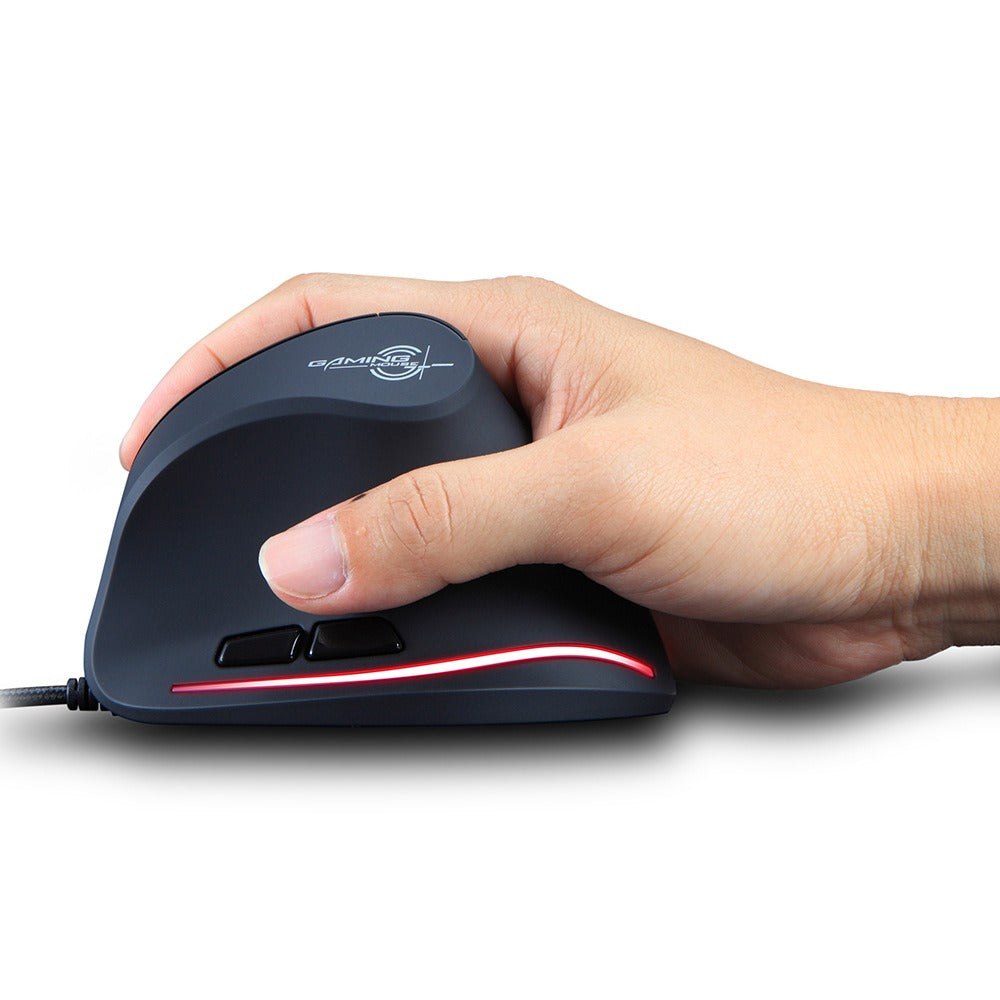


Your hand rests in a handshake position, so your wrist stops fighting a flat mouse through the afternoon. The T20 pairs a sculpted palm rest with a vertical grip, thumb-side buttons and a braided wired cable. It plugs in and works at any desk, for office work and long gaming sessions alike.
Read the full descriptionYour hand rests in a handshake position, so your wrist stops fighting a flat mouse through the afternoon. The T20 pairs a sculpted palm rest with a vertical grip, thumb-side buttons and a braided wired cable. It plugs in and works at any desk, for office work and long gaming sessions alike.
Vertical ergonomic design for a more natural, handshake-style wrist position
A flat mouse twists your forearm hour after hour. The T20 holds your hand in a natural handshake position, so your desk day feels less like a fight.

The vertical body turns the hand into a handshake position instead of the palm-down twist of a flat mouse. Your forearm sits closer to neutral, and the sculpted palm rest carries the weight of the hand so the fingers do not have to clamp down. Shoppers comparing an upright option with a regular wired model will notice the difference on the first long task.

Two thumb-side buttons sit where the thumb already rests, and the scroll wheel with its DPI button on top is within reach of the index finger. Common actions stay in place, so you do not need to stretch for them. Gamers can map their most-used keys to the thumb side and keep the hand in the same spot through a whole session.
The braided USB cable feels sturdier than a standard rubber lead and lies flat on the desk without much tangling. It is a wired plug-and-play connection, so there is nothing to charge and no battery to swap between sessions.
Connect the braided USB cable to a free port. The mouse works straight away with no driver or charging step.
Let your palm settle on the sculpted rest, with the hand in a handshake angle. Keep the grip light so the body of the mouse supports the hand.
Slide the mouse with your forearm and elbow, keeping the wrist close to neutral. Dragging with only the wrist loads the joint.
Shake out the hand and reset the posture every 45 minutes. Short breaks do more for the forearm than a long stretch at the end of the day.

By mid-afternoon the wrist tightens and the forearm starts to feel heavy. A flat mouse keeps your palm pressed down and your forearm rotated, so every click and every slow drag adds a little more load. Stretching helps for a minute. The position itself stays the same.
A flat mouse asks the forearm to pronate, turning the palm down toward the desk. Wrist rests and new keyboards leave that angle untouched. The discomfort returns the next morning, and it follows you into the evening gaming session.
The T20 sits in your palm at the handshake angle, with the sculpted rest taking the weight of your hand. Your forearm stays closer to neutral and your grip can stay light. Move the mouse from the elbow and the day gets quieter in the wrist.
The grip will feel odd for the first session. Keep sessions short and move the mouse with your whole forearm.
The handshake angle becomes more familiar after a few sessions. Keep your elbow close to your side and check your posture.
Over a month of daily use, most people settle into the vertical grip. If pain persists, see a professional.
| T20 Vertical | Standard flat mouse | |
|---|---|---|
| Hand and forearm angle | Handshake angle | Palm-down, forearm twisted |
| Sculpted palm rest | Varies by model | |
| Thumb-side buttons | 2 | Varies by model |
| LED strip colour options | Red, blue, purple, pink | Varies by model |
Expect the first session to feel odd. Your hand is learning a new angle, so keep early sessions short and move from the elbow instead of the wrist. Most people find the handshake grip familiar after a few sessions, and the position feels settled after about a month of daily use.
The sculpted palm rest is built for a full palm, so the hand should rest on it rather than grip the body. People with very small hands may need to reposition more often. If you already sit with your palm resting and your fingers relaxed, the fit tends to feel natural.
Yes. The two thumb-side buttons and the scroll wheel with DPI button sit within reach of the vertical grip, so you can play without lifting the hand. Keep your grip light during matches. Gamers who prefer a different wired model can also browse the wired mouse computer range.
It is a wired USB mouse with a braided cable. Braiding resists kinks better than a plain rubber lead and keeps the cable flat on the desk. It plugs in and works without any software setup.
Many people keep the flat mouse for precision tasks such as detailed drafting, and use the T20 for the bulk of their day. Alternating the two during the first week is a sensible way to switch without shocking the forearm. Over a full work year, a mouse that keeps your wrist out of a twisted position is a small change with a large daily payoff.
The value comes from daily use. You feel the difference on every hour of desk work, and the premium materials, soft-touch matte body and braided cable are built for that repeated handling. Compared with recurring wrist rests and physio visits that only mask the problem, one mouse that changes the posture is the cheaper path.


 Vertical Ergonomic Wired Mouse for Wrist Strain Relief