
$109.90
Free delivery · 7–14 days
Live Sound Card Mixer for Podcasts, Streams & Karaoke



The SC3 turns your desk into a balanced live setup. Slide four faders to set mic, game and music by feel, tap one of six voice effects, and let the RGB lighting match the stream.
Read the full descriptionThe SC3 turns your desk into a balanced live setup. Slide four faders to set mic, game and music by feel, tap one of six voice effects, and let the RGB lighting match the stream.
All-in-one live streaming audio kit with voice effects, RGB control and individual volume mixing
Stop wrestling levels mid-match. Plug in one kit, slide your faders, and go live with a clean, playful sound that keeps viewers watching.

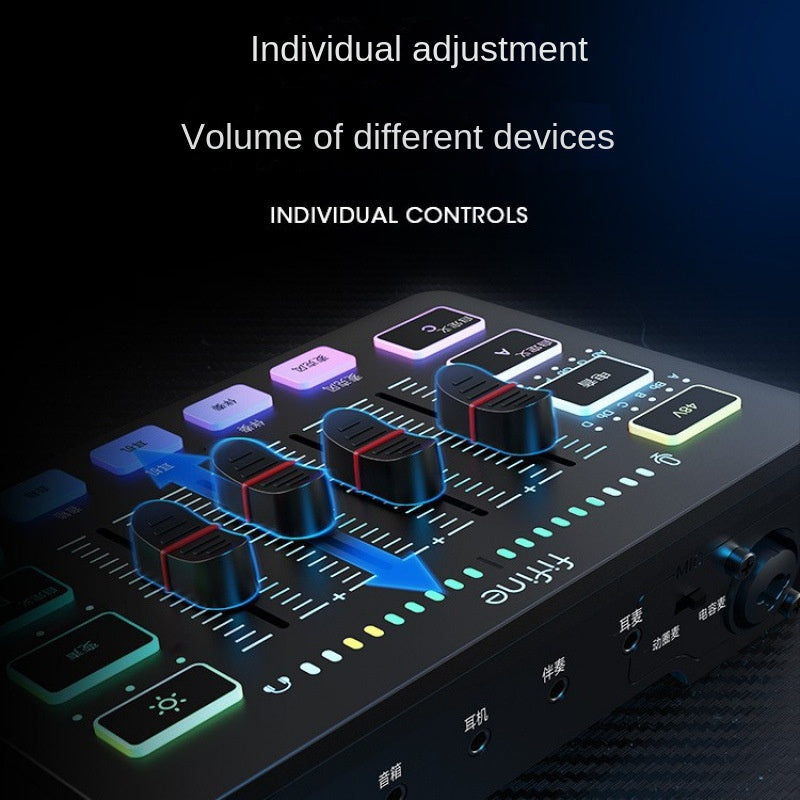
Each fader handles one source, so the mic, the game and the music each get their own level. Push the mic fader up, pull the game down, and your voice sits on top without opening a single menu. The gain and monitor knobs on the mic body handle the input side, so you can set the level once and stop chasing it through the match.

Six voice-change buttons sit in a row on the mixer, each one a sound effect or voice change that works without extra software. Custom keys A, B, C and D sit next to them for the sounds you reach for most. A tap lands the joke, and a second tap brings your normal voice back.

The mixer and the mic base both light up, with five RGB modes and more than eight lamp effects. Switch the look from the mixer, and the desk matches the stream on screen. The ring light on the phone holder adds a face-cam light for vertical clips.
Run the USB cable from the mic and mixer to your PC or phone. Power the RGB and the mixer lights up.
Speak at your normal distance and volume, then turn the gain knob on the mic body until your voice reads clearly on the level meter.
Raise the mic fader, then bring the game and music faders down until your voice sits clearly on top.
Tap a voice-change button to try an effect, then switch the RGB mode from the mixer to match the stream.
USB condenser-style mic with foam windscreen and RGB light ring on the base.
Four channel faders, six voice-change buttons, custom keys and RGB lighting.
Clips to a phone for face-cam shots and vertical clips.
| SC3 kit | Separate mic, interface and mixer | |
|---|---|---|
| Mic, mixer and voice effects in one box | — | |
| Hardware faders for mic, game and music | — | |
| Phone holder and ring light included | — | |
| Software mixer needed for live levels | — | |
| Separate cables and parts to connect | — |
The packaging lists the kit for mobile phones and computers, and the phone holder with ring light is in the box, so talking-head clips and desk streams both work. Plug the USB cable into the device you stream from and pick it as the input in your app.
For streaming, podcasts and singing covers, yes. It is a full-size desktop condenser-style mic with a foam windscreen, a gain knob and a monitor knob. A dedicated studio mic will sound more detailed, but you would still need a mixer and an interface to match what this kit already does in one box.
It is a multi-function sound card with four channel faders, gain and monitor controls, a headphone jack, a monitor jack and 48V phantom power. The RGB is a bonus on top of a working mixer, not the main feature.
The six voice-change buttons sit on the mixer itself, so you can switch effects without opening a software panel. Set your input to the kit in your streaming app and the effects run from the hardware.
Phantom power sends 48 volts down the mic cable to power condenser mics. Turn it on for a condenser mic that needs it, and switch it off before you unplug anything or connect a dynamic mic.
Yes. Podcasts use the gain and monitor knobs for clean vocal levels, and karaoke nights use the music fader to sit the track under your voice. Keep the effects off for a natural voice and switch them on for the party mood. If you want a dedicated karaoke setup, the singing machine karaoke machine range is a separate option.


 USB Streaming Mic Kit with Mixer and Voice Effects