
$54.90
Free delivery · 7–14 days
MMCX earphone cable with Inline Volume and Call Control
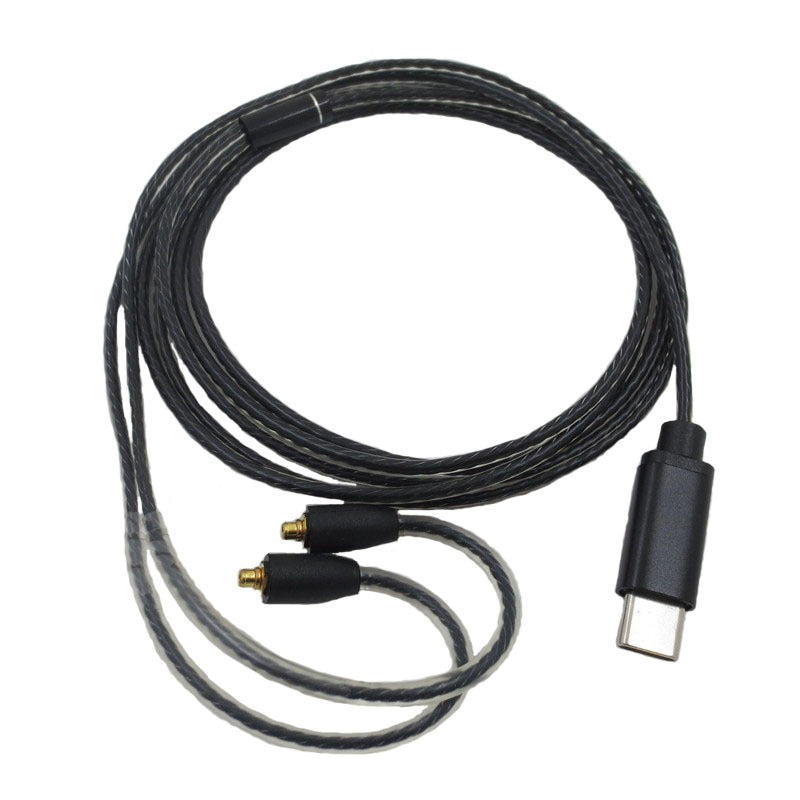


Your MMCX earphones already sound good. This USB-C cable plugs them straight into your phone or laptop, with an inline mic and button for calls and playback. No dongle, no fumbling on the train.
Read the full descriptionYour MMCX earphones already sound good. This USB-C cable plugs them straight into your phone or laptop, with an inline mic and button for calls and playback. No dongle, no fumbling on the train.
Plug-and-play USB-C audio for MMCX earphones with built-in mic and controls
Tired of dongles and calls that cut out on a bare cable? Connect your MMCX earphones straight to USB-C and get a built-in mic and controls on the go.

The USB-C plug goes straight into your phone, tablet or laptop, so there is no 3.5mm adapter to carry or lose. Keep the plug in your pocket and the cable does the rest. If you still own gear that needs a headphone jack adapter, that is a separate job; this cable skips that step entirely.

The inline mic sits on the cable, closer to your mouth than a phone in a bag. The button answers and ends calls and handles play and pause. Clear speech and one-press control mean you stop reaching for the screen every time a call comes in.

Gold-plated MMCX pins sit inside each connector, and strain relief at both connectors and the plug takes the stress of daily pulling. The braided cable runs under a clear sheath, so the build is visible. The result is a tight fit that holds through a long week of commutes.
Line each connector up with the socket on your earphones and press straight in until it clicks.
Use a port that carries audio. Your phone or laptop should recognise the headset as soon as the plug seats.
Press once to play or pause. Use the same button to answer or end a call when the phone rings.
Your phone has no 3.5mm jack, so the dongle comes out on every commute. It is one more small part to lose, and it still leaves you with a bare cable that has no mic. Each call means digging the phone out of your pocket while the train rattles on.
One USB-C plug handles music, the microphone and the controls. The inline button pauses a track or answers a call without touching the phone. There is no adapter in the chain, so the cable is the whole setup.

Picture the train pulling in while your phone stays in your pocket. You press the inline button, say what you need to say, and the earphones stay seated because the MMCX connectors click in firmly. The call ends and the music picks up where it left off.
Connect the MMCX ends to your earphones, then the USB-C plug to your phone or laptop. Music should start without a dongle.
After a few commutes you can answer and end calls with the inline button without looking at your phone.
With regular use the cable becomes the default. Check the connectors now and then to keep the fit firm.
Hold the plug or the connector housing and pull straight out. Pulling on the wire stresses the braid and loosens the MMCX fit over time.
Align each MMCX connector with the socket and press straight in. An angled push can scratch the gold plating.
Use a dry cloth on the gold-plated pins to keep the contact clean.
Loose rings take the strain off the braid and the strain relief at each end.
| This cable | USB-C to 3.5mm dongle | Bare MMCX cable | |
|---|---|---|---|
| Built-in microphone | Yes | No | No |
| Inline call controls | Yes | No | No |
| Extra adapter needed | No | Yes | Varies |
| Braided cable with clear sheath | Yes | Varies | Varies |
Yes. The MMCX ends are built for Shure SE215 and SE535 earphones. Line the connector up with the earphone socket and press straight in until it clicks.
Yes, the USB-C plug connects straight to a USB-C device. Use a port that carries audio, because some charge-only ports will not send sound or the mic signal.
Yes. The inline mic sits on the cable, so your voice reaches the call without a separate headset. The inline button handles calls and playback.
A dongle is one more small part to lose, and it has no microphone or controls. This cable is a single piece with both built in, so there is one connection point instead of two.
You are paying for gold-plated MMCX pins, a braided cable under a clear sheath, a metal-look USB-C housing and strain relief at both ends. A basic cable has no mic or controls, so you would still need a separate headset for calls and a dongle you will likely replace sooner.


 USB-C MMCX Earphone Cable with Mic and Inline Controls