
$109.90
Free delivery · 7–14 days
Wireless Mouse for 4 Devices: Bluetooth + 2.4G Switch





Your older stereo, TV or speaker already has a 3.5mm jack. This USB adapter gives it Bluetooth 5.0, so music streams from your phone with no cable to untangle. One button switches between receiver and transmitter, and no driver is needed.
Read the full descriptionYour older stereo, TV or speaker already has a 3.5mm jack. This USB adapter gives it Bluetooth 5.0, so music streams from your phone with no cable to untangle. One button switches between receiver and transmitter, and no driver is needed.
4-in-1 Bluetooth 5.0 adapter: turn any AUX device wireless as receiver or transmitter
Your stereo and TV still have a plain 3.5mm jack and no Bluetooth. This small USB adapter adds it, so you stop managing cables and just press play.

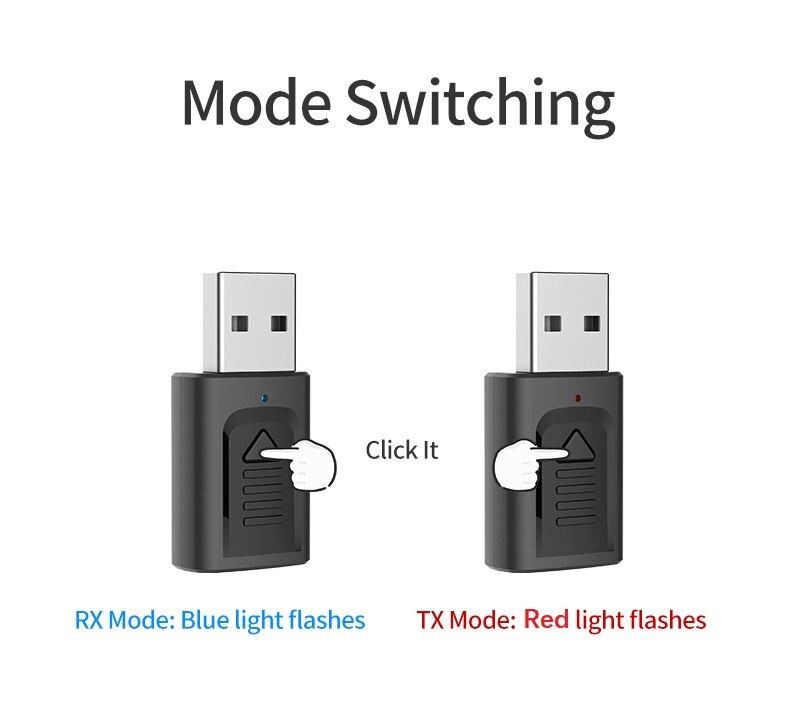
Press the switch button to move between RX and TX. RX sends phone audio into your stereo or speaker and the blue light flashes. TX sends audio out from the device on the AUX jack and the red light flashes. One switch covers both directions, so you never need a second gadget.

The silver USB-A plug takes its power from any USB port, whether that is a car charger socket or a wall adapter. There is no driver to install and no app to set up. Plug it in, connect the 3.5mm end to the AUX jack, and the adapter is ready to pair.

The adapter runs Bluetooth 5.0, so your phone pairs once and reconnects on later trips. The body measures 20 mm wide, 45 mm tall and 11 mm deep, small enough to leave plugged in behind the stereo or beside the TV.
Push the silver USB-A plug into a car USB port or a wall adapter. The LED lights up to confirm power.
Press the switch button. Blue flashing means RX, for playing phone audio through your stereo or speaker. Red flashing means TX, for sending audio to wireless headphones.
Push the 3.5mm plug fully into the AUX port on the stereo, TV or speaker. A snug fit avoids crackling.
Turn on Bluetooth on your phone, select the adapter from the list and start playing a track. The pairing usually takes about a minute.
A compact body that sits behind a stereo or beside a TV without taking up room
Yes, if the stereo has a 3.5mm AUX input. The adapter plugs into that jack and adds Bluetooth without touching the head unit. Stereos with only a cassette deck, CD-only players with no AUX jack, or units with no line input are not a match.
Not directly. The adapter uses a 3.5mm AUX connector, so the TV needs a 3.5mm headphone or AUX output. If your TV has only optical or RCA, a 3.5mm converter is needed first.
No. The packaging lists it as plug and play with no driver needed. Plug the USB end into power, connect the AUX cable, choose the mode and pair from your phone's Bluetooth menu.
An FM transmitter broadcasts on a radio frequency, so you have to find a clear station and deal with static. This adapter sends a Bluetooth signal straight to the AUX jack, with no station to tune. It is a far cheaper fix than replacing a stereo that already works.
Press the switch button. The blue light flashes in RX mode, which receives audio from your phone. The red light flashes in TX mode, which sends audio out to wireless headphones or another Bluetooth device.


 USB Bluetooth 5.0 Adapter: Wireless Audio for Car & TV