
$74.90
Free delivery · 7–14 days
Android 7.1 Smart TV Box with 4K H.265 Decoding Player



Your living room TV can stream 4K HDR without the stutter. This compact Android 8.1 box brings 4GB RAM, 64GB storage and H.265 hardware decoding to the set you already own. Movies, series and sports open faster, and your apps stay put.
Read the full descriptionYour living room TV can stream 4K HDR without the stutter. This compact Android 8.1 box brings 4GB RAM, 64GB storage and H.265 hardware decoding to the set you already own. Movies, series and sports open faster, and your apps stay put.
4K HDR streaming on a 4GB RAM, 64GB storage Android 8.1 TV box
Tired of stuttering apps and full-storage warnings on the TV you already own? This compact Android box with 4GB RAM and 64GB storage makes it feel modern again.

The RK3328 quad-core chip decodes H.265 in hardware, so 4K video plays without the processor straining. The box outputs 4K at 60fps, which keeps fast action on live sports clean. Your TV still has to accept that signal, so check its input specs first.

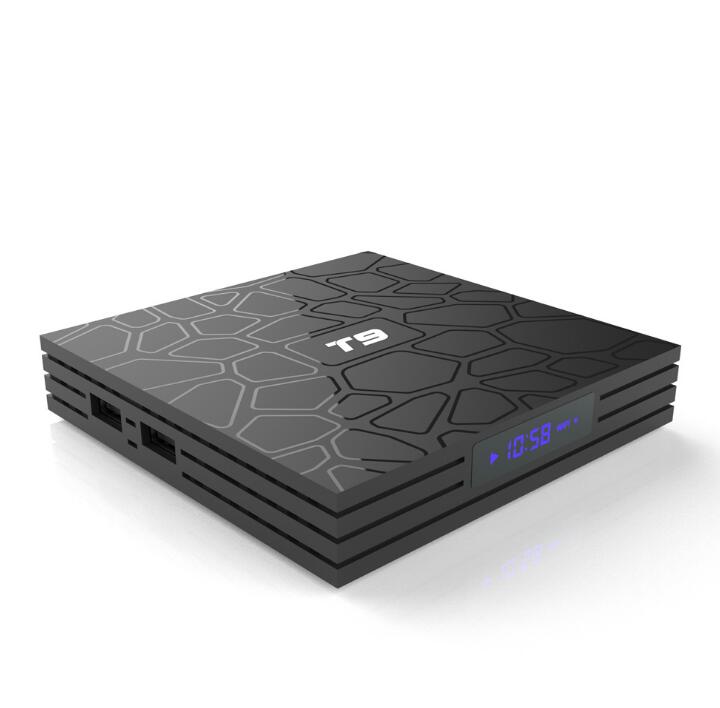
4GB RAM keeps several apps ready at once, and 64GB of eMMC storage gives your app library room to grow. Full-storage warnings stop being a monthly chore. The matte black shell with its cracked-stone top sits neatly under a TV.

The box supports 2.4GHz and 5GHz WiFi, so you can pick the less crowded band. Bluetooth 4.0 handles a remote or speaker on the same setup, and two USB 3.0 ports on the front edge take a drive or dongle. If the router sits far from the TV, a wifi signal booster closes the gap.
Plug the box into an HDMI input on your TV and connect the power supply. The blue LED clock lights up when the box starts.
Pick the 5GHz network if your router offers it. Keep the box within easy range of the router for a steady connection.
Choose 1080p first, then step up to 4K once the picture holds steady on your TV.
Log in to your streaming apps once. They stay installed and open faster after a few sessions.

Movie night starts with a spinning wheel. The TV has a decent screen, but apps take their time to open, stall mid-scene and crash when storage fills up. By the third pause, the set feels older than it is.

This compact Android TV box with 4GB RAM and 64GB storage sits beside the TV you already own and takes over the streaming. Apps stay installed, and the processor has room to run them. You keep the screen and swap out the brains.

Same couch, same remote habits, better picture. The RK3328 chip decodes H.265 in hardware and outputs 4K at 60fps, so films and live sports run smoother. Your usual apps are waiting on the home screen when you sit down.
| This box | Cheap 1GB stick | Built-in TV apps | |
|---|---|---|---|
| RAM for running apps | 4GB | Limited | Varies by TV |
| Storage for apps | 64GB | Limited | Varies by TV |
| 4K output at 60fps | Partial | Partial | |
| H.265 hardware decoding | Partial | Varies by TV | |
| Dual-band WiFi | Partial | Varies by TV |
Start the box at 1080p in the display settings, then step up to 4K once the picture holds steady. The 4K 60fps output only shows on a TV that accepts that signal, so check your TV's input specs before you buy.
You need a 4K-capable panel to see the 4K output at full detail, and HDR shows only on sets that support it. On a 1080p screen the box still runs apps faster and plays smoother thanks to the 4GB RAM, but the picture tops out at 1080p.
Android 8.1 runs the major streaming apps. The 4GB RAM and 64GB storage leave room for several at once, so they stay installed and open faster. Check each app's minimum Android version before you install it.
The box connects over 2.4GHz or 5GHz WiFi with Bluetooth 4.0 and runs Android 8.1. Change the default passwords on your router and the box, and keep the box updated like any other connected device on your network.
A new 4K TV costs far more than this box, and the screen you own may still look good. If the panel works and only the apps lag, upgrading the streaming box is the cheaper fix. The 64GB storage also holds a large app library as your streaming habits grow.


 Android TV Box 4K HDR with 4GB RAM and 64GB Storage