
$38.90
Free delivery · 7–14 days
2.5 Inch Portable HDD Case: Hard-Shell Drive Protection

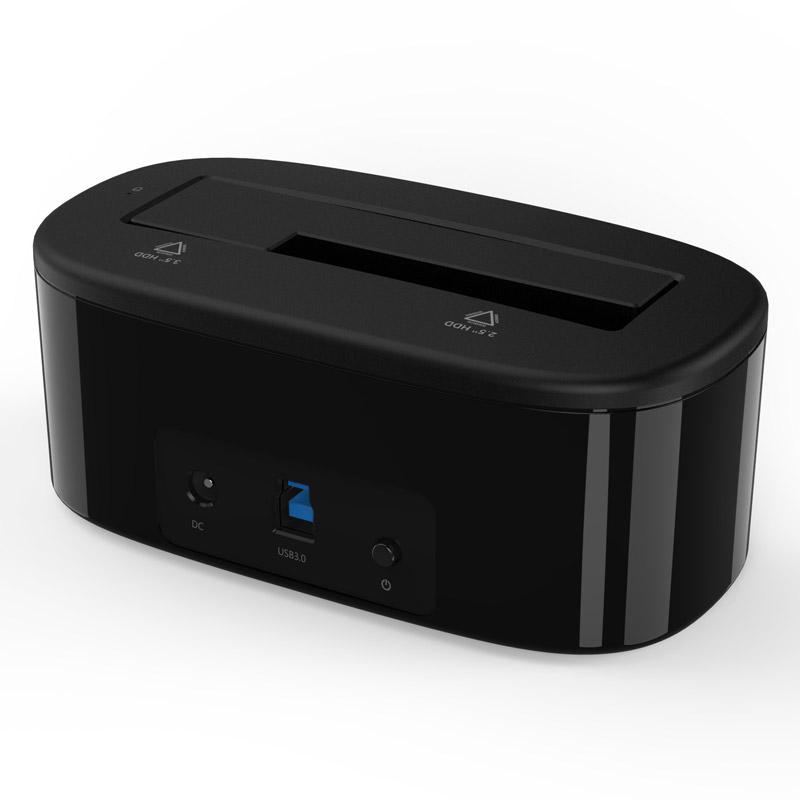


Dock a bare 2.5 or 3.5 inch drive in seconds and work on it from your desk. The tool-free slot takes both sizes up to 8TB, and USB 3.0 at 5Gbps moves backups and clones without opening a PC case.
Read the full descriptionDock a bare 2.5 or 3.5 inch drive in seconds and work on it from your desk. The tool-free slot takes both sizes up to 8TB, and USB 3.0 at 5Gbps moves backups and clones without opening a PC case.
Plug in and access 2.5 or 3.5 inch hard drives up to 8TB at 5Gbps over USB 3.0
Before, every bare drive meant opening a tower or hunting for the right enclosure. After, you drop a 2.5 or 3.5 inch drive into one compact dock on your desk and back up, migrate or clone at 5Gbps.

Seat the drive by hand and line it up with the 2.5 or 3.5 inch alignment markings on the top tray. No screws, no bracket, no adapter to hunt for. The same dock that holds a laptop drive also takes a desktop-size disk, which means one device covers the drives you already have.

USB 3.0 runs at 5Gbps and the dock supports UASP, which is the protocol that lets large files move with less overhead than older USB 2.0 links. It handles drives up to 8TB, so a full archive copies from the desk in one session.

A status LED lights when the dock is powered and the drive is connected. Check the light before you start a copy or clone, so you know the computer sees the disk. The footprint is compact at 142mm long, so it fits beside a laptop without taking over the desk.
With the dock powered off, match your drive to the 2.5 or 3.5 inch markings on the top tray and press it down flat until it sits square.
Plug the DC power input and the USB 3.0 cable into your computer, then press the power button on the front.
When the LED lights and your computer shows the drive, copy, migrate or clone your files. Eject the drive in your operating system before you power off the dock or remove it.
Yes. The top tray has a tool-free slot with alignment markings for each size. Seat the drive flat on the matching markings and you do not need a screwdriver or a bracket.
The dock supports UASP, the protocol that speeds up transfers over USB 3.0. Most current computers detect the drive without extra software, so you can start copying right away.
USB 3.0 runs at 5Gbps, which is a large step up from USB 2.0 for big folders and full-drive clones. Your drive's own speed sets the real ceiling, so an older spinning disk will transfer below the link maximum.
Yes, the dock supports drives up to 8TB. Larger archives copy in one session without splitting the job across several enclosures.
Work on the drive the same way you would in a PC. Eject it in your operating system before you remove it or power off the dock, and check the LED before you start. Keep a second copy of anything irreplaceable.
A single-bay enclosure locks you to one drive size and sits on your desk as a separate box for each disk. This dock takes both 2.5 and 3.5 inch drives in one slot, so one device covers the drives you already own. At a glossy black footprint of 142mm long, it costs less desk space than a pile of enclosures.


 USB 3.0 Hard Drive Docking Station for 2.5 and 3.5 Inch