
$49.90
Free delivery · 7–14 days
Flat Tangle-Free Charging Cable for Logitech UE BOOM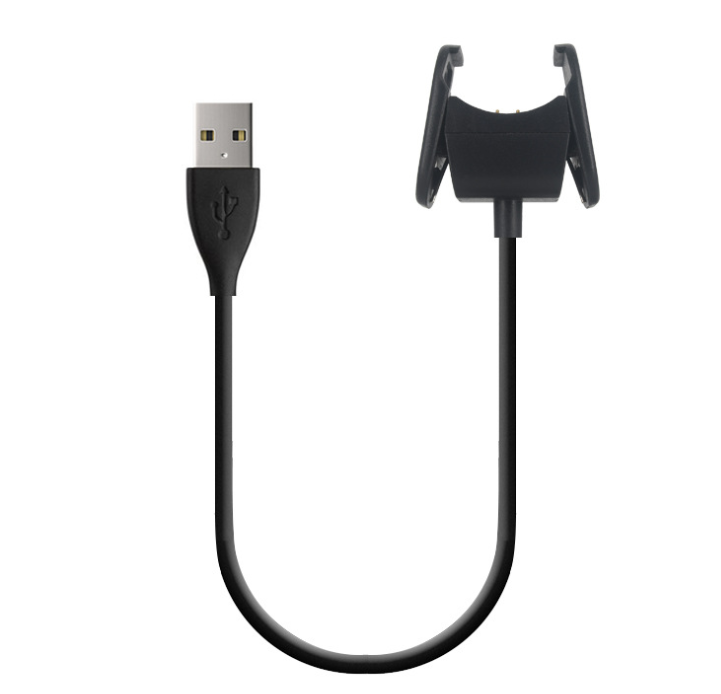


Your Mi Band charges with the strap still buckled. A matte black cradle clips onto the band, a 30 cm cable runs to any USB-A port, and the band starts the day charged. Keep one by the bed and one in the bag.
Read the full descriptionYour Mi Band charges with the strap still buckled. A matte black cradle clips onto the band, a 30 cm cable runs to any USB-A port, and the band starts the day charged. Keep one by the bed and one in the bag.
Fast, secure charging for your Mi Band without removing the strap
Clip the cradle onto the band, plug into any USB-A port, and let it top up with the strap still on. Keep a spare by the bed and a flat band stops being a morning problem.
Line up the two pins with the band's contacts, press until the cradle sits flat, and the charge starts. The strap never comes off, so there is no buckle to fight at night or in a rush before a workout.
The cradle carries two gold-plated pins, which keeps the contact surface clean and the connection steady. A quick wipe with a dry cloth now and then is all the upkeep they need.
The cable runs 30 cm from the cradle to the plug, enough to reach a bedside adapter or a desk port without stretching it tight. The strain relief is rounded where the wire meets the cradle, so it bends at the join instead of at a sharp point. For more tidy setups, see cable organizers.
Wipe the band's charging contacts and the two pins on the cradle with a dry cloth. Dust and sweat can interrupt the connection.
Keep the strap buckled. Line both pins up with the band's contacts and press until the cradle sits flat, not at an angle.
Connect the USB-A plug to a bedside adapter, laptop or wall port. The band starts charging, and you unclip it in the morning.

You reach for the band in the morning and the screen is dark. The original charger is in a drawer somewhere, or it is gone for good. So you dig through the cable tangle, pull the strap off, and hope the contacts line up. Every top-up becomes a small chore you would rather skip.

The cradle clips straight onto the band's charging back, so the strap stays buckled on your wrist. Plug the 30 cm cable into a USB-A adapter by the bed or a laptop on the desk and the band starts charging. Clipping on takes a couple of seconds, and the band is ready by morning. Keep a second cable in the bag and the trip is covered too.
Attach the cradle to the band's charging contacts with the strap still on and plug into any USB-A port. Charging starts without removing the strap.
Keeping the cable at the bedside makes overnight charging a habit. The band starts the day with a charge instead of a warning.
The cable lives on the nightstand or desk, so a missing original charger stops being a reason the band goes flat. Check the contacts now and then for dust.
A dry cloth on the pins and band contacts keeps the connection steady.
Grip the cradle or the plug housing when you unplug, so the strain relief stays intact.
Press the cradle on flat. A skewed clip may not seat both pins.
Loop the cable loosely by the bed or in a bag rather than wrapping it tight around the cradle.
| This cable | Original Xiaomi cable | Unbranded cable | |
|---|---|---|---|
| Charges with strap on | — | — | |
| Clip-on cradle | — | Varies | |
| Gold-plated contacts | Varies | Varies | |
| Standard USB-A plug |
The cradle is built for the charging back of the Mi Band 2, 3 and 4, and the listing names all three. Check your band's model before ordering. Mi Band 1, 5 and 6 are not part of this listing, so this cable is not the match for those models.
It is a plain matte black cable with a flexible wire, a rounded strain relief and gold-plated pins. It feels like a basic tool, not a luxury accessory. Grip the plug when you unplug, keep the contacts clean, and it stays a dependable spare at the bedside or desk.
The official cable is the safe default if you still have one. This cable does the same daily job: a clip-on cradle, a standard USB-A plug and a 30 cm line. The real difference is cost and availability. A spare that costs little means a lost original stops being a reason the band goes flat.
Yes. The plug is standard USB-A, so any USB-A wall adapter, laptop port or power bank with a USB-A output will take it. You do not need a special adapter.
A second cable for the desk or the bag costs less than one day with a dead band. Once a spare sits by the bed, the band keeps charging on schedule while the original is still lost in a drawer.


 Mi Band 4 Charging Cable for Xiaomi Mi Band 2, 3, 4