
$59.90
Free delivery · 7–14 days
Phone to TV HDMI Cable, Plug and Play Screen Mirroring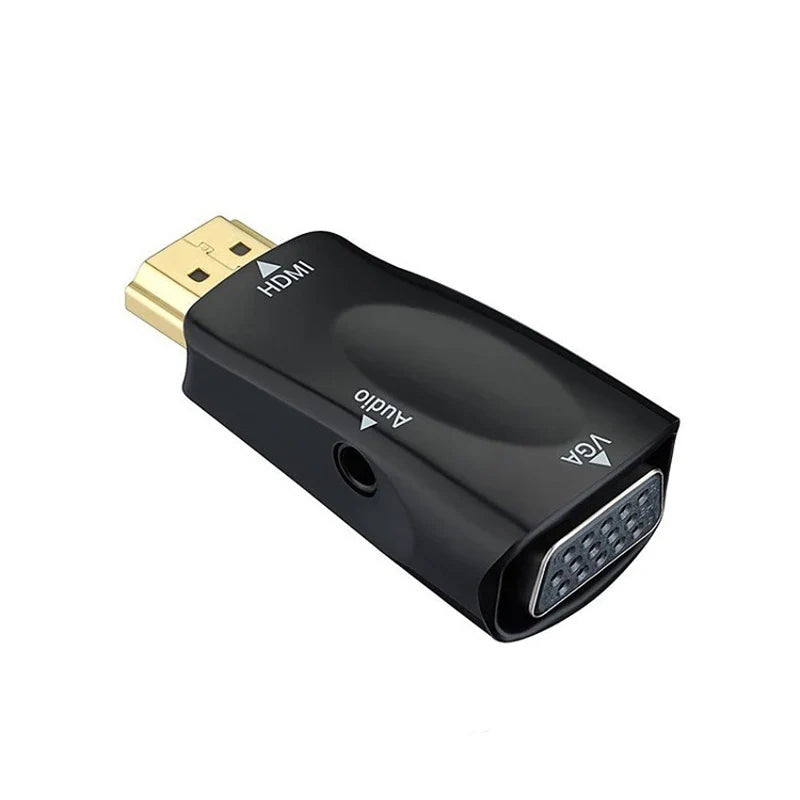


Connect an HDMI laptop, PC or TV box to a VGA monitor or projector with one compact plug-in adapter. The 3.5mm jack sends audio out for screens without speakers, so you can present without hunting for a converter box.
Read the full descriptionConnect an HDMI laptop, PC or TV box to a VGA monitor or projector with one compact plug-in adapter. The 3.5mm jack sends audio out for screens without speakers, so you can present without hunting for a converter box.
Connect an HDMI source to a VGA display with a compact adapter that also carries audio out
Before: an HDMI laptop and a VGA-only projector mean a last-minute hunt for a converter box. After: a small plug-in adapter, a 3.5mm audio jack and a presentation that starts on time.

The HDMI male plug sits on one end and the VGA 15-pin female port sits on the other, both in one moulded body. The adapter sits right at the source, so the only loose cable is the run to the screen. The port labels are clear, so you can confirm the connection before the room fills up.

The 3.5mm jack is an audio output. Plug external speakers into it and the sound follows the picture on a VGA display that has none of its own. The jack sends audio out only, so keep the source volume up and point the speakers at the room.

The HDMI contacts are gold-plated and the VGA terminal is nickel plated, both listed on the packaging. Clean metal contacts keep the connection stable each time you plug in and unplug between rooms.
Connect the HDMI male plug to the HDMI output on your laptop, PC, TV box or set-top box.
Attach a VGA cable to the 15-pin female port on the adapter and connect the other end to the monitor or projector input.
Choose the external display in your system settings, then plug speakers into the 3.5mm jack if the screen has no sound of its own.

You arrive with the slides ready and the start time close. The projector in the corner takes a VGA cable, and your laptop only has an HDMI port. Nothing shows on the screen, and the room is already waiting. Every minute spent searching for a converter is a minute the audience spends watching you fix a cable.

The adapter takes an HDMI male plug on one end and gives you a 15-pin VGA female port on the other. The 3.5mm jack on the side handles audio out, so a VGA screen with no speakers can still play sound through external speakers. One small body does the job that used to need a box, a power point and a second cable.

Plug the HDMI end into your source, run the VGA cable to the screen, and pick the external display. Set the resolution to 1080P, or drop to 720P or 480P if the picture looks unstable. The adapter fits in a jacket pocket, so the next VGA room is no longer a problem you solve on the day.
Slightly shorter than an AA battery
| This adapter | Converter box | Bare adapter + audio cable | |
|---|---|---|---|
| Plugs straight into the HDMI source | Yes | Yes | Yes |
| Audio jack built into the unit | Yes | No | No |
| Needs a separate power supply | No | Yes | No |
| Needs a second audio cable | No | Yes | Yes |
| Pocket-sized body | Yes | No | Partial |
It works when your source has an HDMI output and your screen has a VGA input. Laptops with only a USB-C port need that port to carry HDMI video, so confirm that before you buy. TV boxes and set-top boxes with an HDMI output connect directly.
The adapter supports 1080P, 720P and 480P. Start at 1080P. If the older monitor shows a blank or distorted picture, drop the source to 720P or 480P. Older VGA screens often look sharpest at the lower settings.
Yes. It sends audio out to external speakers, so it is useful for a VGA screen with no speakers. It does not take audio in. Keep the source volume up and connect the speakers to the jack.
A converter box with its own power supply and a separate audio cable adds two more things to carry and plug in. This adapter replaces that setup with one small body, so a single purchase covers every VGA room you present in.
Yes. Connect your laptop to the adapter, run the VGA cable to the projector, and pick the external display before the session. Teachers can add speakers to the 3.5mm jack for video with sound.


 HDMI to VGA Adapter with Audio Output for Older Displays