
$36.90
Free delivery · 7–14 days
Reading Girl Resin Sculpture for Shelf & Tabletop Decor




Stop retyping passages line by line. Pass the pen over a printed page and the words land on your laptop as editable text, ready to edit, translate or drop into Excel. Built for students, language learners and anyone who handles printed documents each week.
Read the full descriptionStop retyping passages line by line. Pass the pen over a printed page and the words land on your laptop as editable text, ready to edit, translate or drop into Excel. Built for students, language learners and anyone who handles printed documents each week.
Scan printed text and translate or digitise it instantly in over 20 languages
Stop copying passages by hand or stalling on foreign-language pages. Glide the pen across printed text and get editable words on your laptop, with translation in over 20 languages.

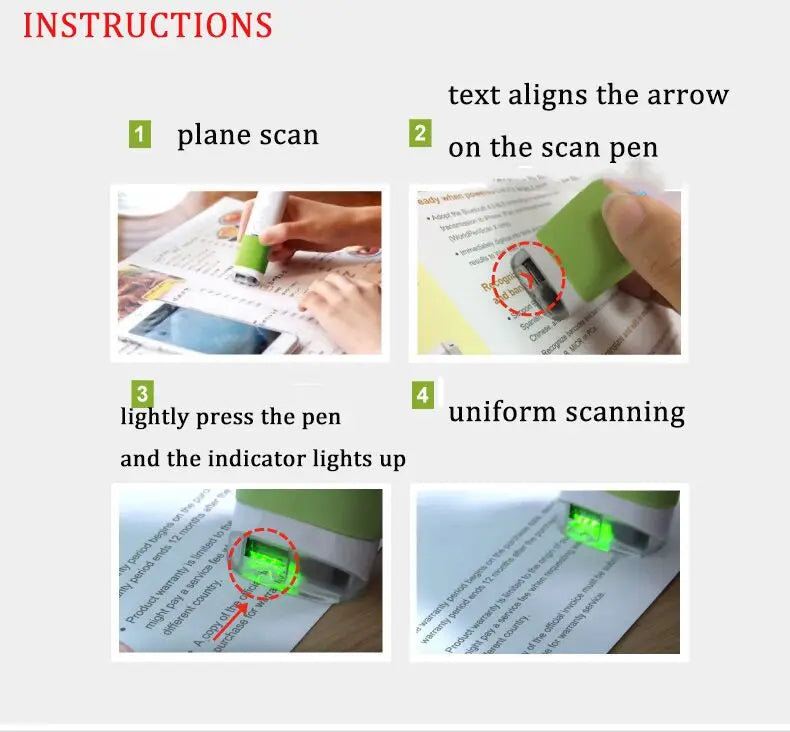
Place the pen flat on the text, align the arrow with the line and press lightly. The indicator lights up when the pen is ready, then you move at an even speed. Flat, aligned passes return clean, editable text, and that is the whole trick. Heavy pressure does nothing for the scanning window, so keep the touch light.

Recognition covers more than 20 languages, including English, Japanese, German, French, Arabic and Chinese. The scanned output can be translated, so a foreign-language handout becomes readable in your own language without a separate copy and paste step.

Scanned text lands in Word, Excel, PowerPoint and Outlook. For data entry, scan a row of figures from a printed report straight into a cell instead of typing each one. The pen connects to the laptop with a simple USB cable.
Plug the USB cable into your laptop and attach the other end to the pen. Open Word or Excel so the scanned text has somewhere to land.
Place the pen flat on the printed text so the scanning window sits on the line.
Line up the arrow on the pen with the text line, then press lightly until the indicator lights up.
Move along the line at a steady pace with no jerky strokes. Check the text on screen before you move to the next line.
A paragraph from a book or handout, copied by hand one line at a time. Every line takes attention, and every line is another chance for a typo. When a deadline is close, the evening disappears into the keyboard, and a page in a foreign language stays unreadable until someone else translates it.
Lay the pen flat, line up the arrow with the text and move at a steady pace. The line lands on your laptop as editable words, and the same scan can run through translation in more than 20 languages. The passage ends up in your own document without a single keystroke.
Connect the USB cable, open Word or Excel, press the pen lightly over a printed line and move at a steady speed. The scanned text should appear as editable words.
By the third session you know how to line up the arrow with the text and keep the pen moving evenly, which tends to give cleaner results.
After a month of study or office work, the pen is the default way to capture passages and short data instead of typing them out.
| Scan pen | Phone OCR app | Manual typing | |
|---|---|---|---|
| Scans straight into a laptop over USB | Yes | No | No |
| Needs camera framing and steady light | No | Yes | No |
| Separate step to move text to a computer | No | Yes | No |
| Typing needed before translation | No | No | Yes |
Yes. The pen sends scanned text to Word, Excel, PowerPoint and Outlook over its USB cable. Open the document first, then scan, and the words appear where your cursor sits.
The package lists a USB cable and Office compatibility, and no companion app is mentioned. Follow the included instructions for any setup step, then start with a test line in Word before a longer session.
More than 20, including English, Japanese, German, French, Arabic and Chinese. Try a passage from your own book first, since small print and glossy pages are the real test for any pen scanner.
Measure it in minutes per page. A phone app still needs framing, good light and a separate step to move text to a computer. The pen turns that into one pass built from premium materials. If it saves you one evening of copying, it has paid for itself. Keep the USB lead tidy with a set of cable organizers on a busy desk.
Flat contact matters most. On a thick book, press the spine gently so the line sits flat under the scanning window, then scan along that line.


 Handheld Text Scanner Pen with 20+ Language Translation