
$37.90
Free delivery · 7–14 days
USB 3.0 Extension Cable for Gaming Controllers and Backups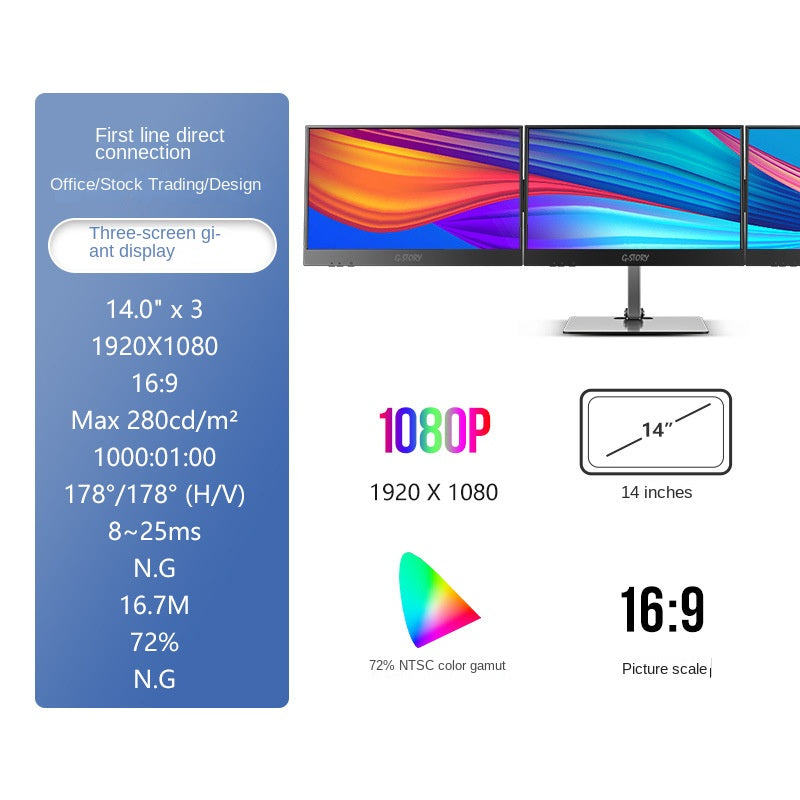


Stop juggling windows on one small laptop screen. This G-STORY kit tiles three or four panels into one wide desk, so charts, feeds and documents stay in view while you work. The stand adjusts to eye level and the portable model takes the setup on the road.
Read the full descriptionStop juggling windows on one small laptop screen. This G-STORY kit tiles three or four panels into one wide desk, so charts, feeds and documents stay in view while you work. The stand adjusts to eye level and the portable model takes the setup on the road.
Turn one computer into a three- or four-screen giant display for trading and office work
Stop alt-tabbing through one small laptop screen. Set up a wide multi-panel desk where every chart, feed and document stays in view.

The frames are thin enough that three or four panels read as one surface. A wallpaper or a row of windows runs across the seams without a heavy black gap cutting through it. Use the side panels for feeds and documents and keep the centre panel for the chart you watch most.

The central stand adjusts in height and pivots, so the screen sits at eye level instead of pulling your neck down. The weighted round base keeps the whole frame planted while you type and click through a busy session. The metal-look finish and silver-grey base look right on a trading desk.

The portable model clips to your laptop on an extendable arm and connects with a USB cable. The side ports on the monitor keep your cables tidy, and the whole setup packs up for a hotel desk or a client site. If your desk is crowded, a laptop stand helps keep the laptop at a steady height.
Slim black bezels with silver-grey accents come in protective packing. Line the panels up on the desk so you can see the full layout before you mount anything.
The metal-look stand and weighted round base feel solid in the hand. Set the silver-grey base on a flat, firm surface first.
Fit the stand arm to the base and mount the centre panel. Use the height adjustment and pivot to bring the screen to eye level.
Plug in the USB cable and link the panels to your laptop. Arrange them side by side and set your wallpaper or windows across the full display.
Ultra-thin bezel panels for side-by-side tiling
Height-adjustable with pivot
Silver-grey base that keeps the frame steady
Charts, news, email and a spreadsheet all want the same small screen. Each time you switch windows to find the right one, the price moves on without you. You end the day rebuilding the same view you had at nine in the morning.
Three panels sit side by side on one stand, and your laptop drives them all. The charts go in the centre, the feed and the order window take the sides, and nothing gets pushed off the edge of the display. Glancing replaces searching.
The kit is built to be set up once and left alone. The USB cable and the weighted round base keep the panels steady while you type, and the 1080P panels stay clear enough for long days with charts and documents.
Connect the USB cable, arrange the panels and set your wallpaper across the screens. Most setups come together in a single session at the desk.
After a few sessions you know which windows belong on which panel. Switching between apps becomes a glance instead of a search.
Keeping charts, feeds or documents open at once becomes the default. The desk holds the work and the laptop stays free of clutter.
| G-STORY desk | Laptop screen alone | Single second monitor | |
|---|---|---|---|
| Windows visible at once | 3 or 4 panels | 1 screen | 1 extra screen |
| Continuous wallpaper across panels | Yes | No | No |
| Height-adjustable central stand | Yes | No | Varies |
| Portable model for travel | Yes | No | No |
| Thin bezels for tiling | Yes | No | Varies |
Yes, for daily chart and document work. The panels run at 1920x1080 in a 16:9 picture, and the 178°/178° viewing angle keeps windows on the outer panels readable without leaning in. The maximum brightness is 280 cd/m², which suits a typical office or trading room.
The portable model runs on a USB cable and has side ports for your other devices. Panel sizes and inputs vary across the lineup (14-inch and 21.5-inch options are listed), so check the option you pick against the ports on your computer before you order. For a tidy desk, a cable organizer keeps the leads off the surface.
The bezels are plastic, but the stand is a slim metal-look frame with a silver-grey base and a weighted round foot. That combination keeps the screens steady while you type, click and tap through a full session.
Yes. The extendable arm clamps to the laptop and the USB cable carries the signal, so you can set up a second screen at a hotel desk or a client site. Extend the arm to a moderate angle and tighten it before you start working.
Set the central stand to eye level first, then place the side panels at the same height and angle. Put the centre panel where you look most, and run the wallpaper or open windows across the seams.
A laptop screen shows one window at a time. Three panels show every window at once, and the cost is a one-time purchase instead of a bigger laptop or a second computer. If you lose time switching windows every hour, the desk pays back in focus and fewer missed moves.


 Laptop Second Monitor Extension for Trading & Office