
$5,939.90
Free delivery · 7–14 days
DJI Mavic 3 Pro Drone with Three Cameras and 43-Min Flight


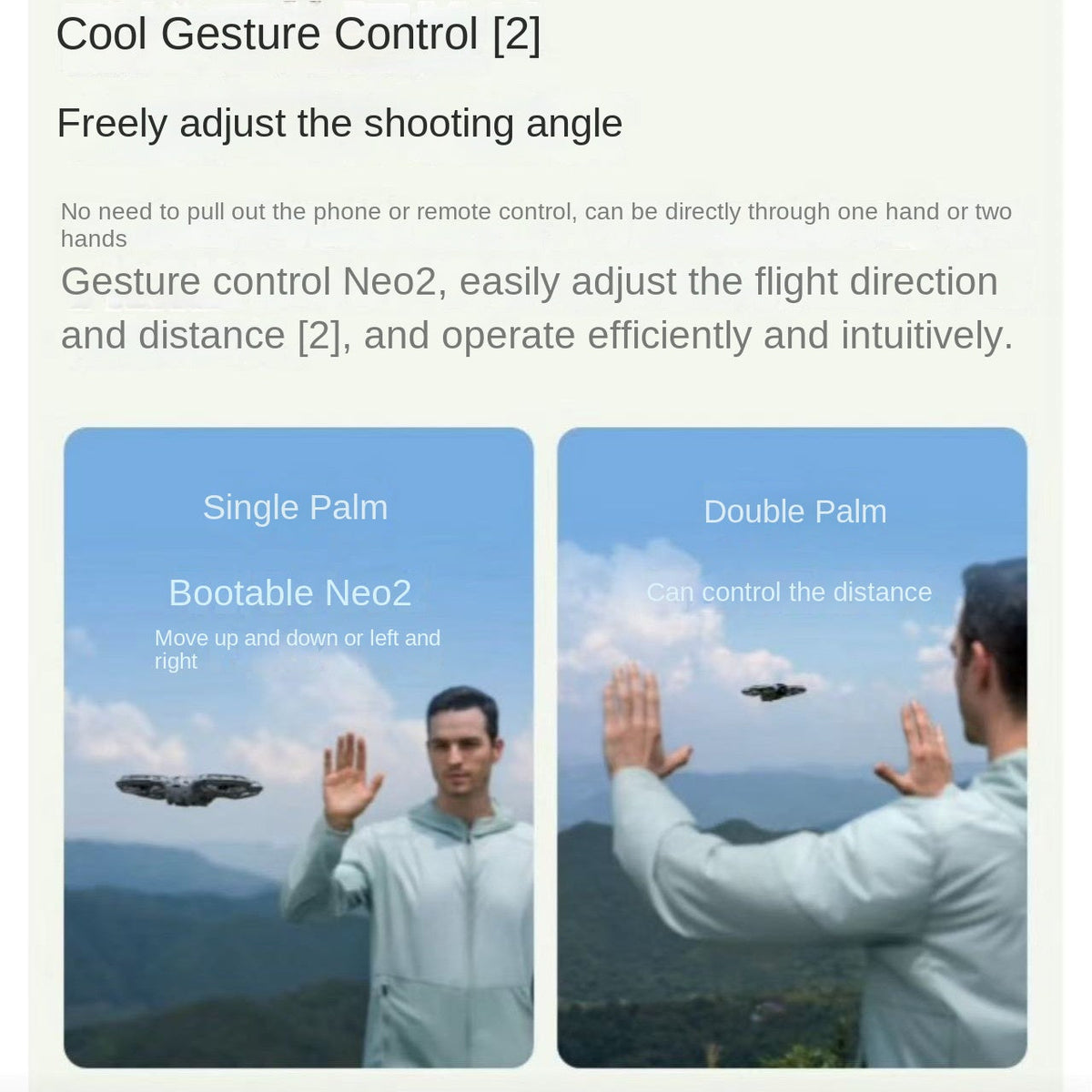


Hold out a palm and Neo 2 lifts off, follows you down the trail and films the shot from above. The folding body fits in a jacket pocket, so the controller stays at home. Solo hikers, riders and travellers finally get the clip they used to skip.
Read the full descriptionHold out a palm and Neo 2 lifts off, follows you down the trail and films the shot from above. The folding body fits in a jacket pocket, so the controller stays at home. Solo hikers, riders and travellers finally get the clip they used to skip.
A flying photographer: a pocket-sized drone that takes off from your hand, follows you, and films on gesture commands.
Stop settling for arm's-length selfies on every trail. Raise a palm and Neo 2 lifts off, follows you, and films you from above.

Hold your hand flat and the drone lifts off from it. There is no controller to unclip and no phone to pair first. The first launch takes a moment to learn, and after that it is the quickest way to get airborne on a trail.

Single-palm commands move the drone up, down, left or right, so you set the angle with your hand. Double-palm sets the distance. You can frame yourself mid-stride and keep walking while it holds the follow.

Four propellers sit inside protective cage guards, and the frame folds down into a shape that slips into a jacket or daypack. Carry it all day on a hike and fly it when the view opens up.
Press the button on top of the drone, then check the status light and the small front display before you launch.
Hold your palm out flat and steady, keep your fingers clear of the guards, and let the handheld take-off lift the drone into the air. Automatic mirror transport handles the rest of the start.
Use one-click film for a quick clip, or use palm gestures to set the angle and distance. When you are finished, find your palm to land, then export the footage.
You reach the ridge, the light is right, and nobody is around to film you. A selfie stick gets you a close, flat frame from arm's length, and balancing a phone on a stick gets old fast. Most days you skip the clip entirely.
Neo 2 starts from your hand. Hold a palm out and it lifts off with no controller, no pairing ritual and no bag to haul up the hill. Single-palm gestures move it up, down, left or right, and a double palm sets the distance.
Walk the trail and the drone follows you down the path. When the hike is done, land it on your palm, export the clip, and you have an aerial shot of yourself that you framed yourself.
Hold your palm out and let the drone take off from your hand. Expect the first flight to be short while you learn how it responds to your gestures.
Single-palm and double-palm commands get familiar after a few sessions. Each outing, you pick angles and distance faster.
A month of hikes and rides gives you a steady set of follow clips. Export and edit them quickly, with one-click film for faster sharing.
| Neo 2 | Controller drone | Selfie stick | |
|---|---|---|---|
| Launches from your palm | — | — | |
| Needs a controller | — | — | |
| Gesture-based framing | — | — | |
| Self-framed aerial shots | — | ||
| Pocket-sized fold | — | Partial |
The props sit inside cage guards, but they still spin fast. Keep your palm flat and steady, keep fingers and loose sleeves well clear, and launch with open space around you.
Single-palm follow and palm landing are the first gestures to learn, and they take a few sessions to feel natural. Start there. Double-palm distance control and the other commands come once the basics feel easy.
Yes, with care. Keep a clear area around you and the drone, since a drone that follows you can surprise people nearby. Local rules often limit flying near crowds, so check them for the trail or road you are riding.
A selfie stick keeps the camera close and low, and a phone on a stick needs balance and a patient second person. Neo 2 lifts off, follows you and films from above with no controller in your pocket. If you already carry a monopod for camera work, keep it for ground shots and let the drone take the high angle.
You pay for the parts that make it usable on the move: a folding body, caged props, a gimbal camera, and palm launch with gesture control. A cheaper drone that needs a controller, pairing and a bag you skip often ends up unused. Neo 2 earns its place on the trips where you want the clip and the controller would have stopped you.


 Mini Camera Drone Neo 2: Palm Takeoff, Gesture Filming