
$5,939.90
Free delivery · 7–14 days
DJI Mavic 3 Pro Drone with Three Cameras and 43-Min Flight


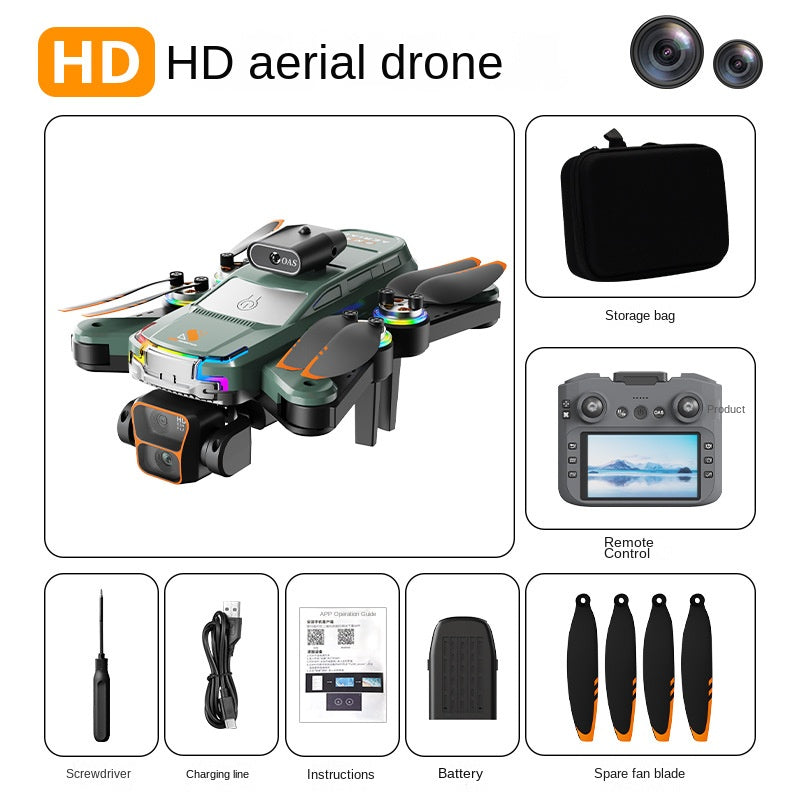
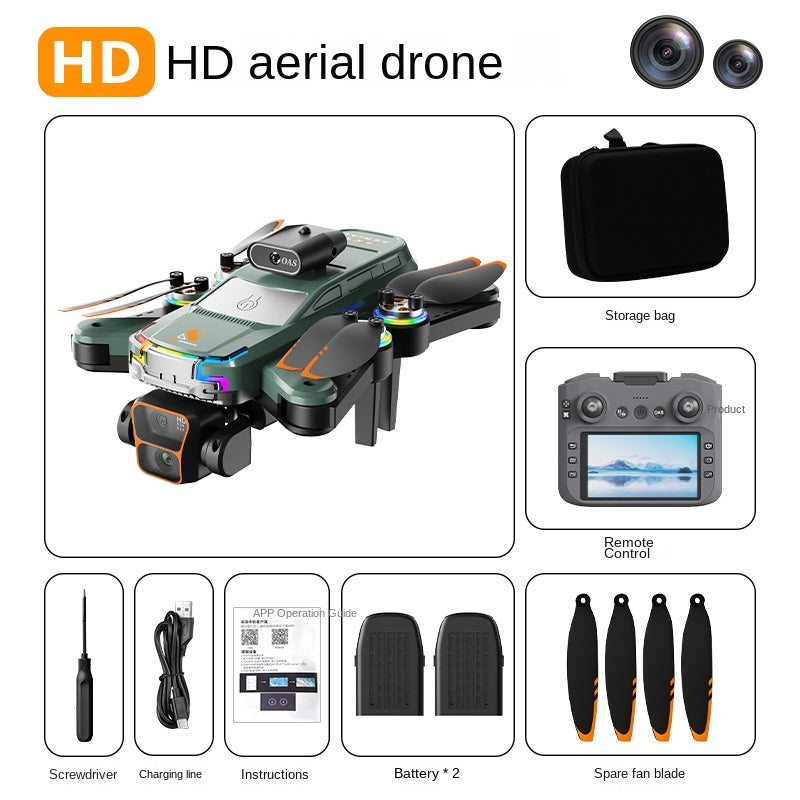


Fly with a sensor watching the front and a screen in your hands. The Z2 PRO folds into one bag, so the overlook you planned to film becomes the shot you actually bring home. Eight items are in the box, including four spare blades and a single battery, so the kit is ready for the...
Read the full descriptionFly with a sensor watching the front and a screen in your hands. The Z2 PRO folds into one bag, so the overlook you planned to film becomes the shot you actually bring home. Eight items are in the box, including four spare blades and a single battery, so the kit is ready for the first trip.
HD aerial drone with obstacle avoidance and a built-in screen controller
Before: a phone, a shaky grip, and a fear of hitting every branch. After: a foldable drone with an obstacle sensor and a screen in your hands, ready for the trail.

The OAS sensor sits on the front top of the body and checks for obstacles in the drone's path. Beginners tend to fly toward what they are looking at, so a sensor that watches the nose takes away the most common crash. It is not a replacement for watching the flight path, but it gives a new pilot a margin for error on the first ridge.
The controller has a built-in display and dual joysticks, so you fly and watch the feed from one device. There is a phone holder on the controller if you prefer a bigger view, but you never have to pair a phone to get started. Framing a landscape is much easier when the picture is in your hands.

Foldable arms and a storage bag make the Z2 PRO easy to carry on a day hike. The drone and controller share one bag, so you do not juggle loose parts at the trailhead. If you run through batteries on a long day, a battery charger keeps the kit ready for the next flight.
Connect the included charging cable and charge the single battery before the first flight.
The printed insert has a QR code and setup diagrams for the APP operation guide. Follow them in order.
Power on the screen controller, then complete pairing with the drone as shown in the guide.
Take off in a clear area with no people nearby. Hover low, get a feel for the joysticks, then climb for the wide shot.
Foldable HD aerial drone
Built-in display and dual joysticks
Holds the drone and controller together
Single battery in the box
For the battery
For basic tool work
Swap a blade in the field
QR code and setup diagrams

The overlook is right there, the light is perfect, and you already know what the frame would look like from above. Then the doubt kicks in. One bad turn near a pine or a power line and the drone is gone, along with the only shot you had planned for the whole trip.

The OAS sensor sits on the front top of the body and watches for obstacles ahead of the drone. The screen controller carries its own display, so you see the feed without balancing a phone on a trail. Those two changes take most of the guesswork out of a first flight.
The arms fold in, the drone drops into the storage bag with the controller, and the whole kit travels as one piece. On the ridge, the mountain fills the controller screen while the drone holds its line above you. Pack it up, and the footage comes home with you.
The OAS sensor sits on the front top of the body and checks for obstacles ahead of the drone. It is a second pair of eyes, not an autopilot. Sensing has limits in wind and low light, so practice in open ground first and keep your own eyes on the flight path.
Yes. The arms fold in and the drone, controller, and accessories all fit in the included storage bag. It is built for a day hike, a road trip stop, or a carry-on bag at the airport.
Yes. The screen remote controller has a built-in display and dual joysticks, so you fly and watch the feed from one device. A phone holder is also on the controller if you want to use your own screen.
It is built for beginners who want to learn with a sensor on the front. Scan the QR code, follow the setup diagrams, and complete pairing before your first takeoff. Then practice takeoffs and gentle turns in a wide open field before flying near trees or ridges.
Phone-controlled mini drones give you no front sensor and no built-in screen, and holding a phone while you fly is a fumble on a trail. The Z2 PRO includes the drone, screen controller, storage bag, battery, charging cable, screwdriver, and four spare blades. Buying those accessories separately adds up, and the kit is ready on the first trip.


 Foldable HD Camera Drone with Obstacle Avoidance Sensor