
$89.90
Free delivery · 7–14 days
USB Condenser Microphone with Ear Monitor & Echo Control

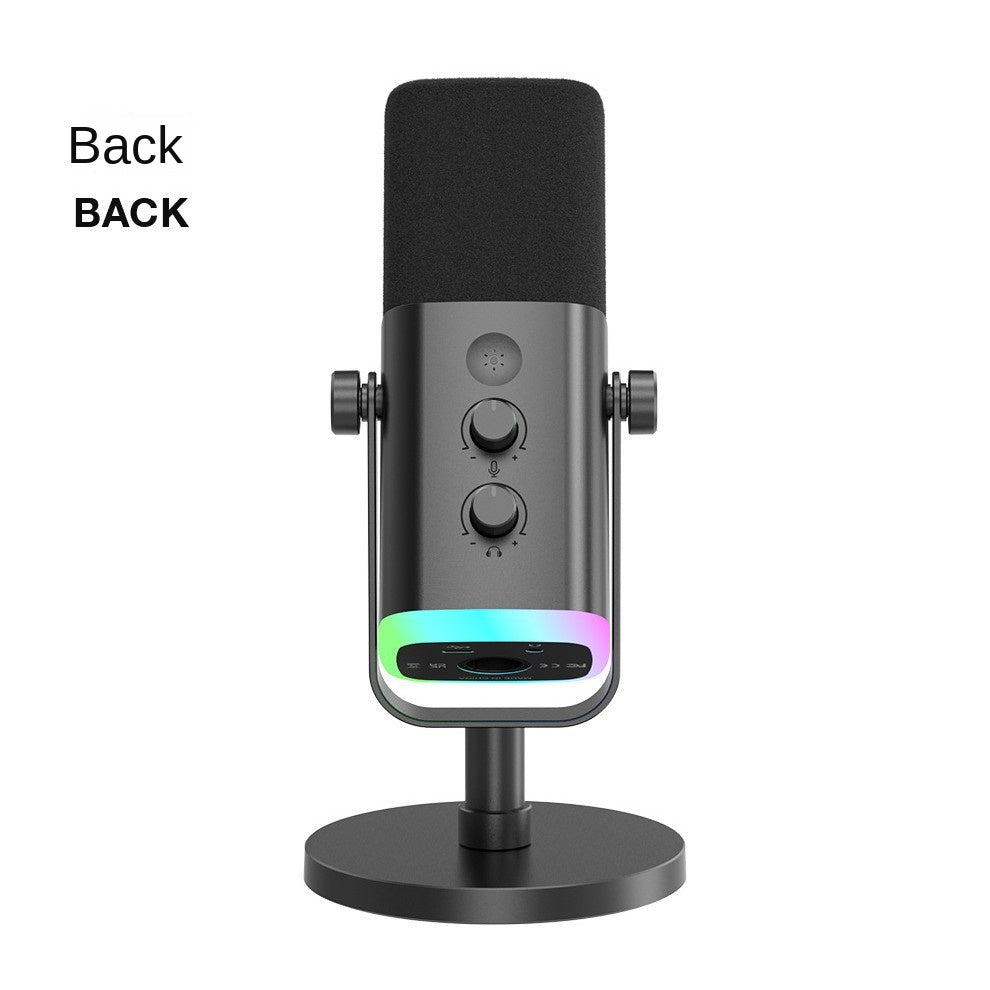


Your voice comes through clear over game audio, without alt-tabbing or digging through software. The gain and headphone knobs sit right on the matte black body, and the RGB base adds a bit of stage light to the desk. Built for streams, voice chat, karaoke nights and home recording.
Read the full descriptionYour voice comes through clear over game audio, without alt-tabbing or digging through software. The gain and headphone knobs sit right on the matte black body, and the RGB base adds a bit of stage light to the desk. Built for streams, voice chat, karaoke nights and home recording.
Studio-quality desktop mic with RGB styling and on-body controls for streaming and karaoke
Tired of repeating yourself over game audio? Plug in a desktop condenser mic with knobs on the body, and your voice cuts through from the first session.
Gain, headphone volume and mute sit on the body, so you adjust mid-stream without touching software. The front panel has a gain knob, a headphone volume knob, a mute and function button and a touch-style mic button on top. Change a level and you hear it in your headphones right away, which is the whole point of a mic you can reach.
The RGB strip runs along the base and throws colour onto the desk. Set it to a calm cyan for a daytime stream or push it toward violet for a late karaoke session. It is a small detail, and it changes the mood of the whole room.
The mount tilts with two adjustment knobs, so you can aim the capsule at your mouth and leave it there. The round base is heavy enough to keep the mic steady when you lean in to sing or reach for the keyboard. The foam windscreen sits in front to tame breath pops.
Attach the mic to the adjustable stand and tighten the mount so the capsule sits level with your mouth.
Set the round base on the desk, sit about a fist's width from the windscreen, and use the tilt knobs to angle the capsule slightly off-axis.
Use a USB data line for PC, or the XLR cable if you run the mic through an audio interface. Pick one route and stick with it.
Speak at your loudest level, raise the gain knob until the meter peaks in the yellow zone, then set headphone volume to taste.
Matte black metal body with RGB base strip and on-body controls
Tilt knobs on the mount and a round weighted base
For XLR setups with a separate audio interface
For PC and computer connections

Voice chat goes quiet every time the game gets loud. You repeat yourself twice, then give up and talk louder into a laptop mic that was never built for it. Your squad is still asking you to say it again, and the chat is moving on without you.

The gain knob, the headphone volume and the mute button all sit on the mic body. Turn a knob, hear the change, and get back to the match. No alt-tabbing, no hunting through menus while the stream keeps running.
Set the gain once, tilt the capsule toward your mouth, and let the foam windscreen take the pops. Your next stream or karaoke night sounds like you actually sound, and the room hears every line.
| This | Laptop mic | Earbud mic | |
|---|---|---|---|
| Clear pickup at arm's length | — | — | |
| Gain and headphone knobs on the body | — | — | |
| Foam windscreen for breath pops | — | — | |
| Adjustable stand with tilt | — | — | |
| Picks up keyboard clicks and room noise | — |
Yes. USB connects straight to a PC, and the included XLR cable runs the mic through an audio interface. Mobile setups work with the included USB data lines and an adapter that suits your phone. Pick one route per session so you never double up the inputs.
Use USB if you stream or game from a PC and want the simplest setup. Use XLR if you already own an audio interface or plan to record music at home. XLR gives you more routing options, but it needs that interface to run.
The body is matte black metal with a weighted round base, so it stays put on a busy desk. The RGB strip is built into the base and it does not change how the mic records. For daily streams and karaoke nights, the build holds up better than a plastic budget mic.
Less than a laptop mic does. The foam windscreen and the position of the capsule keep the pickup focused on your voice. Sit about a fist's width from the windscreen and keep the capsule off-axis from your mouth. Clicks still get through if you type right next to the mic, so move the keyboard back a few inches.
No. Gain and headphone volume are knobs on the mic body. You can adjust levels mid-stream without opening a mixer or alt-tabbing, which keeps your attention on the game or the song.


 Condenser Microphone for Streaming, Gaming and Karaoke