
$74.90
Free delivery · 7–14 days
Solar Robot Toy: 12-in-1 STEM Kit, No Batteries for Kids


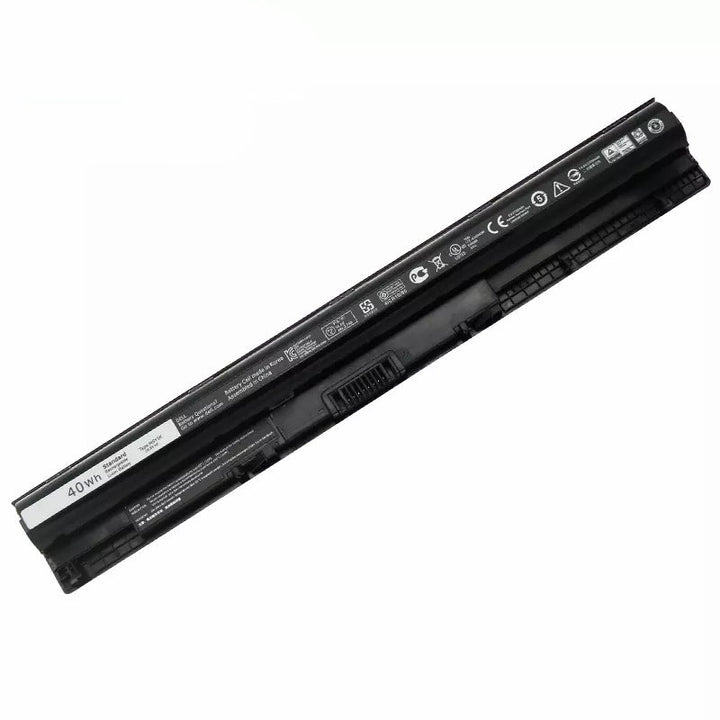
Find laptop batteries and replacement laptop batteries for compatible notebook models, including the M5Y1K Laptop Battery — 40Wh Dell Replacement Cell. Use the guide below to check fit, compare replacement options, and choose practical accessories such as an adjustable laptop stand for better airflow and positioning.
Start by checking your laptop’s exact model number and the battery part number printed on the original pack. Matching only the laptop brand is not enough, because one model family may use several battery designs. Compare the listed voltage, capacity, connector position, cell shape, and mounting points before ordering. For example, the M5Y1K Laptop Battery is a 40Wh Dell replacement cell, so confirm that your laptop specifically supports the M5Y1K battery code. If the old battery is swollen, damaged, or no longer safe to handle, stop using the laptop and seek qualified service. Searching for “replacement laptop battery for HP” or “Dell laptop batteries” can help you begin, but the part number should decide compatibility.
Laptop batteries generally differ by their physical design, electrical specifications, and installation method. Removable batteries can often be released from the outside of the laptop, while internal batteries require the bottom cover to be removed. A direct replacement is designed to match the original battery’s connector and mounting layout; a universal battery may require additional checking and is not automatically compatible. Capacity, shown in Wh, indicates the battery’s stored energy, but actual runtime depends on the laptop, software, screen brightness, and workload. When comparing laptop batteries for sale, prioritize confirmed fit over the lowest price. A compatible replacement is more useful than a cheap laptop battery that cannot connect or mount correctly.
Look for a clearly stated battery part number, model compatibility list, voltage, capacity, connector details, and physical dimensions. Product photos can help you compare connector placement and mounting tabs, but do not rely on appearance alone. Check the seller’s return terms in case your laptop model or battery code does not match. The M5Y1K 40Wh Dell replacement cell suits shoppers whose laptop documentation or existing battery confirms the M5Y1K code. Avoid listings that omit essential specifications.
Before installation, shut down the laptop completely, unplug the charger, and follow the manufacturer’s service instructions for your model. For an internal battery, use the correct tools and avoid pulling on cables or touching exposed contacts unnecessarily. After fitting the replacement, check that the connector is fully seated and the battery is secured before closing the case. Start the laptop and confirm that the operating system recognizes the battery and reports charging normally. Use the supplied or compatible charger, keep vents clear, and avoid placing the notebook on soft surfaces. An ergonomic laptop stand or Laptop Stand N3 can improve positioning and airflow around the computer, but it does not replace a correctly fitted battery.
A frequent mistake is ordering by brand alone instead of matching the exact model and battery code. Other problems include confusing Wh with physical compatibility, overlooking connector placement, buying a battery with an incompatible voltage, or assuming every listing described as “universal” will fit. Do not force a connector, modify the battery, or continue using a pack that is swollen, cracked, leaking, unusually hot, or physically damaged. Keep the order confirmation and check the replacement before disposing of the old battery.
A replacement battery is suited to laptop owners whose current battery holds noticeably less charge, shuts down unexpectedly, fails to charge, or is identified by the system as needing service. It can also make sense when an otherwise usable laptop has become inconvenient to use away from a charger. Before buying, confirm that the laptop’s screen, keyboard, charging system, and operating system still meet your needs; a battery will not repair unrelated hardware problems. The M5Y1K Laptop Battery — 40Wh Dell Replacement Cell is intended for compatible Dell systems using the M5Y1K battery code. Choose a local seller, online retailer, or marketplace based on availability and returns, but always verify compatibility before purchase.
Replacing the battery can be worthwhile when the laptop still performs well but no longer provides useful time away from a charger. Compare the battery price with the laptop’s age, condition, and the cost of replacing the entire device. Confirm compatibility before ordering.
The cost varies by laptop model, battery type, capacity, availability, and whether installation is included. An internal battery may also involve a service charge if you do not install it yourself. Check the exact part number and compare the total purchase or repair cost.
Some laptops have externally removable batteries, while others require the bottom cover to be removed. If the battery is internal, follow the manufacturer’s service instructions and use suitable tools, or ask a qualified technician. Do not attempt installation if the battery is swollen or damaged.
Battery lifespan depends on usage, charging habits, heat exposure, storage, and the laptop design. Over time, batteries normally hold less charge and may provide shorter runtime. The best indicator is the battery’s current condition and performance rather than a fixed replacement date.
Heat, repeated heavy use, physical damage, and long-term chemical aging can reduce battery performance. Leaving a laptop in hot conditions or using it with blocked vents may add unnecessary stress. Keep airflow clear and use a compatible charger.
Common signs include noticeably shorter runtime, unexpected shutdowns, failure to charge, or a system warning about battery health. A battery that is swollen, cracked, leaking, or unusually hot should not be used. Check the laptop’s battery report or settings, then match the replacement using the original part number.