
$54.90
Free delivery · 7–14 days
Wireless Gaming Earbuds with LED Battery Display Case


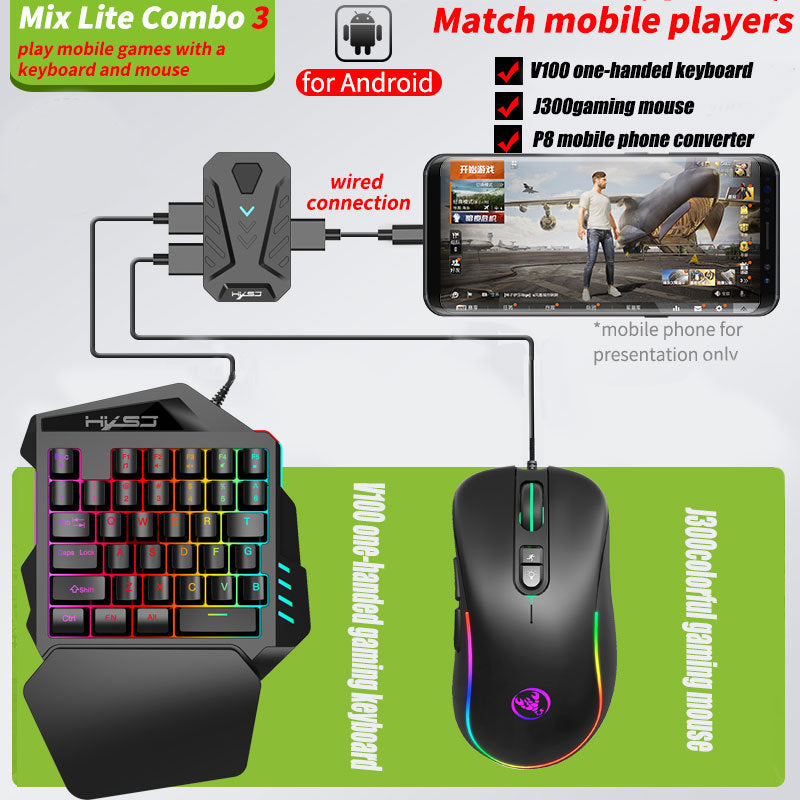
Thumbs stop cramping and aim stops sliding off the glass. This four-piece Android kit plugs a one-handed RGB keypad, a gaming mouse and a P8 converter into your phone for keyboard and mouse control in PUBG Mobile. The setup runs on a wired connection and sits on a couch or desk.
Read the full descriptionThumbs stop cramping and aim stops sliding off the glass. This four-piece Android kit plugs a one-handed RGB keypad, a gaming mouse and a P8 converter into your phone for keyboard and mouse control in PUBG Mobile. The setup runs on a wired connection and sits on a couch or desk.
Play Android shooters like PUBG Mobile with keyboard and mouse precision
Tired of thumbs that cramp and taps that miss? Plug in the V100, J300 and P8 and your Android phone aims like a PC.

The mouse and keypad plug into the P8 converter, which connects to your Android phone over a wired USB link. Aim comes from a mouse hand instead of a thumb dragging across glass, so your crosshair moves where your hand moves. The packaging diagram shows the exact path from the phone to both peripherals.

The V100 is a one-handed keypad with a wrist rest built into the layout. Your left hand sits on the rest and your fingers reach the keys without stretching, so long ranked sessions do not end with sore thumbs. The mouse takes over aiming and firing on the right side.

RGB backlit keys and a light strip on the J300 mouse give the setup a bold look in a dim room. The mouse has a DPI and light toggle on top, so you can switch the lighting and sensitivity without leaving the game. The same kit also works with a computer for PC games, see the wired mouse computer range for more options.
Connect the rectangular P8 converter to your Android phone with the connection cable.
Plug the V100 keypad and the J300 mouse into the USB ports on the P8. The packaging diagram shows both connecting to the converter.
Open your game's control settings and check that the keys register. Set your layout before the first ranked match.
Compact keypad with RGB-backlit keys and a wrist rest
RGB light strip and a DPI/light toggle button on top
Rectangular converter with USB cable ports
Wired USB connection for the phone and peripherals
| This kit | Touchscreen aim | Bluetooth gamepad | |
|---|---|---|---|
| Dedicated keyboard and mouse aim | — | — | |
| Wired connection | — | — | |
| One-handed keypad with wrist rest | — | Partial | |
| RGB backlit keys and light strip | — | — |
The kit is built for Android phones and the packaging names PUBG Mobile as the target game. Check that your game supports external keyboard and mouse controls, then map the keys in its control settings before your first match.
Yes. The V100 has a wrist rest built into the keypad, so your left hand rests in one place while your fingers work the keys. Expect a short adjustment period if you have only used a standard keyboard.
The packaging describes a wired setup with no app step. Plug the P8 into your phone, connect the keyboard and mouse to the converter ports, then confirm the game registers the keys.
Yes. The packaging lists the P8 as a mobile and PC converter, so the same keyboard and mouse can run PC games. Plug the converter into a computer for PC play.
A Bluetooth gamepad sends wireless button presses, while this kit uses a wired connection with a dedicated mouse for aim. Four pieces come in one box, so you get keys, a mouse, the converter and cables without buying each part separately.
A single keyboard or mouse does not connect to an Android phone on its own. The P8 converter is the link that makes both peripherals work together, and it ships in the box with the V100, J300 and cables. Buying the four pieces together is the simplest path to a working setup.


 Wired Android Keyboard and Mouse Converter for PUBG