Under-Desk Power Strip Rack and Cord Organizer Shelf
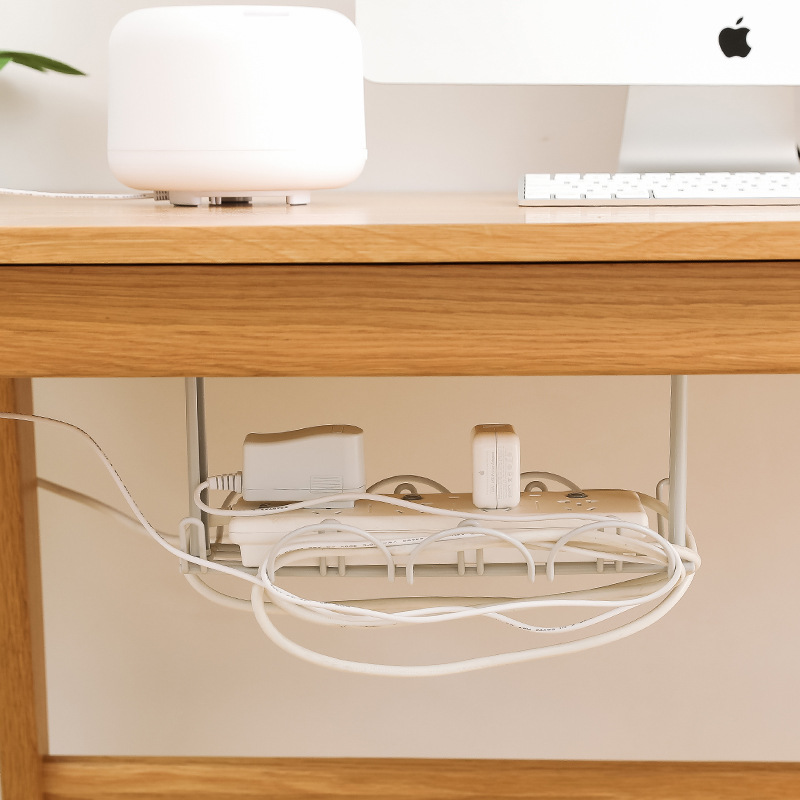
Lift the power strip off the floor and the whole underside of the desk feels finished. This matte white wire rack holds the strip and adapters, guides each cord through a loop, and mounts with no drilling. Add the under-cabinet shelf and the kitchen counter clears too.
Read the full descriptionDescription
Lift the power strip off the floor and the whole underside of the desk feels finished. This matte white wire rack holds the strip and adapters, guides each cord through a loop, and mounts with no drilling. Add the under-cabinet shelf and the kitchen counter clears too.
Hides power strips and tangled cords under desks and cabinets for a tidy workspace
- tangled power cords
- cluttered desk underside
- wasted under-cabinet space
Get your power cords off the floor and your workspace back
Tangled cables pool under the desk and crowd the kitchen cabinets. This white wire rack lifts the power strip and adapters into one neat spot, so the space underneath finally looks like the rest of your setup.
Everything your power strip needs, lifted off the floor
- A power strip held up, not rolling
The wire basket cradles the power strip and adapters a few inches off the floor. The strip stays where you set it when the chair rolls back, and heavy adapters sit flat on the grid instead of pulling on the cords.
- Cords looped, not tangled
Cable loops and plastic clips route each cord so it stays in its channel instead of knotting. Charger, monitor and laptop lines each get their own path, so unplugging one does not drag the others.
- Mounted with no drilling
The 3M VHB pads hold the brackets to a smooth surface, and the five screws add a firmer mount where you want one. The whole rack goes up in one sitting, with the posts set to your desk or cabinet depth beforehand.
The kit, counted out
- 5 pcsin the complete kit
- 2 pcsmounting brackets included
- 2 pcsadjustable hanging posts
- 5 pcsscrews for a firmer mount
Mount it in one sitting, no drilling
- 1Clean the mounting surface
Wipe the underside of the desk or cabinet with rubbing alcohol and let it dry fully. Dust and grease weaken the adhesive bond.
- 2Set the posts to depth
Measure from the mounting surface to where you want the basket. Adjust the two hanging posts to that length before anything is fixed.
- 3Mount the brackets
Press the 3M VHB pads onto the brackets and hold them firmly in place. Add the five screws if you want a firmer hold, especially under a desk where the chair pulls on the cords.
- 4Load the basket and route the cords
Place the power strip and light adapters in the basket, then loop each cord through the clips so it has its own path.
Five pieces, everything you need to mount it
- Wire cable rack×1
Matte white powder-coated basket with cable loops and clips
- Mounting brackets×2
Light grey plastic brackets that anchor the rack
- Hanging posts×2
Adjustable rods to match desk or cabinet depth
- 3M VHB adhesive strips
No-drill mounting for smooth surfaces
- Mounting screws×5
For a firmer mount under load
From a rolling strip to a clean underside
The Floor Is Where Cords Go To Hide
Every time you reach under the desk, a power strip is lying in the dust with a knot of cords wrapped around it. Cable ties hold the bundle together for a day, then it sags again. The strip rolls when the chair rolls, and the monitor cord is the first thing to pull loose mid-call.

One Rack, Lifted Clear
The wire basket takes the power strip and adapters off the floor and keeps them there. Plastic cable clips guide each cord into place. The same rack mounts under a kitchen cabinet, where it holds jars and utensils and frees up the counter.
Tidy Underneath, Calm Above
Once the rack is mounted, the underside of the desk looks as finished as the top. Cords stay in their loops, the strip stays put, and the kitchen shelf carries what used to crowd the counter.
What to expect after setup
- First useMounted and loaded
Once the brackets and posts are set, place the power strip in the basket and route the cords through the loops. The floor under the desk is clear.
- Week 1Cords stay where they belong
Over the first week, check that the adhesive holds and the cords stay in their loops. Tighten the screws if the rack shifts under load.
- 30 daysClutter stays away
After a month, the routine is simple: plug in, unplug, and the cords stay routed. The underside of the desk looks as tidy as the top.
Characteristics
Reviews
Questions and answers
It is built for a power strip and light to medium adapters. The open wire grid spreads the weight, and the five screws add support where the brackets meet the desk. Keep heavy bricks on the floor, not in the basket.
The adhesive is a foam tape meant to hold firmly, so removal takes a little care. Pull it slowly and warm it with a hair dryer if needed. For a rental or a desk you want to keep pristine, use the screws instead and skip the tape.
Yes. The 3M pads mount the brackets to a smooth underside, and you do not need a desk edge. Wipe the surface with rubbing alcohol first and let it dry, so the pads grip properly.
The hanging posts adjust in length, so you set the depth before anything is fixed. Measure from the underside of the desk to the spot where you want the rack, then adjust the posts to match.
The powder-coated finish wipes clean with a damp cloth. The matte surface also hides fingerprints better than glossy metal, which matters on a desk you touch every day.
A cord tray usually means drilling and a sturdy desk edge. Clips and ties hold the cords but leave the strip rolling on the floor. This rack lifts the strip, guides the cords and mounts with no drilling, all in one five-piece set.