
$594.90
Free delivery · 7–14 days
Pocket AI Voice Translator: 138 Languages, Works Offline
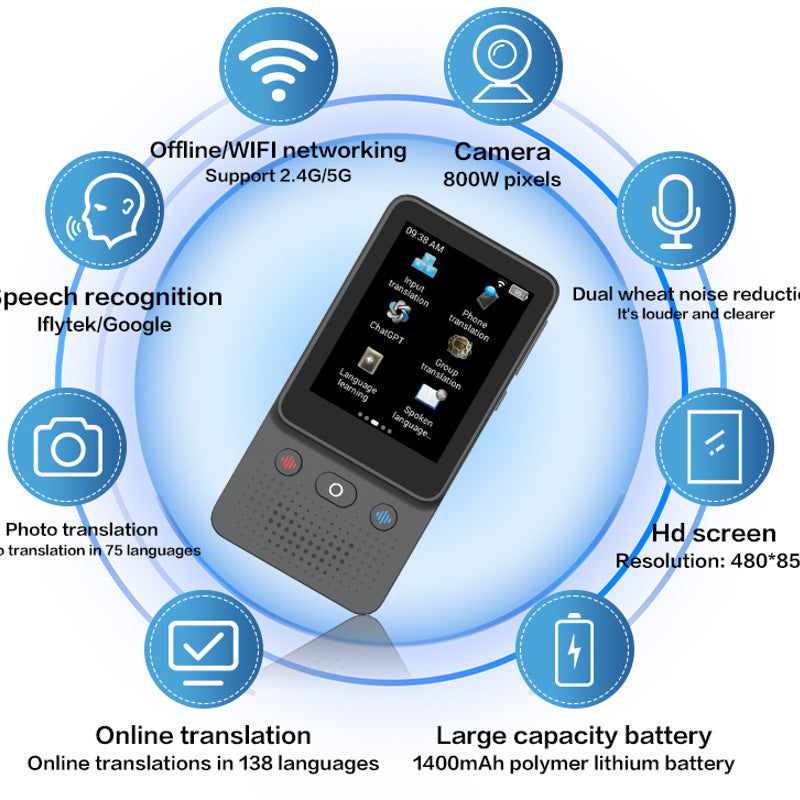


The T2 is a pocket translator for the moments when a sentence matters and a phone is too slow. It handles speech, text and photos in 138 languages online, and works offline without a data plan. Two microphones with noise reduction keep the speaker clear in a busy room.
Read the full descriptionThe T2 is a pocket translator for the moments when a sentence matters and a phone is too slow. It handles speech, text and photos in 138 languages online, and works offline without a data plan. Two microphones with noise reduction keep the speaker clear in a busy room.
Pocket translator that works offline and online, translating speech, text and photos across 138 languages
Before: lost sentences in client calls and blank stares at menus and signs. After: a pocket translator that handles speech, text and photos in 138 languages, online or offline.
Two microphones with noise reduction pick up speech in meetings and busy spaces. Hold the T2 between you and the speaker, face it toward the person talking, and the voice comes through louder and clearer than a phone held at arm's length across a table. Background machinery and chatter lose most of their pull.
The rear camera captures a menu, road sign or printed form, and the translation appears on the 2.4-inch HD screen. Photo translation covers 75 languages. Frame the text, press once, and read the result. It is the fastest way to sort out a bilingual customs form at the counter.
Offline mode runs without mobile data, and online mode unlocks 138 languages for speech and text. Supports 2.4G and 5G Wi-Fi when you want the full language list. If you would rather hold a second device, the earbud option in our voice translator earbuds range covers spoken translation without a screen.
Set your language pair, then press the left or right voice button for each speaker. Hold the device between you and read the translation on the screen as each turn comes in.
Open photo mode, frame the text with the rear camera, and capture it. The translation appears on the 2.4-inch display, ready to read at the counter or on the street.
Type or paste text in text mode when you have a document in front of you. Use the record button in the center to capture a talk or lecture for review afterward.
Matte black body with dotted speaker grille and 2.4-inch touchscreen
Charges at 1.0A max from a standard USB source
First power-on, language selection, online and offline modes

A foreign speaker says something that matters, and the room turns to you. You have a second or two to decide whether you understood. Phone apps need data, battery and both hands, and by the time the screen loads the moment has passed. Nodding along is the cheapest option, and the most expensive one when the contract is on the table.

The T2 is a focused handheld with a 2.4-inch touchscreen and three physical buttons: left voice, center record and OK, and right voice. You press the button for the speaker, hold the device between you, and read the translation as it comes in. Nothing to unlock, nothing to hold up in the air.
Offline mode works without a data connection, so basements, rural roads and roaming dead zones stop being a problem. When you are back online, the device covers 138 languages for speech and text. You leave the meeting with the notes you need and the confidence to answer the question you actually wanted to ask.
Charge the device, select your languages and connect to Wi-Fi if you want online mode. Offline mode is ready once the language packs are set up.
Within a few uses you know which button starts voice input, which records, and how to switch between speech, text and photo modes.
Used across meetings, travel and signage, the T2 becomes the device you reach for before opening a translation app.
| T2 | Phone translation app | |
|---|---|---|
| Works without mobile data | — | |
| Hands-free while speaking | — | |
| Offline mode | Partial | |
| Photo translation | ||
| Dedicated physical buttons | — |
Online mode covers 138 languages for speech and text, and offline mode handles the core language packs without a data connection. Expect the online list to be the wider and more complete one. For a business meeting, set the language pair before the call and check the screen against what you hear.
The two microphones with noise reduction help most when the device sits between speakers and faces the person talking. In a loud room, place it closer to the speaker and press the voice button for each turn. A single speaker close to the device is the easiest setup.
Offline support varies by feature. Photo translation covers 75 languages, while online mode covers 138 languages for speech and text. Check the supported list for your mode before you travel, and download the language packs you need while you still have Wi-Fi.
Yes, for the languages covered by photo translation. Switch to photo mode, frame the text with the rear camera, and capture it. The translation appears on the 2.4-inch screen with no data connection needed.
A phone app needs data or Wi-Fi, two free hands, and a screen you hold up in the middle of a conversation. The T2 works with physical buttons and does not need a SIM plan. If you already carry a translator earbud, the T2 gives you a screen for reading text and photos, which earbuds do not.
The T2 has a 1400mAh polymer lithium battery and charges over Type-C at 1.0A maximum. Use a standard USB adapter rated at 1.0A. A higher-current charger does not charge it faster, so there is no reason to buy one.


 Portable Offline Translator with Photo and Voice Mode