
$49.90
Free delivery · 7–14 days
Dual USB 3.0 OTG Flash Drive for Android & PC Files
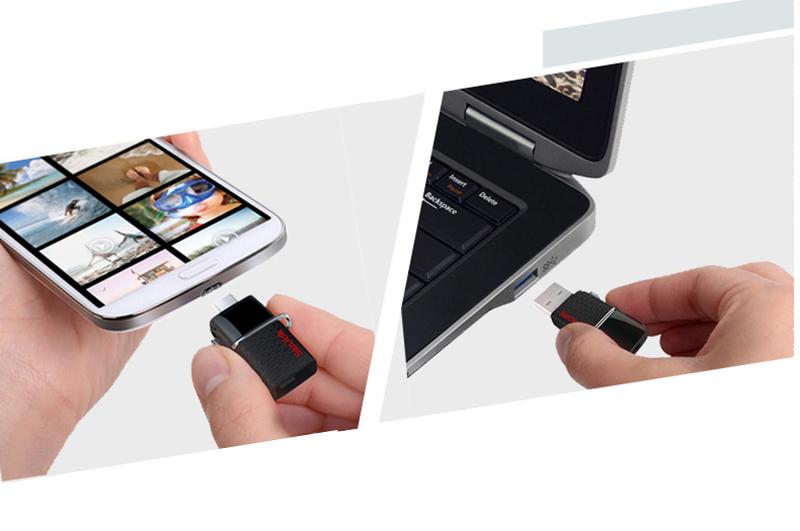

Your phone fills up, your laptop sits across the room, and a cable hunt starts. This SanDisk drive ends that loop with a micro-USB end for Android and a USB 3.0 end for your PC. Copy the day's footage, eject, and keep moving.
Read the full descriptionYour phone fills up, your laptop sits across the room, and a cable hunt starts. This SanDisk drive ends that loop with a micro-USB end for Android and a USB 3.0 end for your PC. Copy the day's footage, eject, and keep moving.
One drive for both your phone and your computer: dual micro-USB and USB 3.0 OTG storage
Your phone is full and your laptop is across the room. Plug in, copy the footage, and keep moving without a cloud upload.
Micro-USB goes into your Android phone or tablet. The USB 3.0 Type-A end goes into a PC or laptop port. You skip the cable kit and the adapter, and you stop carrying a second stick for the desktop.
The glossy black body has a hexagonal grip that stays easy to hold with one hand. The polished metal swivel ring turns to reveal the connector, and the red SanDisk logo stays easy to spot in a bag full of cables.
Connect the micro-USB end to your Android phone or tablet. Accept any OTG or file access prompt that appears.
Open your gallery or file manager, select the photos and videos, and copy them to the drive.
Use the eject option on the phone, then pull the drive out. Removing it mid-copy can corrupt the file in progress.
Plug the USB 3.0 end into a laptop or PC port and drag the files across.
Most Android phones and tablets with a micro-USB port and OTG support show the drive as storage. Some phones need OTG switched on in settings or a prompt accepted before files appear. Test it once at home so you know how your phone behaves before you need it on the road.
Usually not. 130 MB/s is the maximum read rating listed for the drive. Your phone's port and OTG mode set the real pace, so large video batches take longer from the phone than PC-to-PC copies. Start big copies while the phone charges.
The USB 3.0 end is a standard Type-A connector, so it fits any Mac with a USB-A port. Newer Macs with only USB-C ports need a USB-C to USB-A adapter.
Yes. USB 3.0 Type-A works in USB 2.0 ports. An older port runs the drive at USB 2.0 speed, which is slower but still fine for photos and documents.
Cloud storage bills every month and waits on uploads. This is a one-time purchase that moves files over a cable with no connection needed. A cheaper generic dual drive can cost less up front, but this SanDisk pairs a metal swivel ring and a glossy build with a USB 3.0 end that matches the port your PC already has. You pay once and copy at your own pace.


 SanDisk Ultra Dual OTG USB Drive for Android and PC