
$49.90
Free delivery · 7–14 days
Cable-Free Qi Charging Pad for iPhone X/8 & Galaxy S8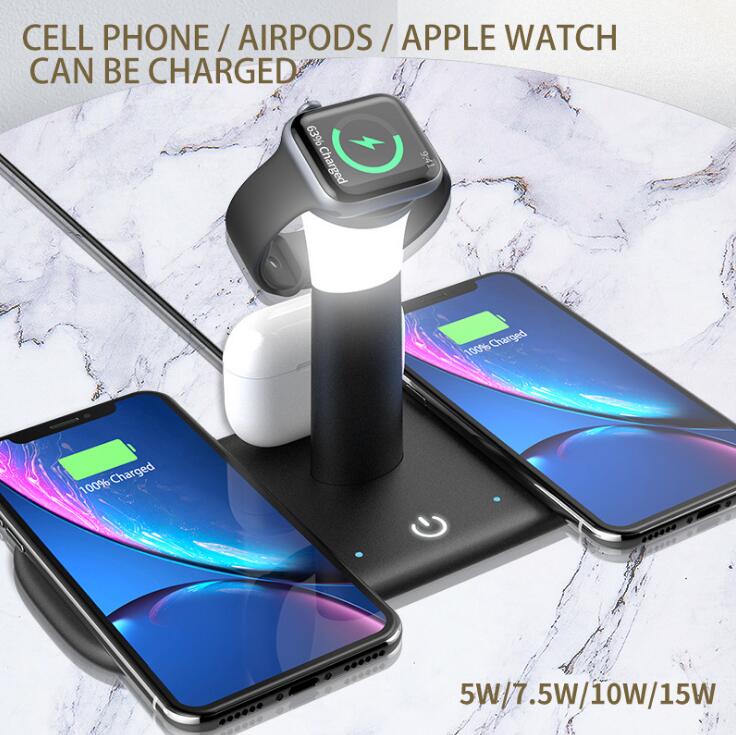


Your nightstand stays clear and every device is full by morning. One matte dock charges your iPhone, AirPods and Apple Watch together, and its dimmable lamp is ready when you wake up in the dark.
Read the full descriptionYour nightstand stays clear and every device is full by morning. One matte dock charges your iPhone, AirPods and Apple Watch together, and its dimmable lamp is ready when you wake up in the dark.
Charge your iPhone, AirPods and Apple Watch together on one dock, plus a dimmable night light
Tired of cables piled on the nightstand and a watch that dies overnight? Set iPhone, AirPods and Apple Watch on one matte base, and wake up to full devices and a tidy desk.

The Qi pad, the Apple Watch stand and the AirPods area share one base, so a single outlet powers all three. The watch stand sits on top of the lamp column, which keeps the watch upright and steady overnight. You put each device down and walk away.

The lamp runs a stepless dimmer in warm white at 3000K. Long-press the touch button to move through brightness, and short-press to switch scenes. The frosted column spreads the light, so it works as a bedside lamp or a desk light without glare in your eyes.

The dock charges at up to 15W and offers 5W, 7.5W, 10W and 15W settings, so you choose the speed you want. The touch button responds in 0.1s, and charging indicator LEDs confirm each device has started.
Connect the USB power cable to a wall adapter or power strip. Route the cable behind the base to keep the nightstand clear.
Remove metal accessories or thick magnetic wallets first, then set the phone flat in the middle of the pad.
The watch stand sits on top of the lamp column. Keep the puck clear of other items so it makes full contact.
Place the AirPods in the charging area on the base. The indicator lights confirm each device has started charging.
Long-press the touch button to move brightness up or down. Short-press to switch between scenes.
Qi pad, Apple Watch stand, AirPods area and dimmable lamp
Connects the dock to a wall adapter or power strip

Every night the same thing happens. A phone cable here, a watch charger there, and a loose AirPods cable trailing off the edge. By morning the watch is at a low battery and nobody remembers which outlet they used.

The Qi pad takes the iPhone, the Apple Watch rests on its stand at the top of the lamp, and the AirPods sit in their own area on the base. One outlet powers all three, so there is nothing to hunt for in the dark.
The nightstand is clear, the phone and watch are full, and the lamp is set to a low glow for when you wake up. The dock stays where it is, so the routine takes no thought at all.
Plug in the USB cable, place the iPhone on the Qi pad and rest the watch on its stand. The indicators light up when each device starts charging.
Most people find a favorite bedtime setting within a few nights of long-pressing the touch button and short-pressing to switch scenes.
With phone, watch and earbuds on one base each night, the cable pile is gone and every device is charged by morning.
| This dock | Three separate chargers | Basic Qi pad | |
|---|---|---|---|
| Charges iPhone | Yes | Yes | Yes |
| Charges Apple Watch | Yes | Yes, own cable | No |
| Charges AirPods | Yes | Yes, own cable | Depends on the case |
| Built-in night light | Yes, 3000K dimmable | No | No |
| Outlets needed | One | Three | One |
| Cables on the nightstand | One | Three | One per device |
All three. The Qi pad takes the iPhone, the Apple Watch rests on its stand at the top of the lamp column, and the AirPods sit in their own charging area on the base.
The dock offers 5W, 7.5W, 10W and 15W output levels, so you can drop to a gentler setting whenever you like. Charging speed depends on the adapter you plug in, so use a USB power adapter rated for the output you want and check the charging indicator to confirm it is working.
Thick metal cases and magnetic wallets can block the coil alignment, which slows charging or stops it entirely. Take off metal accessories and center the phone on the Qi pad before you leave it.
Yes. Long-press the touch button to move the light up or down, and short-press to switch between lighting scenes. The output levels are set separately, so you can pick a slower charge overnight and a faster one when you are in a hurry.
One dock replaces the Qi pad, the watch charger and a loose AirPods cable, and it adds a dimmable night light on top. You get one outlet, one spot to keep tidy and one base to replace, which is what most nightstand setups actually need.


 15W Wireless Charging Stand for iPhone, Watch & AirPods