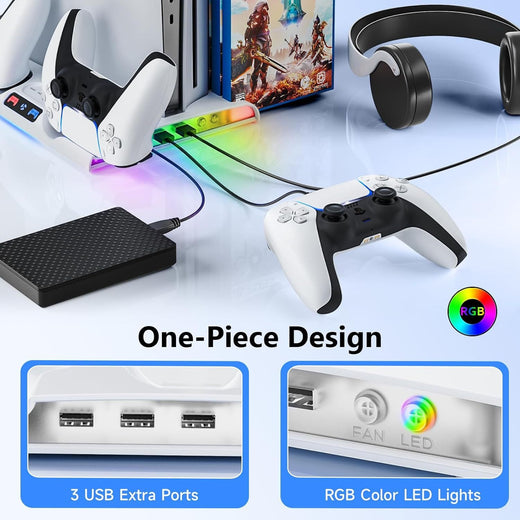
PS5 Controller Charger with RGB Lighting — Dual Fast
Light up your battlestation with dual-speed charging
This RGB-infused dock charges two PS5 controllers faster than your console ever could, with seven color modes that sync to your gaming mood. A cleaner desk, a more immersive experience.

Where Speed Meets Aesthetics
Three core strengths that set this dock apart from basic chargers.

Contact Charging That Just Works
Drop your controller onto the magnetic alignment pins and charging begins instantly. No fumbling with ports, no wear on the USB-C connector.

Your Light, Your Vibe
Cycle through 7+ color modes via the onboard button or a dedicated app. Match your setup’s palette or create a rainbow wave that pulses with the music.

Clean Desk, Clean Mind
The dock’s compact footprint and integrated cable management hide the single USB-C power cord, leaving only elegance and space for your play.
What Gamers Say
From casual to competitive, real feedback on this dual charger.
Finally a dock that looks as good as my setup. The RGB lighting is stunning.
Dual charging is a game‑changer. I never run out of battery during long multiplayer sessions.
The contact pins are genius — no more broken Micro‑USB ports. Only took a minute to get used to.
Matches my white PS5 Slim perfectly. The cable management is a nice touch.
My streaming backdrop looks ten times better. The color modes sync with my room lighting.
Charges fast enough for daily use. Lights are cool but I wish there were more brightness levels.
Solid build, looks premium. Already ordered a second one for my girlfriend’s setup.
The magnetic alignment is so satisfying. Just drop them on after every session.
Good value for the price. Would be perfect if it had passthrough USB for a headset dongle.
No more dead controllers! The LEDs tell you at a glance if they’re charged.
My desk finally looks like I belong in esports. The cyan pulse mode is my favorite.
Solid product. Only complaint is the app could be more intuitive, but the hardware is great.
Set up in under a minute
Three easy steps to go from box to charged.
Plug the USB‑C cable into any powered port.
Use the included cable and connect to your console, a PC USB port, or a standard power adapter (not included).
Place controllers onto the contact pads.
Align the controller’s charging contacts with the dock’s pins. They click into place magnetically.
Press the light button to choose your color mode.
Cycle through solid colors, breathing effects, or the full rainbow wave. The LED indicator confirms charging status.
Proven Performance
Specs that speak for themselves.
Why this, not that?
A quick comparison against traditional USB charging.
| This DockBEST | USB Cables | |
|---|---|---|
| Simultaneous dual charge | ✓ | ✗ |
| RGB ambient lighting | ✓ | ✗ |
| Zero port wear | ✓ | ✗ |
| Single cable desk setup | ✓ | ✗ |
| Aesthetic centerpiece | ✓ | ✗ |
From Cable Chaos to Command Center
Gamers know the frustration: dead controllers mid-session, cables tangled, aesthetics ruined. We designed a solution that turns charging into a visual feature.
The Mid-Game Letdown
You’re deep in an online match and your controller dies. The nearest USB port is across the room, and your gaming zone looks like a tech graveyard with wires everywhere.
One Dock, Infinite Style
Slide your controllers onto the contact points and watch them lock into place. LEDs pulse to life, indicating charge status while adding a futuristic glow to your desk.
Always Ready, Always Stunning
Controllers charge in under two hours, and the dock’s slim profile keeps your space tidy. The ambient lighting becomes part of your stream setup, impressing viewers.
Care notes
Keeping your dock pristine.
About this item
A game room centerpiece that charges two DualSense controllers rapidly while bathing your setup in customizable ambient light. No more cable clutter, just elegant performance.
RGB lighting-enabled dual fast charging dock for PS5 controllers with customizable color modes
- slow controller charging
- desk clutter from multiple cables
- lack of aesthetic gaming setup coordination
Before you buy
Real answers to common questions.